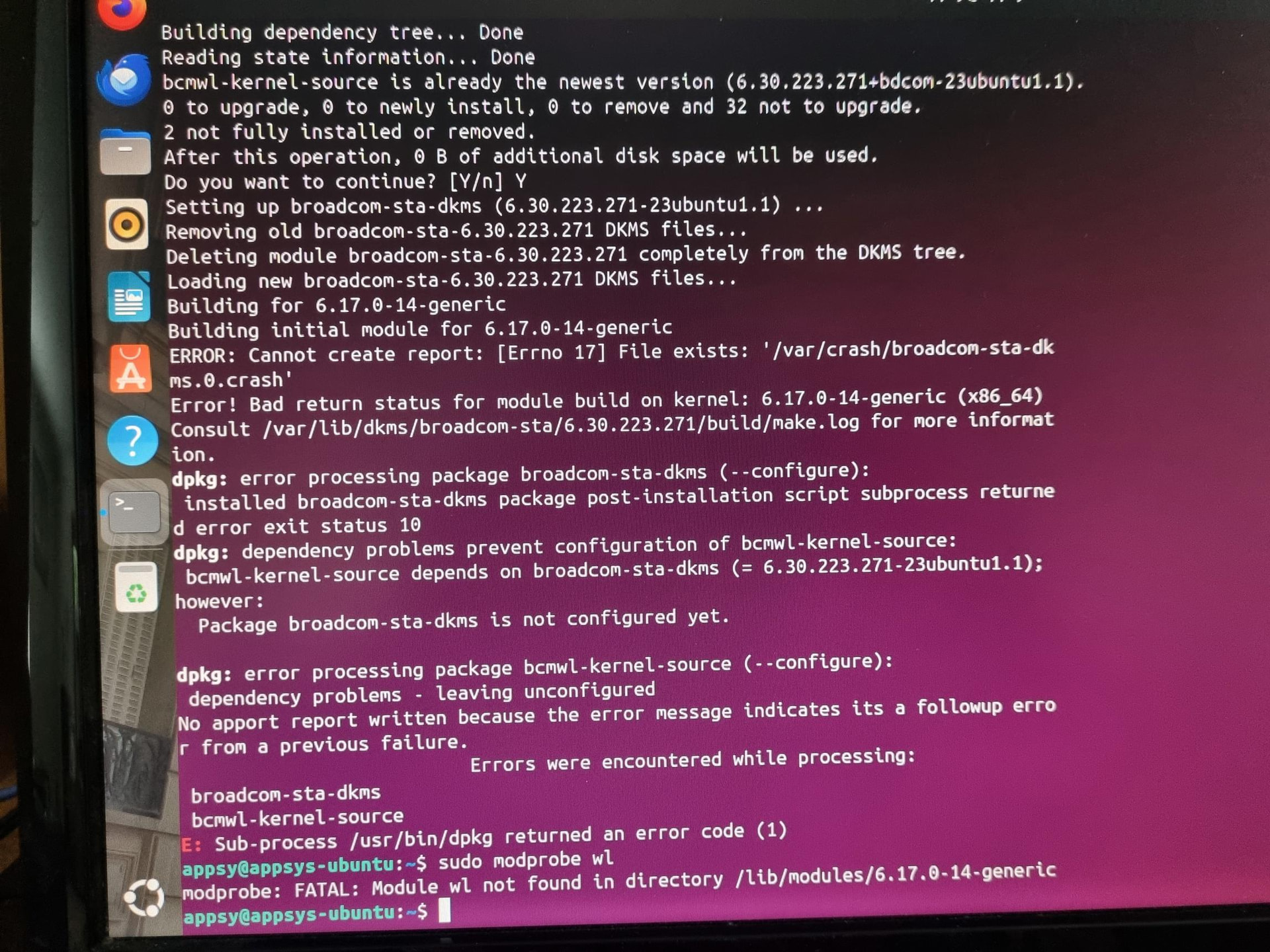
Hi there, I am pretty much experiencing the same predicament as jwmullins, I am also a similar age! After many years of getting screwed over by Microsoft, I decided to explore Ubuntu and I am liking it. I started by installing on a laptop and it was trouble free and works perfectly. Late I tried installing it on a PC and it was a challenge! The fun started when I started installing as dual boot with windows (just in case of problems}. It would not install as dual boot so I bit the bullet and installed as a clean install, and it worked eventually. During the install I encountered the issue with the wifi card so used a wired connection. So, now, despite all of the attempted solutions, I am still unable to connect to the TP Link T6E. I can see the Broadcom driver in “Additional Drivers” but it seems like I am the only one! I was receiving advice fro Askubuntu a few days ago but they have lost interest and no advice is forthcoming. Attached is a screen shot showing the latest errors encountered. Please help, I am desperate! Regards
Welcome to the forum @appsy
TP-Link T6E uses a Broadcom BCM4352 chip, and the broadcom-sta driver has had a rocky history with newer kernels. 
The error says broadcom-sta-dkms package failed to build against your running kernel (6.17.0-14-generic), which means the wl module never got installed = modprobe: FATAL: Module wl not found.
The stale crash file tripped up the build. You should be able to clear that and rebuild cleanly:
sudo rm -f /var/crash/broadcom-sta-dkms.0.crash
sudo apt remove --purge bcmwl-kernel-source broadcom-sta-dkms
sudo apt install broadcom-sta-dkms
If the DKMS build fails again, check the actual build log for the real error:
sudo cat /var/lib/dkms/broadcom-sta/6.30.223.271/build/make.log
Once the package installs cleanly load the module:
sudo modprobe wl
Then check if the interface appears:
ip link show
If the DKMS build keeps failing on 6.17, the open-source brcmfmac driver is worth trying as an alternative]). It’s in-kernel and doesn’t need DKMS at all.
Please let us know what the make.log shows if you’re still stuck.
Hi Hydyn, thank you for the prompt response. I followed your advice and received confusing results. I am trying to include a screen shot of results showing the errors but it doesn’t want let me attach the file!
Hi @appsy I’ve bumped your trust level up to TL1 so you can upload images/screenshots.
HI Hydyn, thank you for that but, it still won’t let me upload the screenshot.
What’s the file extension that you are trying to upload? .png, .jpg?
Hi, the file I am trying to send is a .jpg
The file is in a Google Drive folder, could that be the cause of problem?
Probably. I tested uploads with a test user and seems to be fine.
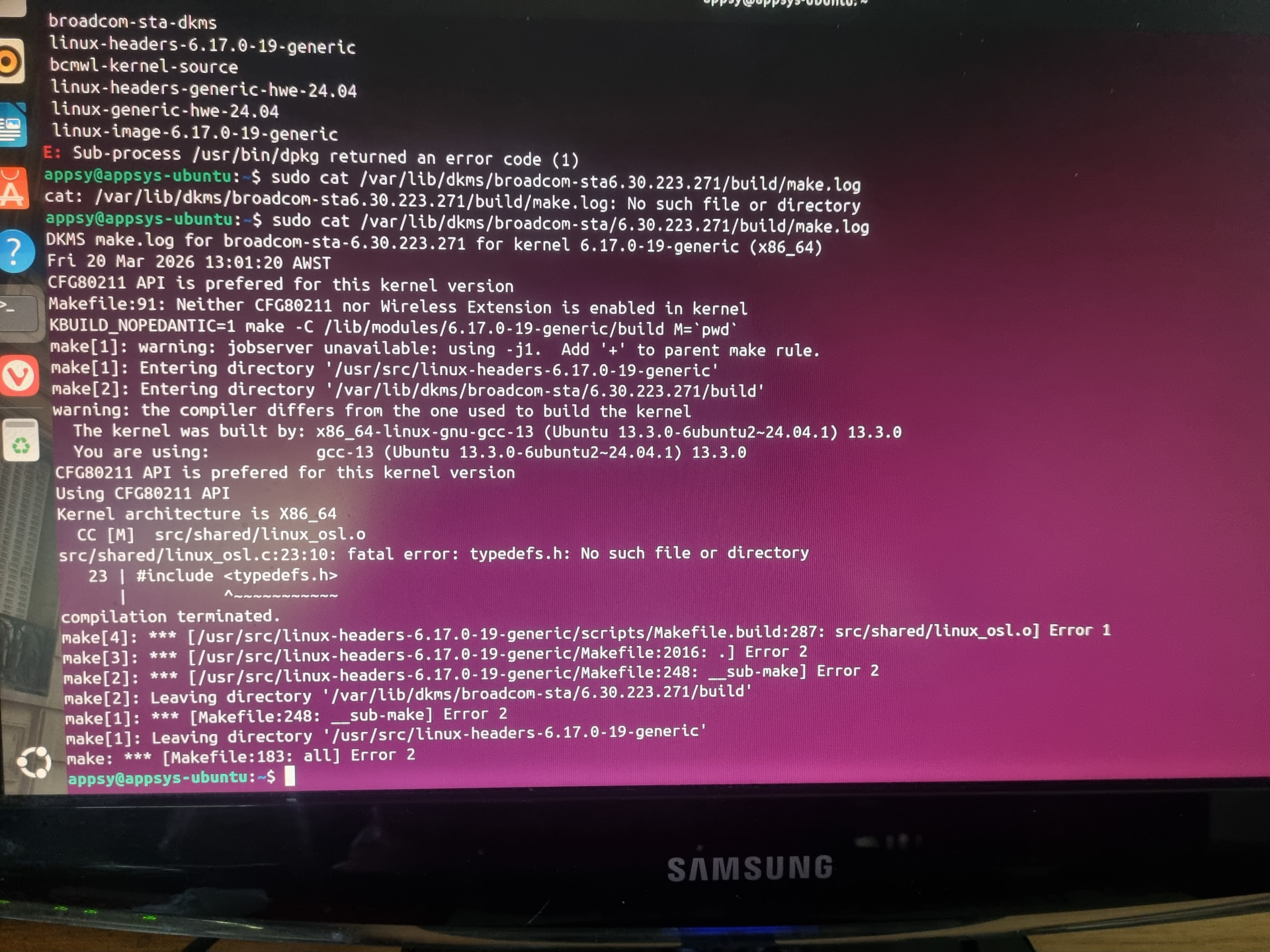
Thanks for getting that make.log.
The actual failure is:
src/shared/linux_osl.c:23:10: fatal error: typedefs.h: No such file or directory
The broadcom-sta driver is incompatible with kernel 6.17. It’s a known upstream issue – the driver hasn’t been updated to match changes in recent kernel headers.
At this point I’d skip broadcom-sta entirely and try the in-kernel brcmfmac driver instead:
sudo modprobe -r wl
sudo modprobe brcmfmac
Then check if the interface appears:
ip link show
If brcmfmac loads cleanly, run:
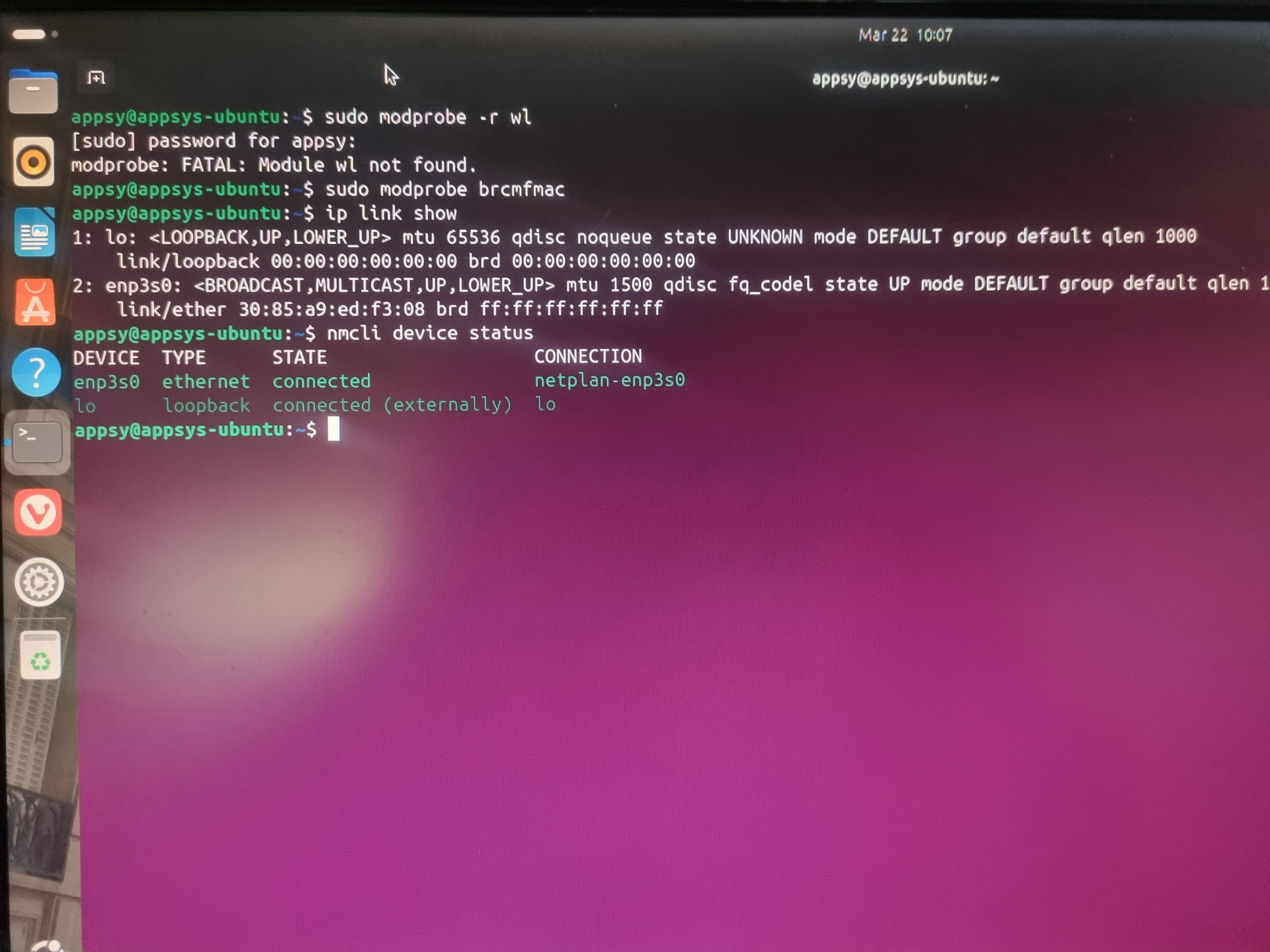
nmcli device status
…and let us know what you see. If it shows your Wi-Fi adapter, you should be able to connect from there through Network Manager.
Edit:
I did some searching. Looks like a fix has been accepted into Ubuntu’s noble-proposed pocket. If you want to try it before it lands in the stable repo:
bashsudo add-apt-repository ppa:ubuntu-proposed/noble
sudo apt update
sudo apt install broadcom-sta-dkms
Otherwise, the safer path right now is to use brcmfmac as mentioned earlier because it’s in-kernel, no DKMS required, and works on 6.17.
There’s also a community-patched version of the driver on GitHub (GitHub - Nurozen/broadcom-sta-6.17: Broadcom STA wireless driver (wl) patched for Linux kernel 6.17+ — BCM4360, BCM43602, BCM4352, etc. · GitHub) if you specifically need the wl driver for some reason.
Looks frustrating have you tried booting in recovery mode or checking if the display drivers need reinstallation
It sure is. I haven’t performed those checks. Do you think it would help?
Hi People, I attempted Olivia’s suggestions and received this rather lengthy screen.$ sudo apt install linux-modules-extra-$(uname -r)
[sudo] password for appsy:
Reading package lists… Done
Building dependency tree… Done
Reading state information… Done
linux-modules-extra-6.17.0-14-generic is already the newest version (6.17.0-14.14~24.04.1).
0 to upgrade, 0 to newly install, 0 to remove and 21 not to upgrade.
6 not fully installed or removed.
After this operation, 0 B of additional disk space will be used.
Do you want to continue? [Y/n] y
Setting up linux-image-6.17.0-19-generic (6.17.0-19.19~24.04.2) …
Setting up broadcom-sta-dkms (6.30.223.271-23ubuntu1.1) …
Removing old broadcom-sta-6.30.223.271 DKMS files…
Deleting module broadcom-sta-6.30.223.271 completely from the DKMS tree.
Loading new broadcom-sta-6.30.223.271 DKMS files…
Building for 6.17.0-14-generic 6.17.0-19-generic
Building initial module for 6.17.0-14-generic
ERROR: Cannot create report: [Errno 17] File exists: ‘/var/crash/broadcom-sta-dkms.0.crash’
Error! Bad return status for module build on kernel: 6.17.0-14-generic (x86_64)
Consult /var/lib/dkms/broadcom-sta/6.30.223.271/build/make.log for more information.
dpkg: error processing package broadcom-sta-dkms (–configure):
installed broadcom-sta-dkms package post-installation script subprocess returne
d error exit status 10
Setting up linux-headers-6.17.0-19-generic (6.17.0-19.19~24.04.2) …
/etc/kernel/header_postinst.d/dkms:
- dkms: running auto installation service for kernel 6.17.0-19-generic
Sign command: /usr/bin/kmodsign
Signing key: /var/lib/shim-signed/mok/MOK.priv
Public certificate (MOK): /var/lib/shim-signed/mok/MOK.der
Building module:
Cleaning build area…
make -j4 KERNELRELEASE=6.17.0-19-generic KVER=6.17.0-19-generic…(bad exit stat
us: 2)
ERROR: Cannot create report: [Errno 17] File exists: ‘/var/crash/broadcom-sta-dk
ms.0.crash’
Error! Bad return status for module build on kernel: 6.17.0-19-generic (x86_64)
Consult /var/lib/dkms/broadcom-sta/6.30.223.271/build/make.log for more informat
ion.
dkms autoinstall on 6.17.0-19-generic/x86_64 failed for broadcom-sta(10)
Error! One or more modules failed to install during autoinstall.
Refer to previous errors for more information.
- dkms: autoinstall for kernel 6.17.0-19-generic
…fail!
run-parts: /etc/kernel/header_postinst.d/dkms exited with return code 11
dpkg: error processing package linux-headers-6.17.0-19-generic (–configure):
installed linux-headers-6.17.0-19-generic package post-installation script subp
rocess returned error exit status 11
dpkg: dependency problems prevent configuration of bcmwl-kernel-source:
bcmwl-kernel-source depends on broadcom-sta-dkms (= 6.30.223.271-23ubuntu1.1);
however:
Package broadcom-sta-dkms is not configured yet.
dpkg: error processing package bcmwl-kernel-source (–configure):
dependency problems - leaving unconfigured
dpkg: dependency problems prevent configuration of linux-headers-generic-hwe-24.
04:
linux-headers-generic-hwe-24.04 depends on linux-headers-6.17.0-19-generic; how
ever:
No apport report written because the error message indicates its a followup erro
r from a previous failure.
No apport report written because MaxReports is reached
already
Package linux-headers-6.17.0-19-generic is not configured yet.
dpkg: error processing package linux-headers-generic-hwe-24.04 (–configure):
dependency problems - leaving unconfigured
dpkg: dependency problems prevent configuration of linux-generic-hwe-24.04:
linux-generic-hwe-24.04 depends on linux-headers-generic-hwe-24.04 (= 6.17.0-19
.19~24.04.2); however:
Package linux-headers-generic-hwe-24.04 is not configured yet.
No apport report written because MaxReports is reached already
dpkg: error proces
sing package linux-generic-hwe-24.04 (–configure):
dependency problems - leaving unconfigured
Processing triggers for linux-image-6.17.0-19-generic (6.17.0-19.19~24.04.2) …
/etc/kernel/postinst.d/dkms:
- dkms: running auto installation service for kernel 6.17.0-19-generic
Sign command: /usr/bin/kmodsign
Signing key: /var/lib/shim-signed/mok/MOK.priv
Public certificate (MOK): /var/lib/shim-signed/mok/MOK.der
Building module:
Cleaning build area…
make -j4 KERNELRELEASE=6.17.0-19-generic KVER=6.17.0-19-generic…(bad exit stat
us: 2)
ERROR: Cannot create report: [Errno 17] File exists: ‘/var/crash/broadcom-sta-dk
ms.0.crash’
Error! Bad return status for module build on kernel: 6.17.0-19-generic (x86_64)
Consult /var/lib/dkms/broadcom-sta/6.30.223.271/build/make.log for more informat
ion.
dkms autoinstall on 6.17.0-19-generic/x86_64 failed for broadcom-sta(10)
Error! One or more modules failed to install during autoinstall.
Refer to previous errors for more information.
- dkms: autoinstall for kernel 6.17.0-19-generic
…fail!
run-parts: /etc/kernel/postinst.d/dkms exited with return code 11
dpkg: error processing package linux-image-6.17.0-19-generic (–configure):
installed linux-image-6.17.0-19-generic package post-installation script subpro
cess returned error exit status 11
No apport report written because MaxReports is reached already
Errors were encoun
tered while processing:
broadcom-sta-dkms
linux-headers-6.17.0-19-generic
bcmwl-kernel-source
linux-headers-generic-hwe-24.04
linux-generic-hwe-24.04
linux-image-6.17.0-19-generic
E: Sub-process /usr/bin/dpkg returned an error code (1)
Hey @appsy just to steer things back on track. This issue is not related to display drivers or recovery mode.
Every error in your output is about broadcom-sta-dkms, which is the wireless (Wi-Fi) driver for your TP-Link T6E. None of it touches display/graphics.
The packages failing (broadcom-sta-dkms, bcmwl-kernel-source, linux-headers, linux-image) are all cascading from the broadcom-sta DKMS build being broken on kernel 6.17, which is the known bug I linked earlier.
First you should clean up dpkg so your system isn’t stuck:
sudo rm -f /var/crash/broadcom-sta-dkms.0.crash
sudo apt remove --purge broadcom-sta-dkms bcmwl-kernel-source
sudo dpkg --configure -a
sudo apt install -f
The first command just removes a stale crash report file that’s getting in the way, nothing dangerous. Avoid typos.
Then try the in-kernel driver:
sudo modprobe brcmfmac
ip link show
nmcli device status
Post that output.
Hey Hayden, here you go: appsy@appsys-ubuntu:~$ sudo dpkg --configure -a
[sudo] password for appsy:
appsy@appsys-ubuntu:~$ sudo apt install -f
Reading package lists… Done
Building dependency tree… Done
Reading state information… Done
0 to upgrade, 0 to newly install, 0 to remove and 21 not to upgrade.
appsy@appsys-ubuntu:~$ sudo modprobe brcmfmac
appsy@appsys-ubuntu:~$ ip link show
1: lo: <LOOPBACK,UP,LOWER_UP> mtu 65536 qdisc noqueue state UNKNOWN mode DEFAULT group default qlen 1000
link/loopback 00:00:00:00:00:00 brd 00:00:00:00:00:00
2: enp3s0: <BROADCAST,MULTICAST,UP,LOWER_UP> mtu 1500 qdisc fq_codel state UP mode DEFAULT group default qlen 1000
link/ether 30:85:a9:ed:f3:08 brd ff:ff:ff:ff:ff:ff
appsy@appsys-ubuntu:~$ nmcli device status
DEVICE TYPE STATE CONNECTION
enp3s0 ethernet connected netplan-enp3s0
lo loopback connected (externally) lo
appsy@appsys-ubuntu:~$
If broadcom-sta is now purged, follow Option 1 from this community-patched driver that builds on kernel 6.17.l:
…your BCM4352 is listed as supported.
After you’re done, run nmcli device status and you should see a wireless interface.
If no luck you will have to build it manually.
Hi Hayden, I attempted option 1 and this is the result: ppsy@appsys-ubuntu:~$ sudo cp -r . /usr/src/broadcom-sta-6.30.223.271
[sudo] password for appsy:
appsy@appsys-ubuntu:~$ sudo dkms install broadcom-sta/6.30.223.271
sudo: dkms: command not found
Almost there! Just need to install dkms first:
sudo apt install dkms
Then try to run the install again:
sudo dkms install broadcom-sta/6.30.223.271
Good luck. If this does not work, then you will have to manually and generally you should only proceed if there’s nothing on this system important and you don’t mind starting over.