Every now and then, when I boot, my Desktop environment results in a state that there is no recognized network interface and therefore no access to the Internet!
I should be able to have the following report correctly,
ifconfig enp2s0
but, unfortunately, it always says that it doesn’t recognize that interface!
I must sadly report that every time that happens, having tried a few things that failed, I am always forced to restart the computer (specifically “restart”, not “shutdown” then reboot).
I saw in another post that the following should report as this,
# cat /run/network/ifstate

enp2s0=enp2s0
lo=lo
but, when I have a problem, that only reports
lo=lo
Is there any one particular service that I need to restart to restore proper neworking?
That behaviour resembles some symptoms exhibited by slowly dying electronic components. You see, micro-cracks, old capacitors, etc. can prevent some parts from being started/recognised when a system has cooled down. As soon as the system becomes warm, the problem magically eliminates itself.
Thank you, Pavlos. I normally use ifconfig, but it was coming up empty, so I went looking for alternate things to look at to help identify relevant symptoms or diagnose the root cause.
grep <interface> /var/log/syslog there should be some chatter when the interface picks/renews an ip. My interface is enp3s0, here’s a portion of syslog.
May 19 07:39:22 cw avahi-daemon[881]: New relevant interface enp3s0.IPv6 for mDNS.
May 19 07:39:22 cw avahi-daemon[881]: Registering new address record for fe80::78dd:a3b7:9a6e:14dc on enp3s0.*.
May 19 07:39:22 cw NetworkManager[884]: <info>  [1779201562.9035] dhcp4 (enp3s0): state changed new lease, address=10.0.0.41
May 19 07:39:22 cw avahi-daemon[881]: Joining mDNS multicast group on interface enp3s0.IPv4 with address 10.0.0.41.
May 19 07:39:22 cw avahi-daemon[881]: New relevant interface enp3s0.IPv4 for mDNS.
May 19 07:39:22 cw avahi-daemon[881]: Registering new address record for 10.0.0.41 on enp3s0.IPv4.
May 19 07:39:22 cw NetworkManager[884]: <info>  [1779201562.9049] device (enp3s0): state change: ip-config -> ip-check (reason 'none', sys-iface-state: 'managed')
May 19 07:39:22 cw NetworkManager[884]: <info>  [1779201562.9072] device (enp3s0): state change: ip-check -> secondaries (reason 'none', sys-iface-state: 'managed')
May 19 07:39:22 cw NetworkManager[884]: <info>  [1779201562.9073] device (enp3s0): state change: secondaries -> activated (reason 'none', sys-iface-state: 'managed')
May 19 07:39:22 cw NetworkManager[884]: <info>  [1779201562.9078] policy: set 'Wired connection 1' (enp3s0) as default for IPv4 routing and DNS
May 19 07:39:22 cw NetworkManager[884]: <info>  [1779201562.9082] device (enp3s0): Activation: successful, device activated.
May 19 07:39:22 cw systemd-resolved[763]: enp3s0: Bus client set search domain list to: lan
May 19 07:39:22 cw systemd-resolved[763]: enp3s0: Bus client set default route setting: yes
May 19 07:39:22 cw systemd-resolved[763]: enp3s0: Bus client set DNS server list to: 10.0.0.1
new lease every 8m
May 19 08:01:52 cw NetworkManager[884]: <info>  [1779202912.9044] dhcp4 (enp3s0): state changed new lease, address=10.0.0.41
May 19 08:09:22 cw NetworkManager[884]: <info>  [1779203362.9088] dhcp4 (enp3s0): state changed new lease, address=10.0.0.41
My firewall (pfsense) has lease time 900s, that’s 15m.
But DHCP renews every 1/2 of that time, so about 8m
Once the new card is installed, I should then be able to do something to tell the system to ignore the on-board network interface, currently known as enp2s0. Correct? [4]
Hello, Eric! I do not want to mislead you for I have not assembled or upgraded any desktop for about a decade. IMHO, you can use any standard 1 Gb expansion card for any slot. (Tip: do not neglect to consult with Linux hardware compatibility lists.)
Surely, you can disable old interface in NetworkManager or in another way, but to me it is enough just to pull patchcord out of its socket.
Maybe the onboard nic goes into deep sleep and loses connectivity.
Suggestion: pcie_aspm=off in boot parms.
like GRUB_CMDLINE_LINUX_DEFAULT="quiet splash pcie_aspm=off"
sudo update-grub
sudo reboot
this should prevent the onboard nic from going to deep sleep.
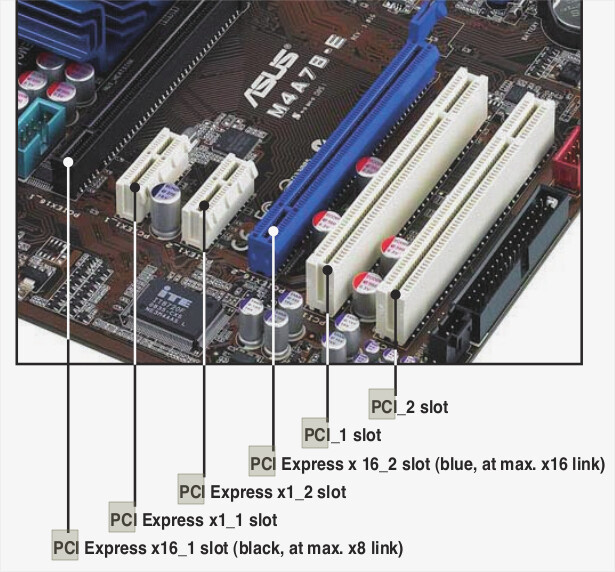
IMO, you dont need a 2.5G card. But if you buy a card, the x1 slot (shortest pcie) is ok. You unplug the rj45 from the onboard and plug it on the pcie card. ifconfig will tell you the new card interface (it will not be enp2s0)
I tried to extract entries from syslog to reproduce the kind of report (excerpt?) you gave there, for a recognized and functional interface. My report is below. Are the differences mostly due to different OS version running?
May 19 15:13:35 OasisMega1 avahi-daemon[954]: New relevant interface enp2s0.IPv4 for mDNS.
May 19 15:13:35 OasisMega1 avahi-daemon[954]: Joining mDNS multicast group on interface lo.IPv4 with address 127.0.0.1.
May 19 15:13:35 OasisMega1 avahi-daemon[954]: New relevant interface lo.IPv4 for mDNS.
May 19 15:13:35 OasisMega1 avahi-daemon[954]: Network interface enumeration completed.
May 19 15:13:35 OasisMega1 avahi-daemon[954]: Registering new address record for 192.168.0.12 on enp2s0.IPv4.
May 19 15:13:35 OasisMega1 avahi-daemon[954]: Registering new address record for 127.0.0.1 on lo.IPv4.
May 19 15:13:35 OasisMega1 avahi-daemon[954]: Server startup complete. Host name is OasisMega1.local. Local service cookie is 1025674960.
May 19 15:13:39 OasisMega1 avahi-daemon[954]: Got SIGHUP, reloading.
May 19 15:13:39 OasisMega1 avahi-daemon[954]: No service file found in /etc/avahi/services.
May 19 15:13:39 OasisMega1 NetworkManager[957]: <info>  [1779218019.8778] hostname: hostname: using hostnamed
May 19 15:13:39 OasisMega1 NetworkManager[957]: <info>  [1779218019.8778] hostname: static hostname changed from (none) to "OasisMega1"
May 19 15:13:39 OasisMega1 NetworkManager[957]: <info>  [1779218019.9126] dns-mgr[0x5b4832e212a0]: init: dns=systemd-resolved rc-manager=unmanaged (auto), plugin=systemd-resolved
May 19 15:13:39 OasisMega1 NetworkManager[957]: <info>  [1779218019.9390] manager[0x5b4832e43000]: rfkill: Wi-Fi hardware radio set enabled
May 19 15:13:39 OasisMega1 NetworkManager[957]: <info>  [1779218019.9391] manager[0x5b4832e43000]: rfkill: WWAN hardware radio set enabled
May 19 15:13:40 OasisMega1 NetworkManager[957]: <info>  [1779218020.1017] Loaded device plugin: NMBluezManager (/usr/lib/x86_64-linux-gnu/NetworkManager/1.36.6/libnm-device-plugin-bluetooth.so)
May 19 15:13:40 OasisMega1 NetworkManager[957]: <info>  [1779218020.1532] Loaded device plugin: NMWifiFactory (/usr/lib/x86_64-linux-gnu/NetworkManager/1.36.6/libnm-device-plugin-wifi.so)
May 19 15:13:40 OasisMega1 NetworkManager[957]: <info>  [1779218020.4388] Loaded device plugin: NMTeamFactory (/usr/lib/x86_64-linux-gnu/NetworkManager/1.36.6/libnm-device-plugin-team.so)
May 19 15:13:40 OasisMega1 dbus-daemon[956]: [system] Activating via systemd: service name='org.freedesktop.nm_dispatcher' unit='dbus-org.freedesktop.nm-dispatcher.service' requested by ':1.3' (uid=0 pid=957 comm="/usr/sbin/NetworkManager --no-daemon " label="unconfined")
May 19 15:13:40 OasisMega1 NetworkManager[957]: <info>  [1779218020.4404] Loaded device plugin: NMWwanFactory (/usr/lib/x86_64-linux-gnu/NetworkManager/1.36.6/libnm-device-plugin-wwan.so)
May 19 15:13:40 OasisMega1 NetworkManager[957]: <info>  [1779218020.5027] Loaded device plugin: NMAtmManager (/usr/lib/x86_64-linux-gnu/NetworkManager/1.36.6/libnm-device-plugin-adsl.so)
May 19 15:13:40 OasisMega1 NetworkManager[957]: <info>  [1779218020.5039] manager: rfkill: Wi-Fi enabled by radio killswitch; enabled by state file
May 19 15:13:40 OasisMega1 NetworkManager[957]: <info>  [1779218020.5042] manager: rfkill: WWAN enabled by radio killswitch; enabled by state file
May 19 15:13:40 OasisMega1 NetworkManager[957]: <info>  [1779218020.5044] manager: Networking is enabled by state file
May 19 15:13:40 OasisMega1 NetworkManager[957]: <info>  [1779218020.9815] settings: Loaded settings plugin: ifupdown ("/usr/lib/x86_64-linux-gnu/NetworkManager/1.36.6/libnm-settings-plugin-ifupdown.so")
May 19 15:13:40 OasisMega1 NetworkManager[957]: <info>  [1779218020.9816] settings: Loaded settings plugin: keyfile (internal)
May 19 15:13:40 OasisMega1 NetworkManager[957]: <info>  [1779218020.9816] ifupdown: management mode: unmanaged
May 19 15:13:40 OasisMega1 NetworkManager[957]: <info>  [1779218020.9817] ifupdown:       interface-parser: parsing file /etc/network/interfaces
May 19 15:13:40 OasisMega1 NetworkManager[957]: <info>  [1779218020.9817] ifupdown:       interface-parser: source line includes interfaces file(s) /etc/network/interfaces.d
May 19 15:13:40 OasisMega1 NetworkManager[957]: <info>  [1779218020.9818] ifupdown:       interface-parser: finished parsing file /etc/network/interfaces
May 19 15:13:40 OasisMega1 NetworkManager[957]: <info>  [1779218020.9821] ifupdown: guessed connection type (enp2s0) = 802-3-ethernet
May 19 15:13:41 OasisMega1 NetworkManager[957]: <info>  [1779218021.0154] dhcp-init: Using DHCP client 'internal'
May 19 15:13:41 OasisMega1 NetworkManager[957]: <info>  [1779218021.0155] device (lo): carrier: link connected
May 19 15:13:41 OasisMega1 NetworkManager[957]: <info>  [1779218021.0159] manager: (lo): new Generic device (/org/freedesktop/NetworkManager/Devices/1)
May 19 15:13:41 OasisMega1 NetworkManager[957]: <info>  [1779218021.0172] device (enp2s0): carrier: link connected
May 19 15:13:41 OasisMega1 NetworkManager[957]: <info>  [1779218021.0178] manager: (enp2s0): new Ethernet device (/org/freedesktop/NetworkManager/Devices/2)
May 19 15:13:41 OasisMega1 NetworkManager[957]: <info>  [1779218021.0241] manager: NetworkManager state is now CONNECTED_GLOBAL
May 19 15:13:41 OasisMega1 NetworkManager[957]: <info>  [1779218021.0277] manager: startup complete
May 19 15:13:42 OasisMega1 NetworkManager[957]: <info>  [1779218022.5674] modem-manager: ModemManager not available
May 19 15:13:42 OasisMega1 NetworkManager[957]: <info>  [1779218022.6046] modem-manager: ModemManager now available
May 19 15:13:51 OasisMega1 systemd[1]: NetworkManager-dispatcher.service: Deactivated successfully.
May 19 15:14:12 OasisMega1 NetworkManager[957]: <info>  [1779218052.8848] agent-manager: agent[5c3ea9d686d5f55e,:1.66/org.freedesktop.nm-applet/114]: agent registered
May 19 15:14:42 OasisMega1 NetworkManager[957]: <info>  [1779218082.6535] agent-manager: agent[210db125b3be2f95,:1.98/org.freedesktop.nm-applet/1000]: agent registered
it got an ip for that interface but Iater on, I cannot figure what happened.
Should you reboot your firewall to make sure DHCP is working ok?
about PCIe and PCI
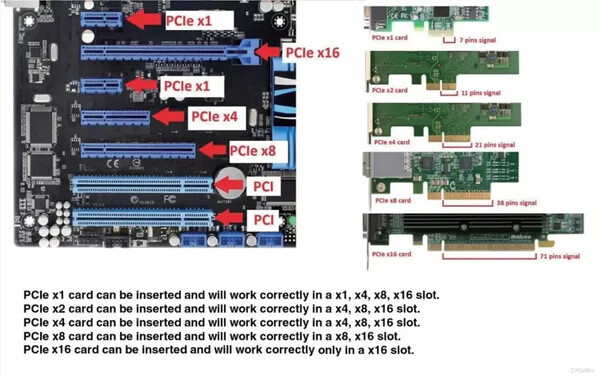
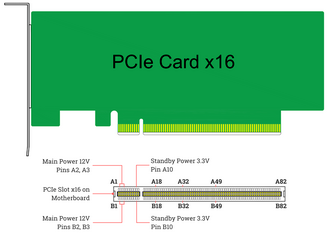
All PCIe have the same 5 legs in the front so an x1 card can fit into an x1, x4, x8, even x16 but not the other way around. An x4 PCIe cannot fit into an x1 but can fit into an x4, x8, and x16.
PCI are very different, the notch is far way to the right and cannot fit into PCIe slots.
(I had a network hicup … now its ok.)
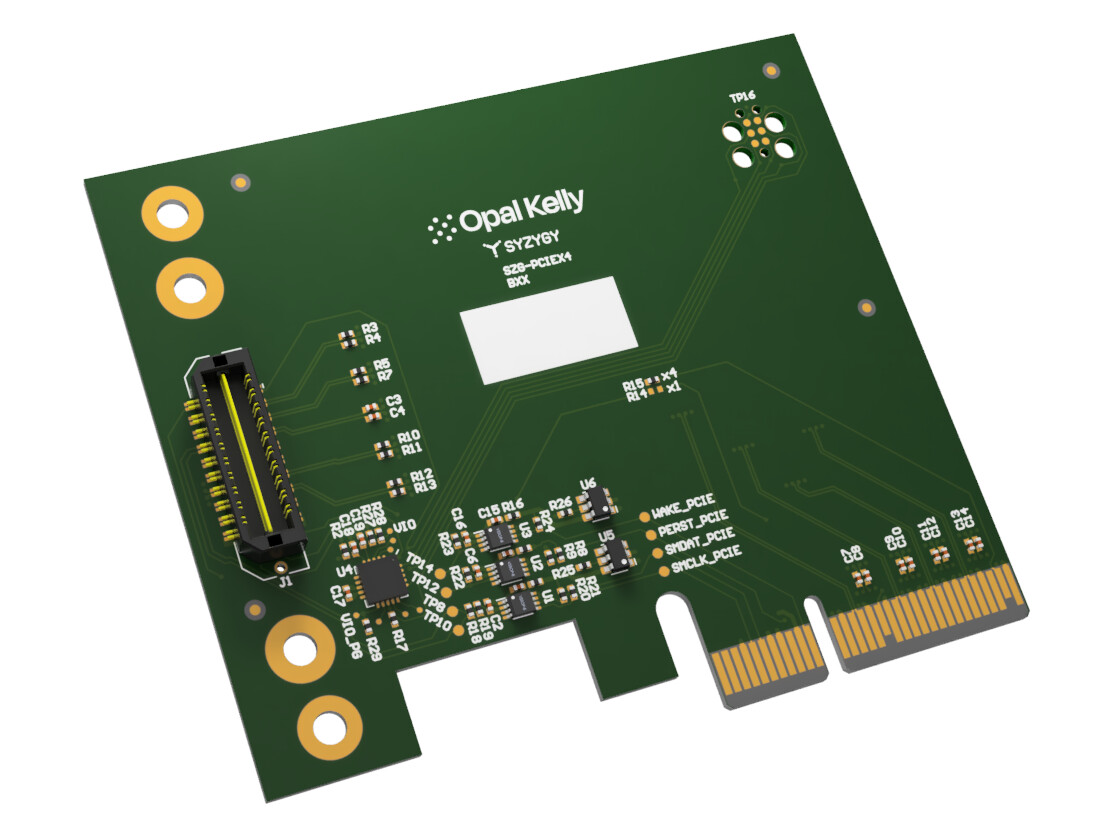
when you look at a PCIe card, the distance from begin to the notch is about 11mm or 1/2 inch. I think there are 11 gold plated contacts.
@ericmarceau I’m late to this party, but if this is still an issue, please share:
The exact message that is telling you " specifically “restart”, not “shutdown” then reboot".’
Output of both cat /etc/os-release and uname -r
Output of ifconfig when the NIC is recognized and when it is not.
Output of lspci both when the NIC is recognized and when it is not.
Output of ethtool -i enp2s0 (when it is working)
All of the commands you tried work at the network stack level. If the NIC isn’t even being recognized, it isn’t in the stack so those would not be effective. Let’s do the above to determine if the NIC itself is not coming online – which is what it sounds like.
Pavlos, correct me if I am wrong, but your point is addressing the loss of the NIC some time after having had functional use of the NIC. Correct?
That is not my problem context. My problem is a condition immediately after boot, where the network has never come up at all!!! If that is the case, the GRUB fix you’ve suggested is not really applicable. Correct?
It’s always good to know the OS (Ubuntu 22.04.5 LTS) and the kernel (6.8) in use.
The successful ifconfig confirms that the driver loaded and is talking to the kernel; i.e., it connected to the network.
The ethtool tells us what driver is being used and what version. May be helpful later once we see what happens during a failure.
The successful lspci command identifies the adapter and confirms that it responded to the PCIe bus enumeration. It could still be a hardware failure but this is the place to start.
Let’s see what they show when you have the next failure.