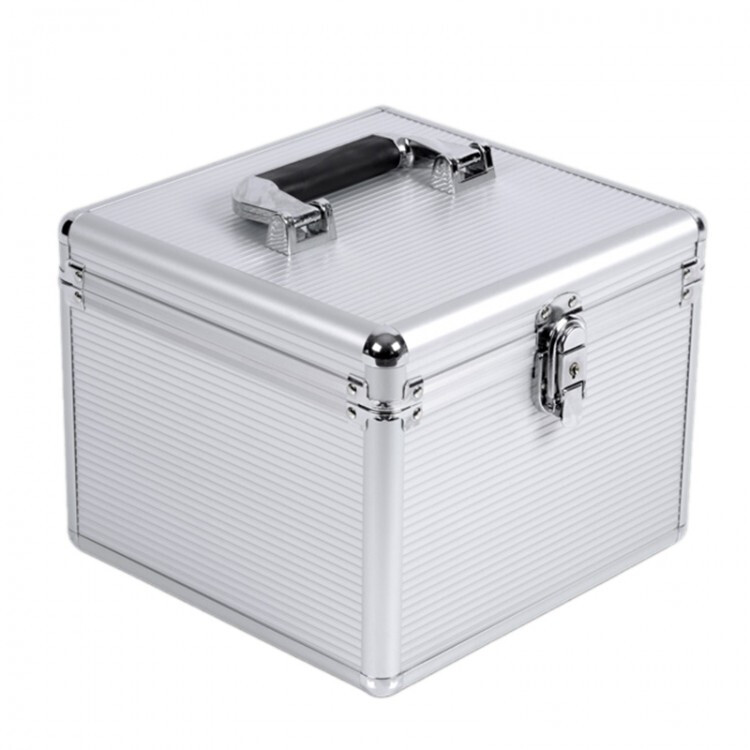
All of my “duplicity” backups are sent to the NAS which is always online.
On the twentieth day of each month, I “rsync” the backups from the NAS to a 1 TB USB flash drive. Except for the hour that the “rsync” is occurring, the 1 TB USB flash drive is on my keychain/keyring.
On the tenth day of each month, I “rsync” the backups from the NAS to a 1 TB MicroSDXC card. Except for the hour that the “rsync” is occurring, the 1 TB MicroSDXC card is in a card holder in my wallet and on my person. It is on this day that I also create a “duplicity” backup of the documents in my primary workstation’s home folder, write this smaller documents backup to a BD-RE, and store it hoping that I never see an EMP (electromagnetic pulse).
On the first day of each month, I pull one of the sixteen 1 TB hard drives out of the storage case, insert it into a dedicated machine (used for backup synching, disk firmware updates, disk testing, disk secure erasing, etcetera), “rsync” the backups from the NAS to the 1 TB hard drive, and finally replace the hard drive in the storage case.
If my house suffered a catastrophic event, I would have the 1 TB USB flash drive, the 1 TB MicroSDXC card, and possibly the BD-REs to use for restores.
The storage cases are Orico B86-08. I could not find an exact picture, but this is similar:
As I’m still not agree I decided to split my external harddrive with a NTFS partition for Windows backups and a BRTFS partititon for Linux backups.
So now the procedure for backupping Linux is, instead using just the dd command for the whole partition, I’m using Timeshift for main system backup and Borg - Vorta for the secondary EXT4 drive backup.
Once again I ask Chat GPT and he said me BRTFS is a more valuable file system for store large and compressed files. Also is more indicated for incremental backups, more in case of large files with low amount of edited blocks (as in case of virtual machine virtual drives).
Notice that I’m still launching the dd backup just for the EFI partition.
I recently upgraded to Fedora 43, and before I did the upgrade I wanted a quick way to backup my entire home directory. Why the entire directory? I found that for my browsing and a few other applications, if I restore the entire directory all my tabs and settings are returned easily.
This was a total of 600K files at about 40 GB. So I actually used my file browser, Nemo, to compress the entire directory, and then I copied it to my external USB hdd. Entire process took less than half-an-hour.
At this point I’m having scheduled weekly backups in an Excel file, so I know sunday morning each 2 weeks I have to take a complete backup. When I have completed the backup process I put a mark on my Excel row which is having a conditional formatting rule for making the row green
Too late! I didn’t try Timeshift! Maybe I should do so! Meanwhile with two of my distributions, MX Linux and antiX Linux they both have ways to do ISO Snapshots, and when running from Live images, live-remaster, live-kernel updates, etc. These snapshots are similar to dd in nature with some additional niceties - they can be written in rewritable format, not the READ ONLY stuff that typifies dd usage; this turns them into a really good BACKUP media to replace a broken or destroyed system and they double as installation media or live media source - so they can be used in at least THREE different ways - do any of you see why a few of us really like MX Linux (and in my case, antiX Linux too)?
The problem with dd command is it dumb copies the entyre disk byte to byte, so it’s a bit slow in the end you’ll have an huge .img file. You eventually can compress it, but the entire process would be slower and more CPU intensive.
I think using MX Linux (which a Debian stable derivate) and antiX (which should be another Debian stable derivate) is just a little detail, I think you can use Timeshift in every distribution?
I never tried using that kind of ISO Snapshot, but I also think you can achieve it in each distribution? It would be interesting to try, maybe @Brian_Masinick can create some documentation about using it
I believe that there are options to select a particular size and range but I will double check this; there are definitely blocksize options; I will check if you can also divide it up without a split command.
You’ll have to experiment, but it’s possible that:
   seek=N (or oseek=N) skip N obs-sized output blocks

   skip=N (or iseek=N) skip N ibs-sized input blocks
I have an nfs filesystem that automounts at /home/archive on access.
Every night at 4:20 AM, a cron job rsyncs my home dir to /home/archive. if my machine blows up, my home directory is intact on the nfs server. The nfs server is exporting a ceph volume.
I also have a dedicated backup server, doing an incremental backup (rsync and sshfs) of key hosts and filesystems to an external drive, also during the wee hours.
Note - I used to have my home directory automounted, but I wanted my main desktop and home dir to be always available, even if the nfs server is temporarily unavailable, so I decided to mount the nfs backup where it was available on demand, but would not hang my desktop if it was unavailable.
I tried using a NFS drive mount for my project folder trough the Windows virtual machine; But I ended up using a simple Samba share, it’s more Posix - NTFS compatible. Everthing is ok after activating opslock options in smb.conf, otherwise files were too cached in linux drive,
And good strategy on backup, the good point is having a separated server machine for storing your backups. In my case my homelab is also my server, I just backup everything in a separate usb drive
@J_J_Sloan
I think NFS is quite old technology, it’s not super indicated for project folder shared folders since it does not manage very well files lock and permissions.
Edit: I tested this behaviour by myself, I had some inconsistences in various .git folders.
But for generic file exploring and as backup repository I think NFS is still a solid alternative.