I want to talk about software cache:
~/.cache is an hidden folder inside /home/user/ directory. This folder is heavily used by applications for store temporary information, and it might hugely increase in size.
For keep my system clean I’m using the free tool Bleachbit for deleting temporary files; generally on this software you can customize which folders monitoring, and ~/.cache is one of those. I think it’s a best practice keeping this folder active on it’s configuration.
The fact is some information stored in ~/.cache folder are very useful for applications, for example I found the software Remmina is saving last connection timestamp in ~/.cache/remmina, each connection in a separated tiny file.
An other example is the software KeepassXC that is saving local account information in ~/.cache/keepassxc.
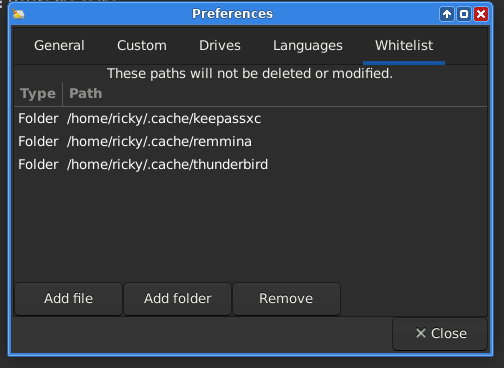
The problem freeing space with software Bleachbit is I was losing some important information, so lately I went deep on this and I discovered in Bleachbit configuration there’s a whitelist section, where you can configure folders you don’t want to being deleted by the software.
The correct procedure is configuring the most important folders in Bleachbit whitelist, I did this for my ~/.cache folder, as you can see in the following screenshoot.
Conclusions
I think deleting temporary files is a best practice, but with this guide you can be safe by don’t letting the software deleting some useful information.
Notice I though in ~/.cache folders there would be only something meaningless, such as some hashed files. But lately I discovered in this folder are still stored some useful information used by various applications.
That’s a solid write-up. You highlighted something many people overlook, which is that ~/.cache is not always just disposable junk. Your examples with Remmina and KeePassXC make the point clearly.
Sharing that detail regarding BleachBit is helpful for others who might be cleaning aggressively without realizing the side effects.
Thanks for taking the time to document what you found. It adds useful nuance to the usual “just clear the cache” advice.
Adding this to our Articles & guides category so we can continue to reference.
It makes sense. It’s a pain sometimes backing up all the temporary and cache folders in the home directory. But what I have found is that when I do a restore even to a new computer, all my settings and previous sessions return. That is a big plus, as it means you don’t have to start over your workflow, or reconfigure the software.
This is another good article. I think the availability of the whitelisting features of Bleachbit make this a pretty good “mostly hands off” tool.
I’m interested in reading a second review after using this for a month or several months. Is it consistently helpful or does it have to be retuned, reconfigured; are the settings reconfigurable, can you start over, or change the settings from time to time?
I’m one of those hands on guys, where I generally automate stuff IF and only IF I have a good algorithm; otherwise I do things manually when they present a space problem or I just want to tidy up.
Totally agree! In my backup setup I always include ~/.cache folder, I think is a best practice: in case of disaster you can recovery all softwares with your settiings.
For what I can tell you in 2 months of using this whitelist functionality on Bleachbit it never rollback and I never had to reconfigure it. The software configurations are stored in ~/.config/bleachbit.ini file, as soon you won’t delete it on purpose or accidentaly delete it, I think there’s no way that configuration will change.
As far as ads go, I often have them blocked. When I WANT to look at an advertisement (for some unusual reason) then I let them through. I downloaded the guy’s script. First, he has ALL the stuff disabled. The script runs and shows what it would do; then you change one of the boolean variables and rerun it IF you want to do what the script has shown. Keep it on and it purges cache and other potentially “unwanted” items. Given that it’s a BASH script, it’s also viewable and alterable; I like that aspect. I have NOT run it ENABLED yet, I may make a couple of different choices than the author, but I still liked the tool - better than the tools that do stuff that I might not know or realize. When it’s a tool I can read, examine, test, and modify, those are the kinds of things that this geek happens to prefer.
@Brian_Masinick good point on that script! The nice thing about it gives you a preview on what it’s going to delete instead nuke everything. I might try it.
I just want to add this about my backup methodology:
Lately I discovered that the software Timeshift does not permit to create backup of folder ~/.cache, it just ignore it. It seems they harcoded ~/.cache folder exlusion in the source code. I tried with different configuration and that folder was everytime excluded. (Tested behavior in Timeshift 24.06.6, big sad)
So I ended up by saving the entire home directlry with the ~/.cache folder in Borg backups, and completly exclude the home folder from Timeshift backups.
Thank you for mentioning folder “~/.cache”. That helped me to eliminate over 11 GB.
The normal applications I use add almost nothing to the folders within the cache folder, but I discovered something odd with GNOME Archive Manager (AKA File Roller). The cache folder contained dozens of folders with naming starting with “.fr-”. All of those “.fr-” folders contained one of the following:
Source files when I was creating a .7z.
The archive itself that I was opening.
I suspect that Archive Manager is copying the file(s) locally when I use Archive Manager across the network using SFTP to the NAS. Why it does not clean up after itself is quirky. Perhaps this is a bug in Archive Manager, but I suppose it could also be a bug in GVFS (GNOME Virtual File System) (AKA GIO (GNOME Input/Output)). I suppose in the future, I should manually copy files locally and clean up after myself. I was wondering why my backups were growing so quickly.
@ricky89 To me you have a reasonable approach. I don’t think there is any such thing as “one size fits all” when it comes to backup solutions. For me, I like the snapshot images and live-remaster alternatives that my favorite distribution (antiX) uses, but that’s one distribution. Frankly, other than that, my own home-grown custom solutions are the way to go and they get developed or hacked together based on the specific system or environment that I’m using and what’s important to back up, as opposed to automatically backing up the full system or doing some kind of incremental backup and recovery. Whatever solution is used ought to be occasionally verified by RUNNING from the backup and try restoring it (with another way to use that), or another system if anything breaks.
I’m not a Gnome user, but I believe indeed the de is a bit cumbersome and redundant, and even a bit buggy. I’m totally sure you can achieve ~/.cache/archives purging with Bleachbit, give a try!
@olivia11
Reasonably intelligent people, and I choose to believe that is people like us, are probably better at creating an appropriate strategy for backups.
To be completely honest with you and the group, sometimes I deliberately choose NOT to do a backup of any kind for a particular distribution. In those cases I have a removable USB drive available to reinstall what I have, or I have the option of overwriting that image with a newer image, but the distribution really doesn’t have anything else other than what I installed plus Internet-based browsers and tools. Those can be reinstalled or reconfigured just as easily as restoring them from backup, and probably in less time, so those cases do not even justify a backup image.
Am I the only one who ever does this? The truth is that anything I want to replicate I already have replicated many times, that’s why not ALL distributions need to be backed up. If they break, I reinstall them or install something else; the data that I care about has MANY backups in different systems, places, etc. so it’s covered even if one system is destroyed.