I have downloaded zoom 7.0 on two machines one on ubuntu 24.04 and one on 26.04.
In machines the zoom side bar( where one sees the scheduled meetings) do not open.
How does one report this to ubuntu?
And can anyone suggest a solution?
Right now I am forced to use web log in
I use Zoom quite a bit and also have 7.0.0 on a 24.04 pc and do not have any issues.A little more info would be helpful.
Are you saying there’s no sidebar when you launch the app? It should be there by default logged in or not.
This is what I see when I log in:
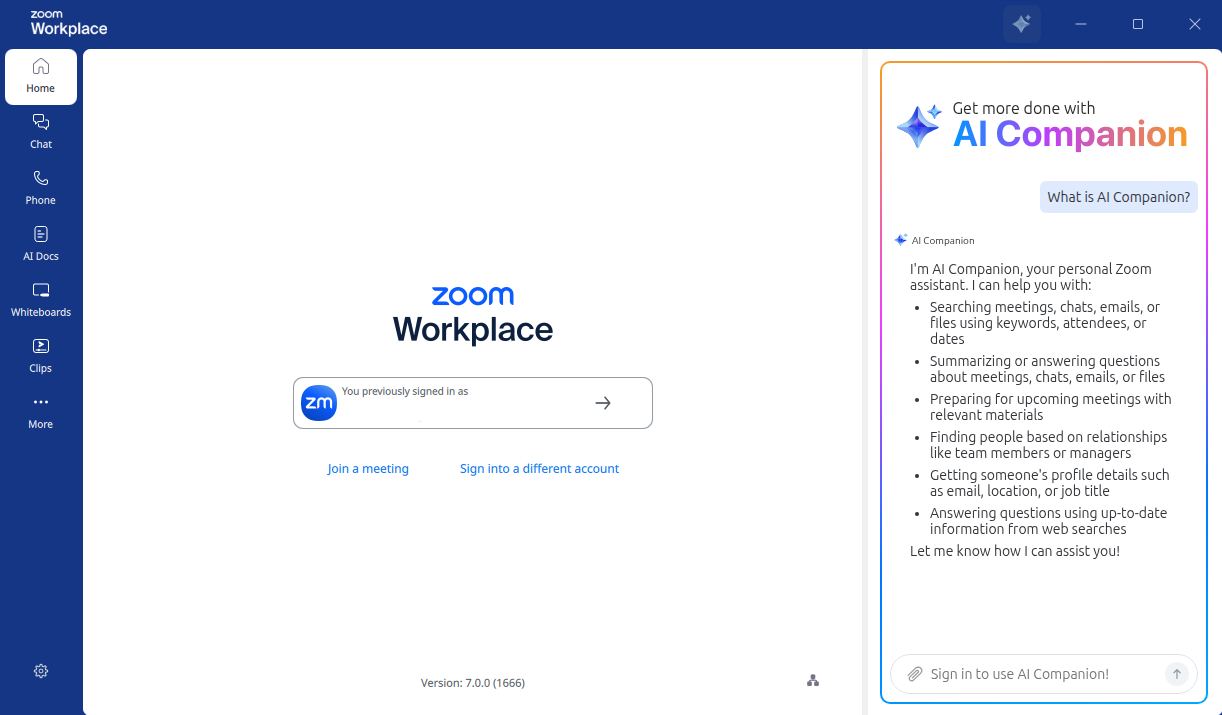
Also are you saying you can’t login either?
I am able to log in to the desktop app. But the sidebar does not show up. It show up in the place where your image is showing the AI companion etc. so in its absence I cannot initiate a scheduled meeting. I have the problem in 24.04 and 26.04. perhaps some missing library?
Ah ok.
I do not have that problem my sidebar shows up. I would purge and reinstall the app and see if the problem persists.
sudo apt purge zoom
sudo apt update
sudo apt install zoom
Hi, @Ravi_E 
I’ve noticed that you had opened a similar topic about a week ago (on 4th April 2026):
I’m curious: was there any particular reason that led you to open this new topic where we are now (“Problem with zoom 7.0.0”) instead of continuing that slightly older one (“Zoom version 7 woes - side bar remains blank”)?
To see if I could replicate your problem, I have now tried to install Zoom 7.0.0 in “Ubuntu MATE 24.04 LTS”. I did experience a somewhat similar problem: when I opened the newly installed “Zoom Workplace” program, the right area of the screen (where the “AI Companion” should appear, as @Norm24 showed) was blank with a spinning wheel in its place and then “Google Chromium” would spontaneously open, complaining that "Google API keys are missing. Some functionality of Chromium will be disabled." and it would then enter a kind of error loop: “Google Chromium” would then automatically close, going back to Zoom with the right area only showing again the spinning wheel and then Google Chromium would open again, showing again the same “Google API keys are missing” error message and then automatically closing, etc…
I eventually broke out of that “error loop”, by signing in with an account inside that “Zoom Workplace” Version 7.0.0 (1666) program and that made the “AI Companion” area to eventually appear correctly in the right part of the screen.
Could you try to do the same (signing in with an account inside the “Zoom Workplace” program) and see if that solves the problem for you?
I hope this helps
Could you elaborate? Do you mean sign in toy account in the zoom workplace app as against sign in to web zoom?
I have done that. No change
Hi, @Ravi_E
You wrote:
Yes, I meant sign in with some e-mail account (home, work or school) inside the initial Zoom Workplace screen, as in the Screenshot that @Norm24 has included in his post but where he (understandbly) “redacted” his e-mail address.
Could you include a screenshot of what you see in your Zoom Workplace program, please (redacting / hiding any private information that you may not want to disclose, as your e-mail address, for instance)?
I use “Ubuntu MATE 24.04 LTS” - I think that’s also the case of @Norm24 - which is still based on “X11” / “Xorg”. I think that “regular” Ubuntu 24.04 LTS (“Noble Numbat”) uses “Wayland” instead, by default, am I right? If so, could that be the reason of the difference? Supposedly in the initial login screen of “Ubuntu 24.04 LTS”, you should be able to choose to run your Ubuntu user session in “Ubuntu on Xorg” mode. Maybe you can try that and see if that helps? Indeed, I now see that @Blue_bird suggested just that in the 3rd step (“3. Try logging out and selecting “Ubuntu on Xorg” from the cogwheel icon at the login screen to see if functionality returns.”) of his following reply in the first topic that you created (“Zoom version 7 woes - side bar remains blank”)
By the way - and speaking of “Wayland” and “Zoom”:
1 - The web page " Sharing your screen or desktop on Zoom" - https://support.zoom.com/hc/en/article?id=zm_kb&sysparm_article=KB0060596 - does mention the following:
" (…)
Requirements for sharing your screen in a Zoom meeting or webinar
(…) Linux sessions utilizing Wayland can only share an entire desktop or whiteboard. To share just a specific application, you need to launch your Linux session with Xorg instead. (…)"
2 - I’ve also found the following discussion topic in the “Zoom Community” - https://community.zoom.com - “Feature Request: Native Wayland support and optimization for Linux | Community”:
I hope this helps
Thank you for this. Incidentally I installed 6.7.5 zoom deb on ubuntu 26.04 and that works perfectly with side bars showing. It appears to be a version 7.0 problem.
Hi Guys,
Just to give an update. Zoom version 7.03 has been launched and the problem with 7.0.has been resolved.
I’m using Zoom 7.1.5 on Ubuntu 26.04, and the whole Zoom UI is about 0.75 FPS
Broadcasting screenshare and camera seems fine though, but anything I’m viewing in the Zoom UI is laggy
Welcome to the community @NullVoxPopuli, good to have you here! 
This may be a Zoom regression/issue: https://community.zoom.com/meetings-2/zoom-lags-so-much-on-cachyos-arch-on-version-7-0-5-1-80679