This is for Ubuntu Mate users. Have you wiped your Ubuntu Mate install and installed a new OS yet, or are you staying on Ubuntu Mate as long as possible?
I plan to stay as long as possible, with the help of Ubuntu Pro.
I have reported my intention to move to mainstream Ubuntu 24.04 LTS + Mate DE within this year. That move promises not only prolonged LTS support but more stability, because Ubuntu 26.04 is Wayland-only and Mate DE is not yet Wayland-ready. And the last but not least I am quite comfortable with the current version.
Sticking with my current 24.04 UM install w/Pro for now.
The apps I use most are all updatable through the devs ppa and/or direct download from their site(s). I don’t see this as a risk as I’ve been installing and updating these apps this way for years.
Come next April I will reconsider my options but for now my current install works and I see no point in changing anything.
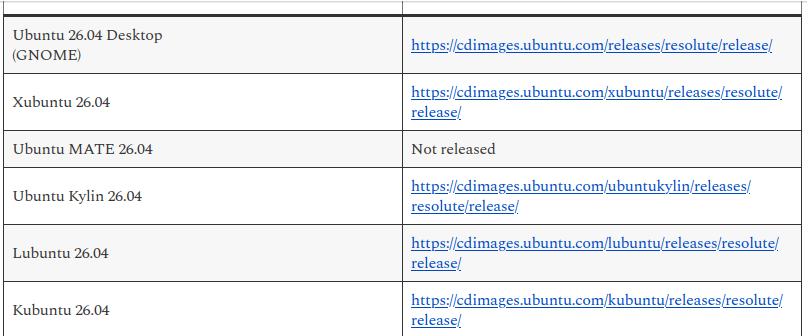
The last [successfully] built Ubuntu MATE resolute image hasn’t been deleted; so you can still download a working ISO if you need to re-install, even if back in the alpha stage of development. I can’t recall why, but I actually provided that URL/link to someone over the recent weekend or yesterday too for some reason. [that may disappear soon when stonking ISOs get built]
I’ve also seen/read numerous reports of users release-upgrading their system to Ubuntu MATE 26.04 LTS too, and I’ve given my thoughts on that a number of times (Ubuntu MATE Community Discourse & Ubuntu Discourse) anyway (I don’t see a problem with that; the ubuntu-release-upgrader treats the system as a Ubuntu install anyway; and MATE is only part of the packages that will get upgraded anyway)
If you plan on using an EOSS flavor release; I’ll suggest people read Thomas Ward’s recent post on the issue too, so at least you’re fully aware of what will get fixes & what may not. He’s far more knowledgeable in security than I am.
Ubuntu MATE is still an official flavor of Ubuntu; it’s not been removed from any page (eg. Ubuntu flavors | Ubuntu) NOR are there plans to do so [that I’m aware of anyway], even if the lack of a Ubuntu MATE development team in the resolute cycle meant they didn’t have a 26.04 release. Myself I’m still hopeful of a Ubuntu MATE stonking or 26.10 release.
If I wanted to use Ubuntu 26.04 LTS and the MATE desktop; I’d have no issues with that at all; but the lack of official ISO release doesn’t actually worry me, as I got very used to installing Ubuntu Desktop ISOs for many years, as I could download those at home [bandwidth] quota free, switch to a quota free mirror, then do the package changes to make the flavor install I actually wanted; as I had bandwidth restrictions for many years at home. Whilst I’ve not had bandwidth quotas for a few years now, these days I’d possibly use a flavor ISO that uses the calamares installer anyway; so I don’t have a forced / format as is required with ubuntu-desktop-installer, as I do like my non-destructive re-installs (even if they’re not as useful as they were in Ubuntu).
Ubuntu 26.04 LTS is NOT Wayland only; Wayland was dropped from main and moved to universe, so it’s as official as as anything else found in the universe repository; which is a LOT of the software I rely on.
I’m using Ubuntu 26.04 LTS right now, and am on my primary PC right now; I’ve used this box every day since release of Ubuntu 26.04; but would have used Wayland for less than 2 hours on this PC in that time; as I’ve been logged into a number of other Xorg/X11 sessions (today is the second day only using LXQt from the Lubuntu team on this box actually since stable release of 26.04; but many DEs still have Xorg/X11 support) and I do like my multi-desktop installs.
@guiverc thanks for posting Thomas Ward’s blog article. That really explains everything in a way even my simple brain can understand!
From that article:
You will still get Ubuntu Kernel upgrades, security patches for OpenSSL, Python, the C libraries, any other critical core packages that are installed, etc. That happens independently from the Flavor’s individual 3-year support periods.
The above is the most important thing I took from that article.
I kind of feel like I’ve jumped the script. I had three MATE 25.10 boxes offer to update to 26.04 LTS upon booting. I didn’t even run the update or upgrade. I thought - “I thought there wasn’t going to be a 26.04 LTS? - might as well see if it works - been preparing for EOL anyway.” Two of the three went fine, and one crashed during the upgrade and seems to have found some Frankenstein combo that works for now. I left some at 24.04.4 - which I think gives me about 10-11 months before I have to do something. Thanks Chris for the ISO link.
Eugene, you may have just shared the wisdom that made the decision for me. I will download to 24.04 LTS for UM for the reason, as you said, that MATE isn’t Wayland-ready.
Just an FYI, if you follow that link to any other flavor (eg. replace ubuntu-mate with ubuntu-unity, lubuntu, etc) you’ll find stonking or what are the stonking (26.10 daily) ISOs.
The current stonking ISO is failing build (for Ubuntu MATE), just as resolute did (late alpha) which is why resolute is still there.
( When stonking (26.10) builds for Ubuntu MATE [currently failing] get fixed that resolute ISO will disappear - ubuntu-mate : Live filesystems : “Ubuntu CD Image Team” team … Someone (developer interested in helping) just asked about them on matrix; which is what caused me to find that link so I could respond (on matrix); that to me is a good sign in regards Ubuntu MATE; and I’m pasting link here too… also I wrongly had resolute in that URL when I first keyed it in, and noted that the resolute ISOs are still being attempted to build; ie. resolute is being built for [unreleased] 26.04.1, so Ubuntu MATE’s ISO builds weren’t disabled; just failing to build due to unfixed issues from early March… Maybe of little interest to most; but Ubuntu MATE users maybe interested )
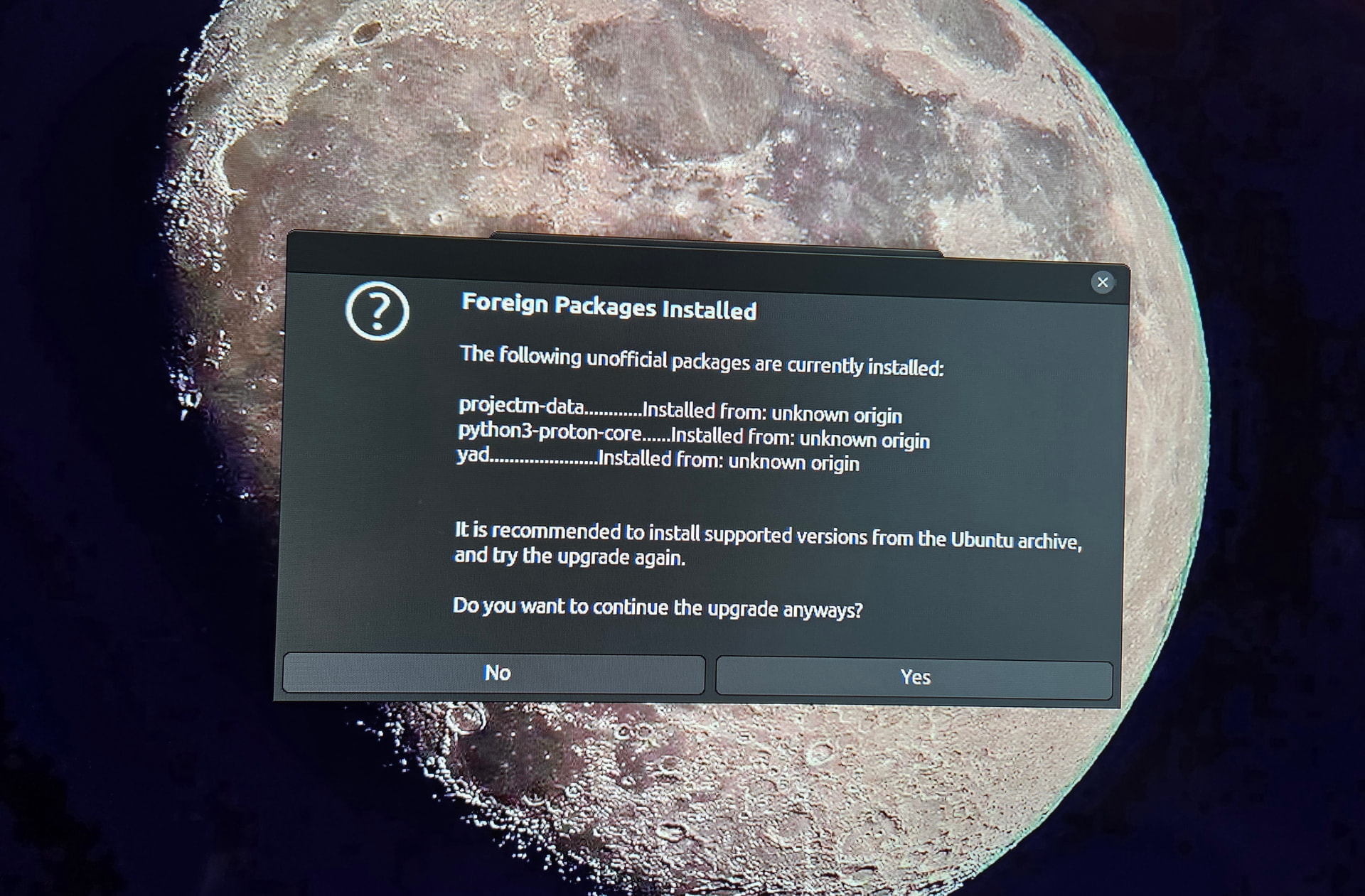
Chris, Just curious how I am being offered upgrading to 26.04 LTS? The one machine that it didn’t work well - did it again last night. I booted up and was offered the upgrade (I do have pro on all these boxes). I clicked to do so, and nothing happened. So, I went to the command line, and it complained about a pulse audio file. So I sudo apt installed that file, and it removed the one it didn’t like and installed the one it couldn’t get past. Then I did the command line again and it found some python3, projectm-data, and yad - three in total (photo) - so I said do it anyway - and i’ll fix them after the fact. Went fine and finished the upgrade. One difference I notice is auto logon is gone on all the 26.04 LTS boxes. I get a suspiciously reddish-orange initial blank page to login (Original Ubuntu?) Once logged in it looks just like my MATE desktop. The line I used was from over ten years ago " sudo do-release-upgrade -d which mentioned there was no developer version, but offered to continue. My question is: did I “stonk” these upgrades? The two that worked without complaint ended up in the same no auto login condition, but run great.
Nahhh, you didn’t stonk anything. Those foreign packages mean a few things were installed from PPAs or outside the official archive, and the upgrader can’t guarantee 26.04 versions exist yet, so it warns you and lets you decide.
So saying yes is fine as long as you’re okay reinstalling or cleaning those up after, which you already seem to have done with pulseaudio.
The auto login going away is normal also.
One thing though, do-release-upgrade -d on LTS Ubuntu. The -d forces development/devel branch upgrades. You don’t want that on a stable box. Just plain sudo do-release-upgrade once it’s offered is the safe way going forward.
Upgrades are OPEN or NOT OPEN based on what you’re using now, and thus the metafile which is used (if -d is used the development metafile is used etc).
Your mention of PRO makes me think it’s LTS [you’re asking about], but you didn’t specify as far as I saw. Your settings also influence which file is looked at; ie. if it’s LTS only the LTS metafile will be used (Supported:0) but if its every release the standard file is viewed… What I describe is assuming defaults are used, but as its our own systems, we can change those defaults anytime if we have sudo rights.
Pulse Audio was used last for audio in 22.04 with Ubuntu; 22.10 switched to PipeWire - though PulseAudio user-layer controls ARE STILL USED, thus if the package/file was a system file it is unusual & likely a result of changes you’ve made; however if it was a user-level control tool it won’t be an issue; but again I’d suspect it was a change you’d made away from defaults - but without file/package name I’m only guessing & could be way off.
The -d option is for DEVELOPMENT usage; ie. there so Quality Assurance testers can QA test the upgrade process, report any bugs, and its this that causes the Ubuntu Release Team to make decisions as to stability; they are the ones who amend the metafiles that impact what our systems see (in regards available release-upgrades).
If you used the -d you mention; you’re NOT using the supported upgrade path, but forcing different files that are available for Quality Assurance testers so they can FORCE an upgrade early for testing. Results in this development stage do vary, as it’s there only for testing/development work & fixing issues before the upgrade is open for regular users. You’ll find much older documentation mentions it, as many didn’t want to wait (for LTS.1); but don’t forget to read the warnings that were provided with its use.
Thanks Chris and Hayden. I learn a bit from all your helpful replies. So, lets say I want to turn off the development switch. Would just running from the terminal sudo do-release-upgrade do it? Or, is there a more specific command line?
Thanks
Jim
The -d is the development ‘switch’ as you put it, so YES leaving it off will mean you’re wanting to use only the supported upgrade paths.
A man do-release-upgrade to view the reference manual page on my release describes the option as
   -d, --devel-release
          If using the latest supported release, upgrade to the development release
and it was an option I was required to use to upgrade from resolute (26.04) to the stonking (what will be 26.10 on release) I’m now using (on this install anyway).
Addendum on a different, but still a Ubuntu matter.
I received an IRC message in a team room a little earlier telling me that the Ubuntu Discourse issues should now all be resolved.
As most are probably aware; the DDoS attacks from weeks ago returned, appearing to be timed for the Ubuntu Summit (last week) & continued over the weekend and into this week too. Some remediation steps taken weren’t as helpful as expected either (making it better for many, but just different problems for others). This now should all be historical now anyway.
( I recall UD discussed on this site here, but the thread I found was already marked SOLVED so adding a comment on this thread/post )
@Jymm: I’m using UM 24.04.4 LTS with an Ubuntu Pro subscription. Since Ubuntu Pro does not support interim releases, I’m staying with 24.04.4. My assessment is that, for my needs, this provides adequate security updates for a few years yet. If a UM 28.04 LTS is released, I’ll upgrade to that. If not, then in 2028 I’ll reconsider whether to upgrade to Ubuntu 28.04 LTS and install the MATE DE.
 I left some at 24.04.4 - which I think gives me about 10-11 months before I have to do something. Thanks Chris for the ISO link.