Norm24
April 13, 2026, 10:36pm
1
Ubuntu MATE 24.04
Title says it all.Not my primary machine but still a stupid mistake while reformatting a partition on a USB stick I wasn’t paying attention and the boot partition on the ssd drive is now empty. I can get in with a live USB but don’t really know what to do from there.
2 Likes
ricmarques
April 13, 2026, 11:03pm
2
Hi, @Norm24 !
Sorry to hear that
If you boot from your live USB “Ubuntu MATE 24.04” flash drive, and then open a “MATE terminal” session, could you please run the following command and reply with the output?
sudo parted -l
2 Likes
Norm24
April 13, 2026, 11:09pm
3
Reformatted the boot partition and changed the filesystem type but was able on my own to get a certain point.
Here’s the output of sudo parted -l:
ubuntu-mate@ubuntu-mate:~$ sudo parted -l
Model: ATA SK hynix SC210 m (scsi)
Disk /dev/sda: 256GB
Sector size (logical/physical): 512B/512B
Partition Table: gpt
Disk Flags:

Number  Start   End     Size    File system  Name  Flags
 1      1049kB  1128MB  1127MB  fat32              boot, esp
 2      1128MB  256GB   255GB   ext4


Model: SanDisk Cruzer Glide (scsi)
Disk /dev/sdb: 30.8GB
Sector size (logical/physical): 512B/512B
Partition Table: gpt
Disk Flags:

Number  Start   End     Size    File system  Name       Flags
 1      32.8kB  4513MB  4513MB               ISO9660    hidden, msftdata
 2      4513MB  4519MB  5202kB               Appended2  boot, esp
 3      4519MB  4519MB  307kB                Gap1       hidden, msftdata
 4      4519MB  30.8GB  26.3GB  ext4
2 Likes
ricmarques
April 13, 2026, 11:20pm
4
OK. Good. So /dev/sda is currently your 256 GB SSD and /dev/sdb is your 32 GB live USB Flash drive, right?
So, the ESP (EFI System Partition) in /dev/sda is in the right place (first partition) and has the right filesystem type (FAT32). Good
Could you please run the following commands in the same MATE Terminal Session?
sudo mkdir -pv /mnt/boot/efi

sudo mount /dev/sda1 /mnt/boot/efi

sudo mount /dev/sda2 /mnt
And then, please run the following commands and paste the output:
sudo ls -al /mnt/boot

sudo ls -al /mnt/boot/efi

sudo ls -al /mnt/boot/efi/EFI

sudo ls -al /mnt/boot/efi/EFI/Boot

sudo ls -al /mnt/boot/efi/EFI/ubuntu
3 Likes
hydn
April 13, 2026, 11:29pm
5
Bummer. I’ve been there as well.
Looks like Ricardo’s got you on the right track here. Hope this has a happy outcome.
2 Likes
Norm24
April 13, 2026, 11:33pm
6
Yes.
Output for sudo ls -al /mnt/boot:
ubuntu-mate@ubuntu-mate:~$ sudo ls -al /mnt/boot
total 292184
drwxr-xr-x  4 root root     4096 Apr 13 20:37 .
drwxr-xr-x 23 root root   466944 Apr 13 21:09 ..
-rw-------  1 root root  9125925 Mar  6 00:43 System.map-6.8.0-106-generic
-rw-------  1 root root  9125925 Mar 13 13:27 System.map-6.8.0-107-generic
-rw-------  1 root root  9126224 Mar 19 11:44 System.map-6.8.0-110-generic
-rw-r--r--  1 root root   287601 Mar  6 00:43 config-6.8.0-106-generic
-rw-r--r--  1 root root   287601 Mar 13 13:27 config-6.8.0-107-generic
-rw-r--r--  1 root root   287605 Mar 19 11:44 config-6.8.0-110-generic
drwxr-xr-x  2 root root     4096 Aug 19  2024 efi
drwxr-xr-x  6 root root     4096 Apr 13 20:37 grub
lrwxrwxrwx  1 root root       28 Apr 13 20:37 initrd.img -> initrd.img-6.8.0-110-generic
-rw-r--r--  1 root root 74906140 Mar 24 12:18 initrd.img-6.8.0-106-generic
-rw-r--r--  1 root root 74904297 Apr 10 00:27 initrd.img-6.8.0-107-generic
-rw-r--r--  1 root root 74918102 Apr 13 20:37 initrd.img-6.8.0-110-generic
lrwxrwxrwx  1 root root       28 Apr 13 20:37 initrd.img.old -> initrd.img-6.8.0-107-generic
-rw-r--r--  1 root root   142796 Apr  8  2024 memtest86+ia32.bin
-rw-r--r--  1 root root   143872 Apr  8  2024 memtest86+ia32.efi
-rw-r--r--  1 root root   147744 Apr  8  2024 memtest86+x64.bin
-rw-r--r--  1 root root   148992 Apr  8  2024 memtest86+x64.efi
lrwxrwxrwx  1 root root       25 Apr 13 20:37 vmlinuz -> vmlinuz-6.8.0-110-generic
-rw-------  1 root root 15034760 Mar  6 06:23 vmlinuz-6.8.0-106-generic
-rw-------  1 root root 15042952 Mar 13 17:46 vmlinuz-6.8.0-107-generic
-rw-------  1 root root 15042952 Mar 19 13:43 vmlinuz-6.8.0-110-generic
lrwxrwxrwx  1 root root       25 Apr 13 20:37 vmlinuz.old -> vmlinuz-6.8.0-107-g
Output for sudo ls -al /mnt/boot/efi:
ubuntu-mate@ubuntu-mate:~$ sudo ls -al /mnt/boot/efi
total 8
drwxr-xr-x 2 root root 4096 Aug 19  2024 .
drwxr-xr-x 4 root root 4096 Apr 13 20:37 ..
Output for sudo ls -al /mnt/boot/efi/EFI
sudo ls -al /mnt/boot/efi/EFI
ls: cannot access '/mnt/boot/efi/EFI': No such file or directory
ubuntu-mate@ubuntu-mate:~$
Output for sudo ls -al /mnt/boot/efi/EFI/Boot:
ubuntu-mate@ubuntu-mate:~$ sudo ls -al /mnt/boot/efi/EFI/Boot
ls: cannot access '/mnt/boot/efi/EFI/Boot': No such file or directory
ubuntu-mate@ubuntu-mate:~$
And finally sudo ls -al /mnt/boot/efi/EFI/Ubuntu
ubuntu-mate@ubuntu-mate:~$ sudo ls -al /mnt/boot/efi/EFI/Ubuntu
ls: cannot access '/mnt/boot/efi/EFI/Ubuntu': No such file or directory
2 Likes
ricmarques
April 13, 2026, 11:40pm
7
That’s great, @Norm24
Please run the following commands in the same MATE Terminal session:
sudo mount --bind /dev /mnt/dev

sudo mount --bind /proc /mnt/proc

sudo mount --bind /sys /mnt/sys

sudo chroot /mnt

mount -t efivarfs none /sys/firmware/efi/efivars

grub-install --target=x86_64-efi --efi-directory=/boot/efi --bootloader-id=ubuntu
Please, paste the output of the last command (so, the output of the “grub-install” command above) and then run the following commands and paste the outputs:
ls -al /boot/efi

ls -al /boot/efi/EFI/Boot

ls -al /boot/efi/EFI/ubuntu
2 Likes
Norm24
April 13, 2026, 11:48pm
8
Output for grub-install --target=x86_64-efi --efi-directory=/boot/efi --bootloader-id=ubuntu:
root@ubuntu-mate:/# mount -t efivarfs none /sys/firmware/efi/efivars
root@ubuntu-mate:/#
grub-install --target=x86_64-efi --efi-directory=/boot/efi --bootloader-id=ubuntu
Installing for x86_64-efi platform.
grub-install: error: /boot/efi doesn't look like an EFI partition.
Output for ls -al /boot/efi
root@ubuntu-mate:/# ls -al /boot/efi
total 8
drwxr-xr-x 2 root root 4096 Aug 19  2024 .
drwxr-xr-x 4 root root 4096 Apr 13 16:37 ..
Output for ls -al /boot/efi/EFI/Boot:
root@ubuntu-mate:/# ls -al /boot/efi/EFI/Boot
ls: cannot access '/boot/efi/EFI/Boot': No such file or directory
And finally ls -al /boot/efi/EFI/ubuntu:
root@ubuntu-mate:/# ls -al /boot/efi/EFI/ubuntu
ls: cannot access '/boot/efi/EFI/ubuntu': No such file or directory
1 Like
ricmarques
April 14, 2026, 12:00am
9
That’s weird
parted -l

df -hTP

ls -al /boot/grub
1 Like
Norm24
April 14, 2026, 12:08am
10
output for parted -l:
root@ubuntu-mate:/# parted -l
Model: ATA SK hynix SC210 m (scsi)
Disk /dev/sda: 256GB
Sector size (logical/physical): 512B/512B
Partition Table: gpt
Disk Flags:

Number  Start   End     Size    File system  Name  Flags
 1      1049kB  1128MB  1127MB  fat32              boot, esp
 2      1128MB  256GB   255GB   ext4


Model: SanDisk Cruzer Glide (scsi)
Disk /dev/sdb: 30.8GB
Sector size (logical/physical): 512B/512B
Partition Table: gpt
Disk Flags:

Number  Start   End     Size    File system  Name       Flags
 1      32.8kB  4513MB  4513MB               ISO9660    hidden, msftdata
 2      4513MB  4519MB  5202kB               Appended2  boot, esp
 3      4519MB  4519MB  307kB                Gap1       hidden, msftdata
 4      4519MB  30.8GB  26.3GB  ext4
output for df -hTP:
root@ubuntu-mate:/# df -hTP
Filesystem     Type      Size  Used Avail Use% Mounted on
/dev/sda2      ext4      233G   45G  177G  21% /
none           efivarfs  128K   63K   61K  51% /sys/firmware/efi/efivars
and finally ls -al /boot/grub:
root@ubuntu-mate:/# ls -al /boot/grub
total 2420
drwxr-xr-x 6 root root    4096 Apr 13 16:37 .
drwxr-xr-x 4 root root    4096 Apr 13 16:37 ..
drwxr-xr-x 2 root root    4096 Aug 19  2024 fonts
-rw------- 1 root root   12393 Apr 13 16:37 grub.cfg
-rw-r--r-- 1 root root    1024 Apr 13 10:05 grubenv
drwxr-xr-x 2 root root    4096 May 21  2025 locale
drwxr-xr-x 2 root root    4096 Sep 14  2024 themes
-rw-r--r-- 1 root root 2411806 May 21  2025 unicode.pf2
drwxr-xr-x 2 root root   24576 May 21  2025 x86_64-efi
1 Like
ricmarques
April 14, 2026, 12:13am
11
Hmm… So, apparently, /boot/efi did not get mounted. OK. Then, please run the following commands, in that same MATE Terminal session:
mount -v /dev/sda1 /boot/efi

grub-install --target=x86_64-efi --efi-directory=/boot/efi --bootloader-id=ubuntu
Please, paste the output of the above commands and then run the following commands and paste the outputs:
ls -al /boot/efi

ls -al /boot/efi/EFI

ls -al /boot/efi/EFI/Boot

ls -al /boot/efi/EFI/ubuntu
3 Likes
Norm24
April 14, 2026, 12:20am
12
Output mount -v /dev/sda1 /boot/efi:
root@ubuntu-mate:/# mount -v /dev/sda1 /boot/efi
mount: /dev/sda1 mounted on /boot/efi.
Output grub-install --target=x86_64-efi --efi-directory=/boot/efi --bootloader-id=ubuntu:
root@ubuntu-mate:/# grub-install --target=x86_64-efi --efi-directory=/boot/efi --bootloader-id=ubuntu
Installing for x86_64-efi platform.
Installation finished. No error reported.
output ls -al /boot/efi:
root@ubuntu-mate:/# ls -al /boot/efi
total 12
drwxr-xr-x 3 root root 4096 Dec 31  1969 .
drwxr-xr-x 4 root root 4096 Apr 13 16:37 ..
drwxr-xr-x 4 root root 4096 Apr 13 20:16 EFI
output ls -al /boot/efi/EFI:
root@ubuntu-mate:/# ls -al /boot/efi/EFI
total 16
drwxr-xr-x 4 root root 4096 Apr 13 20:16 .
drwxr-xr-x 3 root root 4096 Dec 31  1969 ..
drwxr-xr-x 2 root root 4096 Apr 13 20:16 BOOT
drwxr-xr-x 2 root root 4096 Apr 13 20:16 ubuntu
output ls -al /boot/efi/EFI/Boot :
root@ubuntu-mate:/# ls -al /boot/efi/EFI/Boot
total 1884
drwxr-xr-x 2 root root   4096 Apr 13 20:16 .
drwxr-xr-x 4 root root   4096 Apr 13 20:16 ..
-rwxr-xr-x 1 root root 966664 Apr 13 20:16 BOOTX64.EFI
-rwxr-xr-x 1 root root  88344 Apr 13 20:16 fbx64.efi
-rwxr-xr-x 1 root root 856280 Apr 13 20:16 mmx64.efi
and finally ls -al /boot/efi/EFI/ubuntu:
root@ubuntu-mate:/# ls -al /boot/efi/EFI/ubuntu
total 4404
drwxr-xr-x 2 root root    4096 Apr 13 20:16 .
drwxr-xr-x 4 root root    4096 Apr 13 20:16 ..
-rwxr-xr-x 1 root root     108 Apr 13 20:16 BOOTX64.CSV
-rwxr-xr-x 1 root root     126 Apr 13 20:16 grub.cfg
-rwxr-xr-x 1 root root 2660232 Apr 13 20:16 grubx64.efi
-rwxr-xr-x 1 root root  856280 Apr 13 20:16 mmx64.efi
-rwxr-xr-x 1 root root  966664 Apr 13 20:16 shimx64.efi
2 Likes
ricmarques
April 14, 2026, 12:25am
13
Excellent, @Norm24 !
2 Likes
Norm24
April 14, 2026, 12:29am
14
Back in business!
Only caveat is that the boot process took much longer than usual and the grub timeout has reset itself to something 2 seconds.
3 Likes
ricmarques
April 14, 2026, 12:34am
15
That’s great, @Norm24 ! I’m glad I was able to help
2 Likes
Norm24
April 14, 2026, 12:40am
16
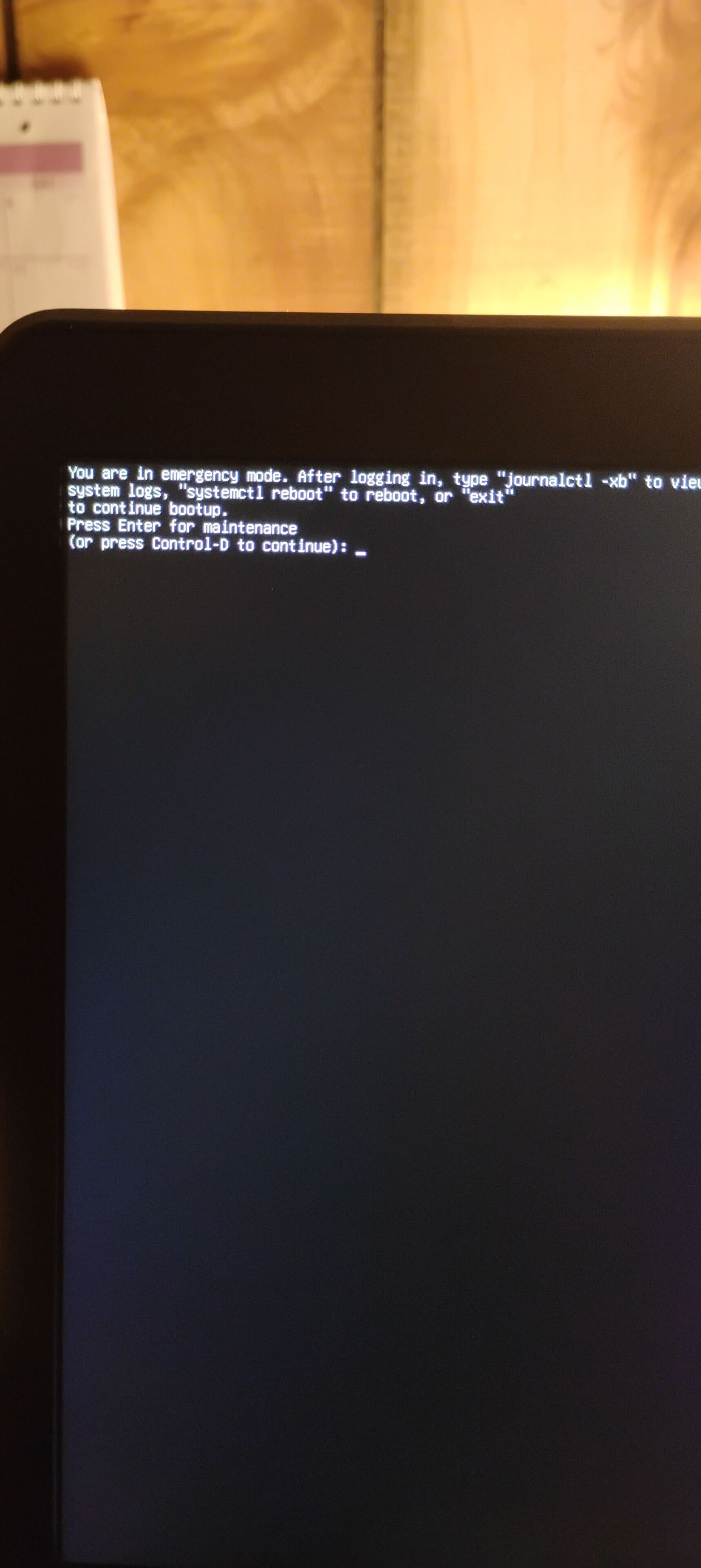
Restart was just as slow and I got this screen:
Doing Ctrl-D allowed to boot into the desktop but it to took quite a bit of time.
1 Like
hydn
April 14, 2026, 3:12am
17
With the accidental reformat maybe the /etc/fstab still has the old UUID for the original EFI partition.
Press enter on that screen and run sudo blkid /dev/sda1 to get the new UUID for your EFI partition. Make sure it matches with whats in cat /etc/fstab
5 Likes
Jymm
April 14, 2026, 12:40pm
19
I did it once too, but I wiped the disc and started over. It is why I keep good backups.
1 Like
Norm24
April 14, 2026, 3:16pm
20
In my case it’s not my primary PC so I’m using this as a learning lesson. My everyday machine gets a backed up twice week.
1 Like
Norm24
April 14, 2026, 3:25pm
21
And my thanks to @ricmarques for taking the time and walking me through the fix. Bookmarked for the future… you never know.
3 Likes
 When you say that you “accidentally reformatted efi boot partition”, did you change its filesystem type or did you “only” erase its contents? Is that computer running only “Ubuntu MATE 24.04” or are you “dual booting” it with any other Operating System (Windows, another Linux distribution…)?