26.04.1 release

Eventually, I completed the upgrade, with some advice (not always correct) from Proton Lumo AI. There were any number of modal dialogs that popped up asking me to make a decision: use the existing conf file or install a new one, use the existing grub file or install a new one. Jeeze Louise. Proton gave me some good advice, except for an incorrect key in one gsettings command. I recorded the output and I’ve attached it below in a PDF if anyone wants to read it before trying this upgrade.

I haven’t noticed any icon or theming problems such as reported by @bornagainpenguin.

Everything seems to work OK, but I did have to execute flatpak update, to update 39 items (mostly platforms and locales) before Bazaar would act nice. Also, the greeter has changed: it is labeled Arctica and has different colors than the traditional MATE green, but it works without any issues.

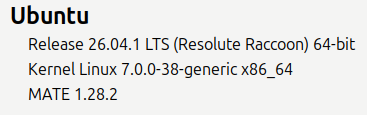
After the upgrade completed, I ran Software Updater again and it updated the kernel files. I now have kernel 7.0.0-38-generic x86_64, and MATE 1.28.2.

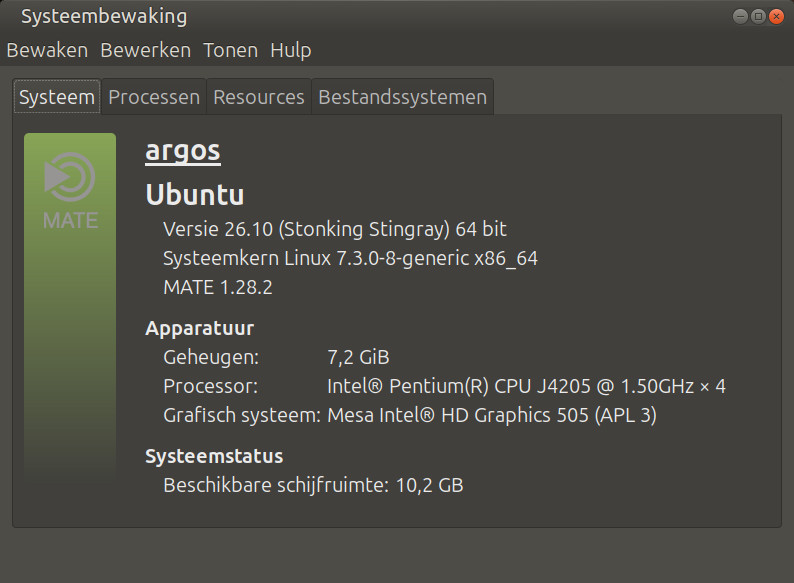
Also, the OS seems to be a little lighter on RAM usage. With no apps running, the NUC is at 2.3 GB out of 7.6 GB, according to System Monitor. When I checked this last week, it was running about 1 GB more when unloaded.

Which brings me to another question: I also have Ubuntu MATE 24.04.5 running on a Lenovo laptop with 4 GB of RAM. With only Brave, Proton Mail, and Proton VPN running, it’s using 2.5 GB out of 3.2 GB. I am interested to hear what some of you think about whether it’s safe to also upgrade this laptop to 26.04.1. With the release of 26.04, Ubuntu raised the minimum recommended RAM to 6GB, but others have said this isn’t a hard lower limit and that 4GB may work just fine for lighter workflows.

NUC_Upgrade_to_26.04.1.pdf (207.9 KB)

2 Likes

Hi @DeanHighland and @bornagainpenguin

I’ve run 26.04 and 26.10 and I can tell you from experience that 26.10 (which will be out this month) is a much smoother ride than 26.04.1
Some 26.04 issues already solved in 26.10:

  • not being able to edit the menu
    (workaround: replace Mozo with Menulibre)
  • screenshot not working
    (workaround: use flameshot or ksnip)
  • software-properties takes >10 sec to open

My advice: Hold on to 24.04 until 26.10 is out. Or upgrade to 26.10 now if you already upgraded to 26.04

Remember that Ubuntu-MATE 26.04 has no LTS status.
(I write this because I tend to forget that myself sometimes)

I usually only upgrade from LTS to LTS but in this case I happily jumped to 26.10

At this moment, my bedside laptop and my old thinkpad are running 26.10 flawlessly. I upgraded my mediacenter from 24.04 to 26.04.1 but I will be upgrading it to 26.10 very soon.
I’l keep my main rig on 24.04 until next summer.

2 Likes

You’ll be fine. It will run flawlessly on 4GB.

Here is UM 26.04 running on my 20yr old Asus F3T (dual Turion, 3GB of RAM):

thom@ganymedes:~$ free -h
               total        used        free      shared  buff/cache   available
Mem:           2,9Gi       651Mi       1,8Gi        17Mi       555Mi       2,2Gi
Swap:          2,9Gi          0B       2,9Gi

My bedside laptop (Pentium N4500, 4GB RAM) is running 26.10:

thom@oldlucifer:~$ free -h
               total        used        free      shared  buff/cache   available
Mem:           3,7Gi       862Mi       2,5Gi        70Mi       580Mi       2,8Gi
Swap:          4,0Gi          0B       4,0Gi

One way or another, I seldom hit swap.

In my experience, used memory seems to be somewhat dependent on the system’s total memory. I guess it has to do with swappiness and cache pressue (both default here)

Be aware though that I disabled snaps on both laptops.

Also in my experience: The minimum for Ubuntu-MATE is 2GB. 1GB and lower will result in quite some swap use (but will still run).
See how 24.04 runs on an ancient eeePC (C-60, <1 GB RAM):

thom@deimos:~$ free -h
               total        used        free      shared  buff/cache   available
Mem:           691Mi       468Mi        69Mi       6,9Mi       256Mi       222Mi
Swap:          2,2Gi        58Mi       2,2Gi

Although it works smooth and without problem, it is a bit slow as you can imagine :innocent: (because of RAM and CPU) so I wouldn’t recommend it.
With specs like this I would not recommend any Ubuntu flavour at all and I probably will migrate it to MX-linux with Moksha desktop.

5 Likes

Wasn’t that resolved through the testing we did for @suivue a few months back?

3 Likes

Yes, but it landed only in 26.10, not in 26.04.1

@suivue and the rest of the team are working hard on getting 26.10 ready for release so it might take some time for a 26.04 fix.

see this post:

It might be wise to skip 26.04 altogether and upgrade to 26.10 when it lands later this month.

5 Likes

@Norm24,
@tkn has already answered.

Once 26.10 is released, my main focus will be to complete the upgrade of remaining MATE packages in Debian and keep up-to-date then on (so we are on par other distros for 27.04) and bring all the bug-fixes to 26.04 and 26.10.

I understand most UM users prefer LTS releases. But given the circumstances, I think this is a good advice. This way we will also get larger user-tester base (me being selfish here :smiling_face_with_horns:).

For those who need LTS, it is better to stay on 24.04 as it is officially supported till April 2027. With a subscription to ‘pro’, one can have extended support (till April 2029), to manage one more year before 28.04 LTS. The MATE packages are stable as is and we can backport the fixes as needed.

3 Likes

It’s confusing, isn’t it? Because after the upgrade, my System Monitor reports this:

I thought that this means I am now on Ubuntu 26.04.1 LTS, but with MATE as the desktop environment rather than Gnome 51. Yes? No?

2 Likes

You wouldn’t unless you were in favor of using those older icon themes. When you “upgrade” it removes the Ubuntu-Mono* icons and the Humanity* icons.

I could have worked around that issue, but when they’ve broken the ability to edit your application menus, have to do installs of other apps for basic system functionality like screenshots…It was simply easier and better to fall back to Ubuntu-Mate 24.04.5 LTS which is still supported for a while longer. And actually works. I did have to compile blueman to fix the issue that came up with it but otherwise my system is stock. I’ve been actively avoiding any PPAs this time around.

I’m just disappointed that Canonical thought this was release-worthy. The Mozo issue is apparently fixed in Debian if you can get all the correct packages. Canonical just doesn’t seem to care to fix them in their distro? Haven’t felt as kicked in the side by them this bad since Gutsy and all the fun we had trying to get audio to work acceptably again…

I’m actually seriously considering Debian at this point. Unless Canonical can do better than they have and as far as I can tell Canonical doesn’t really care. They got left a mess and are doing the minimum they can but it’s just not a priority to them.

2 Likes

The underlying Ubuntu system says LTS (because the underlying system is practically the same for all flavours) but the integration of the desktop therein is not. Therefore ignore the “LTS” that the system reports. It is not valid for the MATE flavour .

2 Likes

Quite understandable. There is quite a lot of cruft I usually have to remove after a new install and I sometimes wonder if it would be easier to switch to LMDE or even CachyOS-MATE.

3 Likes

I can sympathize with you. I guess I won’t be editing menus until the fix for that is back-ported.

I’m not sure to what issue you refer. I had a bluetooth issue in 24.04.5: If I clicked on the bluetooth indicator in my top panel, and selected “Devices…”, the Bluetooth Devices dialog would open immediately, but only the window frame and controls were drawn – the content area (“canvas”?) remained transparent, showing whatever desktop contents were displayed behind the dialog window. Eventually, the content area would be drawn with the device list, but it would take 15 to 20 seconds. If that is the issue you had, I discovered a work-around: I opened the Brisk Menu and selected “Preferences”. Then I right-clicked on “Bluetooth Manager”. From the pop-up, I selected “Pin to desktop”. This placed a Bluetooth Manager launcher on my desktop. I then dragged that launcher to the top panel and dropped it there. Clicking on that launcher displayed the Bluetooth Manager dialog, but unlike launching it from the indicator icon, the dialog content area populated with little to no delay.

The upgrade process to 26.04.1 was arduous. And that has nothing to do with MATE; it’s the underlying Ubuntu upgrader. I’ve been using linux since 2013, and Ubuntu MATE since 2020. I’m a retired engineer and I’ve been working with computers since the late 1970s. And still I felt uncomfortable with this upgrade process. Manually disabling the lock screen using gsettings commands in the terminal? Deciding which grub to keep or replace? This process must be daunting to a newbie, or even to an experienced user who has no terminal know-how.

2 Likes

Are you absolutely, positively sure about that? Or is the situation more nuanced? I could be wrong (and frequently am!), but I think this upgrade changed the underlying Ubuntu system to 26.04.1 LTS, and that the underlying Ubuntu system will now be supported until April 2028. The MATE desktop is (technically) supposed to be supported under its original Ubuntu MATE 2024.04 LTS designation; although that is somewhat a moot point now, since the upgrade boosted the MATE version from 1.26.2 to 1.28.2.

If I’m wrong about that, please berate me (gently). In any case, my Ubuntu Pro subscription ensures support for the underlying Ubuntu OS well past the next LTS (2028), and it looks as if Ubuntu MATE is back on track to have a release then.

2 Likes

Are you referring to UM 24.04 users getting upgrade message? That upgrade is for the base system and is normal for main as well as for all flavors. Base system gets top-notch QA and support. A flavor’s DE related upgrades are their own responsibility. Martin could not continue the development/maintenance of the flavor. So, there was no official UM 26.04 and hence no official UM 26.04.1.

Again, Canonical has absolutely nothing to do with any of the flavors in terms of development/maintenance. They are providing all possible resources to the flavor teams. In my personal experience, no flavor is discriminated. The fault, if any, lies with the flavor team. In this case us, the UM team.

Anyways, past is past. We are trying our best to M-UM-G-A. (Sorry if it offends some).

4 Likes

That is certainly true. The underlying Ubuntu system will be supported until April 2028.

Every standard-ubuntu LTS is supported for 5 years but the LTS flavours are supported for 3 years even though the base system is the same as the standard-ubuntu

Now we have a non-LTS flavour on an LTS base.

Theoretically that would mean that the flavour is supported for 9 months even though the underlying system has 5 years of support. That means that patches and updates for the desktop itself will stop after 9 months while the base system keeps on getting updates.

It is the underlying LTS system that reports ‘LTS’, regardless of desktop.

For the nitty gritty details you’d better ask @guiverc.
He is a lot better in explaining how it all works together.

2 Likes

Upgraded my mediacenter from UM 26.04 to UM 26.10. And ofcourse screenshot and menu editing work again. Also the whole system responds a bit better on average :slight_smile:

That is certainly noticeable. :grinning_face: Quite some papercuts have already been cleaned up and straightened out. 26.10 is already better than 26.04, and that while it is still in beta too. You guys are amazing :+1:

3 Likes

It was doing a crash on startup. A bit odd given that it had worked fine before, but that was probably updates over the course of 24.04.2 LTS to 24.04.5 LTS and something might’ve have changed since then? All I know is I was using ChatGPT to work through the error messages and it pulled up old posts from the community site and said that this was a valid fix and it seemed to solve the problem so I’m happy.

Have no idea what that means. A search brings up MUGEN but I’m fairly certain that wasn’t an invitation to blood sport…

If Ubuntu is going to cut us off (and discussion about how 26.04.1 isn’t actually LTS for Mate users does nothing to dispel that thinking) they should have detected the flavor and blocked us from seeing the update rather than allow an unfinished update to take place. Yes I do blame them for allowing that situation.

I’ve been using Ubuntu since before Gutsy. I installed Warty on my old HP Omnibook when it came out (unsupported graphics made that too slow to be practical and this was before live cds were a thing for anyone but Knoppix) so I’ve been using it for a while. This seriously tarnished them in my eyes.

And yes it has their name on it. They are responsible for the flack they get for their name being on the product. They own the prompt to upgrade the system.

Any way, I’m back on 24.04.5 LTS. Have basically resolved all of my own personal papercuts to my satisfaction, including a vibecoded front end for fwupdmgr after I got tired of seeing the one that comes with the system hang itself on launch. That vibe coded replacement uses GTK3 too like it should and fits in with the native Mate desktop like Mate apps should too.

Not sure about the policy here for vibe coded anything but if it’s allowed I’m happy to offer it to anyone who wants it.

2 Likes

I meant to say Make-UbuntuMATE-Great-Again, as a joke. I hope people are not offended one way or the other.

For the rest, I do not agree with your views, while acknowledging that you might have faced issues.

5 Likes

Oh…oh..how did I miss that…

No offense here at all. I sincerely hope that Ubuntu-Mate weathers this storm and emerges better than ever. This version of the desktop has been the one that most matched what I’d have created myself if I were to have been able to be a programmer. It just fit everywhere for me. It was comfortable in all the right ways and a lot like coming home.

I want good things for it. I want it to continue being around for myself and everyone else.

5 Likes

Maybe I am too disconnected from the mainstream, but I though UbuntuMATE was supposed to be about keeping things stable at the User-level (GUI) by hiding the complexities of evolutionary changes such that a primary subset of sysadmin never changed.

I don’t know if that was anyone else’s understanding or not?

:thinking:

3 Likes

Yes but I added a ppa to my 24.04 system and subsequently downloaded the fix for the issue with mozo and it worked as it was supposed to.

So the fix I tested from the ppa you provided is not valid? mozo now works the way it’s supposed to on my 24.04 system.Very confusing.

4 Likes