Hi guys
I haven’t been around here for quite bit.
I was to understand that UM 26.04.1 release is coming soon.
Making upgrade from 24.04.4 LTS an easy normal thing.
Am I missing something ?
W
Hi guys
I haven’t been around here for quite bit.
I was to understand that UM 26.04.1 release is coming soon.
Making upgrade from 24.04.4 LTS an easy normal thing.
Am I missing something ?
W
August 27th is the release date.
Just look up the release schedule
As is normal, only the next point release is currently there, but its amended as required and newer point release releases get added usually.
Ubuntu and all flavors go through the same schedule for official releases; Ubuntu Release team being in control.
So, Norm, Chris (@guiverc ), is that a proper full release, even if not LTS?
Does that mean they fixed the bug that killed the build process for the 26.04 LTS?
Ubuntu 26.04.1 LTS ISOs can be seen at https://iso.qa.ubuntu.com/qatracker/milestones/476/builds which shows the version detail too, where version is in format of YYYYMMDD.z (.z if more than a single ISO is created on the ISO; not using during the normal daily builds, but is possible as we get close to freeze etc)
Only LTS products & flavors will actually have a release, so I’d not expect an updated ISO for Ubuntu Unity 26.04 for example, and none for Ubuntu MATE which wasn’t involved in that resolute [26.04] release (having issues back in the alpha stage that weren’t fixed in time; and thus fixes pushed from the wider community which were never accepted by Ubuntu MATE team [in time] had to be ‘dropped’ so the beta could be released for everyone else - ie. old story now). Both those flavor builds were reported as being ‘disabled’ some time ago now (by Ubuntu Release team if I recall correctly).
Either way, you’ll see a number of ISOs that were built on 2026-08-04, even a few respins (2nd spin of day as evidenced by .1) & some older, but what’s there will of course change as newer ISOs (dailies) are kicked off as per cron job.
Ubuntu 26.04.1 will soon release, which includes the flavors that are LTS and involved in that release.
( Alas that ISO.QA tracker site is being deprecated, and so it can be misleading when ISO spins were disabled by the Ubuntu Release team who’ll have little interest in fixing its detail if its incorrect. Yes I saw an SRU made for Ubuntu MATE 26.04 ISOs so they’d build, noted it both in the Ubuntu MATE development matrix room and it made my inbox (SRU upload), but I didn’t monitor what happened to it as the Ubuntu Release team had already disabled the non-LTS flavor builds for resolute; I didn’t see them reversing a prior decision so as to make that SRU actually useful )
Any ISO release, or lack there of for Ubuntu MATE 26.04.1, or Ubuntu Unity 26.04 will NOT impact the release-upgrade of users from a prior LTS (ie. 24.04), as the Ubuntu Release Upgrader tools see the system as a Ubuntu 24.04 LTS (noble) one being upgraded to 26.04 (resolute) which refers to the base system, then it upgrades packages; where the MATE part of the system is only packages; ie. https://changelogs.ubuntu.com/meta-release-lts impacts all flavors as well as Ubuntu Desktop/Server.
Thank you for the clarification, Chris! Much appreciated.
Of NO [useful] INTEREST, but as I wondered what I’d see…
I logged in, and the Ubuntu MATE area has the rebuild & status options listed in the Administration section too; whilst I have no intention of trying/using any of those options - I’d not expect those to actually work (and I’d not want to provide a ‘please explain’ if I attempted using either option as I have no valid reason to do so; after all we were ‘told’ it was being ‘disabled’ I mentioned in prior message).
The ISO build features are there for older releases (as I understand it), for stonking [26.10] and later a newer page/tool exists. That old ISO.QA tracker page may disappear after scheduled noble ISOs have released (ie. 24.04.5), or even survive until scheduled resolute ISOs are out (26.04.5); I don’t know & will have to wait and see.
Ubuntu 26.04(.1) has been released
That release relates updated ISOs for new installs, with the upgrades from the prior LTS only happening after the ISO release.
For any using 24.04, and wanting to release-upgrade to 26.04 you’ll still need to wait.
ISO release is always scheduled for a Thursday, with the ‘taps’ turned (ie. edits to metafiles such as https://changelogs.ubuntu.com/meta-release-lts) being done after the Ubuntu Release team have ensured all bug reports made during QA or those that didn’t wait are addressed.
Whilst upgrades from 25.10 were opened months back; as 24.04 is a much older system there is more that is updated, and some rust-coreutils changes that will impact those coming from 24.04 have some more checks to complete before it’s deemed ‘stable’. That state will be assessed early next week (or assessment rescheduled then if it’s not deemed ‘ready’ yet, just as occurs for each release)
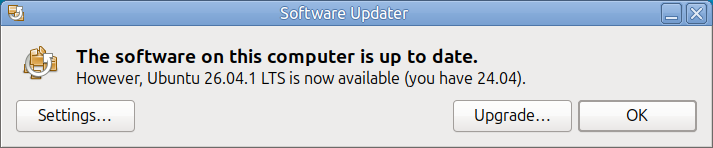
I’m confused. I have Ubuntu MATE 24.04.5. But today I ran software updater, and after it installed the security updates related to HEIC (coincidental, I’m sure), software updater displayed this dialog box:
If I click on Upgrade…, what will happen?
Will I be running some strange hybrid between Ubuntu 26.04.1, but with MATE 1.26.2 as the desktop?
Will I still be running an LTS?
Will my OS now be extended past the end-of-support for UM 24.04 LTS to the end-of-support for Ubuntu 26.04 LTS?
What will happen to my Ubuntu Pro support?
I did it too
Now on 1.28.2
Running LTS
Ubuntu Pro enabled
All by itself
W
Thank you, @Watford .
Could I trouble you to try an experiment? I am curious to see, the next time you restart your machine, whether it will try to launch the MATE desktop in Wayland rather than X11. Ubuntu made much noise about doing away with X11 for 26.04, stating that it would no longer appear in the Display Manager as an option. Could you please tell us whether your Display Manager (the login screen) even offers an option for more than one desktop session or a choice between Wayland and X11?
Thanks.
(BTW: I’m still going to make a redundant complete backup before I try this upgrade.)
That message you posted is from your base Ubuntu 24.04 LTS system, as it sees all flavors as just Ubuntu systems, as that really is what they are, that link I used I think explains it well.
The tool used for the upgrade will upgrade your Ubuntu 24.04 LTS (noble) system to Ubuntu 26.04 LTS (resolute) which includes your packages, where the Ubuntu MATE stuff is just handled by the package upgrades.
This isn’t unique to Ubuntu MATE though, it applies to all Ubuntu flavors.
Ubuntu MATE is still Xorg/X11 in my experience. Ubuntu 26.04 LTS fully supports Xorg/X11.
Some desktops (eg. GNOME) have dropped support for it, so its only those desktops that don’t offer support.
This install I’m using now is running stonking or what will be Ubuntu 26.10 on release, and I’m currently using gdm3 or the GNOME Display Manager, and it’ll actually start Xorg/X11 sessions still, but that’s because Ubuntu is carrying patches that allow it, as a pure GDM3/GNOME system of GNOME 51 I’m running will not. If it didn’t, I’d just switch my install to use sddm, lightdm or another I actually have installed (this install is a multi-desktop install, and I have the DMs each of my flavors depends rules brought in) anyway. A number of my installs flavor desktops offer both Wayland and Xorg sessions actually, with Xorg/X11 still the default for most.
You’ll lose your icons if you were partial to any of the legacy icons, like Ubuntu-Mono-dark\light or the Humanity icons. I’ll be hunting around to see if anyone has maintained some user installable icon packs so I can keep my system the way I prefer it.
Welcome to the community @bornagainpenguin, we’re glad to see you here! 
You might be interested in the PPA of ‘lah7’ (Luke Horwell, the author of mate-welcome and conservator of the old Ubuntu_MATE forum) if you are interested in Ambiant-MATE theme, you can also add custom colors for it:
sudo add-apt-repository ppa:lah7/ambiant-mate
sudo apt update
Warning to everyone who wants to upgrade from Ubuntu-MATE 24.04 LTS to 26.04.1:
screenshot is still broken (is fixed in 26.10)
Workaround by installing Flameshot or Ksnip
transmission-gtk is broken (due to braindead gtk4x)
Workaround by recompiling against gtk3 or by installing transmission-qt
software properties takes a very long time to load in UM 26.04.1
No problem on any of my computers but definitely a showstopper on my main rig where I’ll probably skip this version and upgrade to UM 26.10
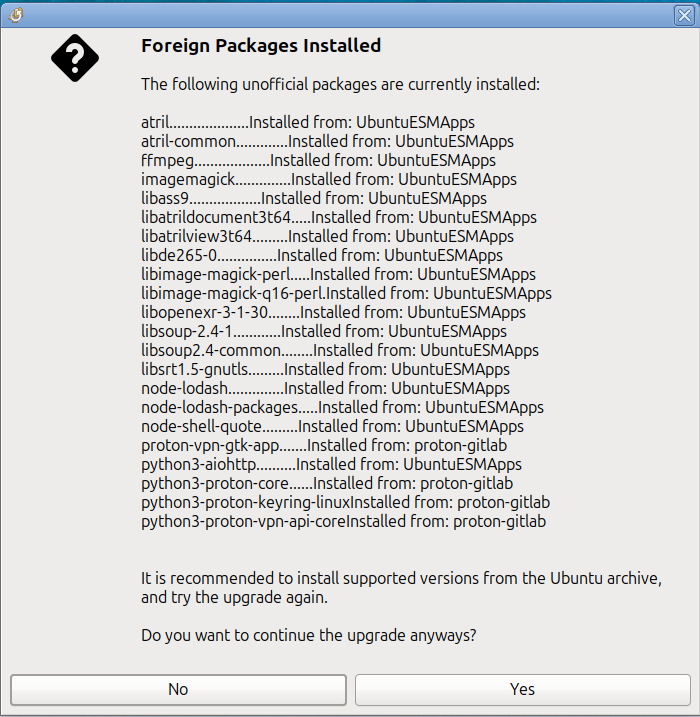
Okay, I started the upgrade and immediately ran into trouble (I think). The upgrader displays this warning dialog:
Except for the last three that are related to my Proton VPN, all of them are from UbuntuESMApps. Were these installed because of my Ubuntu Pro subscription?
And what do I do about this dialog? Do I need to use “apt remove” to uninstall them before proceeding? Many of them are libraries, so it seems like removing them would break anything that depends on them.
Or do I proceed with the upgrade and after it completes (successfully, I hope) do I then replace these packages with their equivalents from resolute?
Any advice you can give will be greatly appreciated.
Now running into a complete inability to edit the menu. If I click on it it just hangs the application. So I have no way to add an app to it.
Starting to regret the install now.
Thanks for this at least. That brought back some options for me.
Always do a backup before you do anything.
There are known (and being worked on) issues where ESM apps are included, I see them pass thru my inbox daily, but sorry I’m not keeping track of the ESM issue as that’s being handled within Canonical.
An example of a bug report is Bug #2168979 “Ubuntu Pro repositories should not be considered t...” : Bugs : ubuntu-release-upgrader package : Ubuntu
Maybe it contains a clue, but that is only one of a many (most will be marked duplicate of existing issues though, so repeats of same bug).