Intel AX210 speeds capped at 20 Mbps on multiple distros

Hi, I’m new here but while going down the rabbit hole for this exact issue, I luckily found that recent thread.

For me, the issue appeared maybe 2 months ago across all my machines running linux (Arch in my case).
All of them are CLI except for my main PC where I dual boot Windows 11 and Arch with KDE Plasma (Grub as the main bootloader).

Here’s my Wifi card (But other devices have Wifi 5 cards with the same issue)

06:00.0 Network controller [0280]: Intel Corporation Wi-Fi 6E(802.11ax) AX210/AX1675* 2x2 [Typhoon Peak] [8086:2725] (rev 1a)
    Subsystem: Intel Corporation Wi-Fi 6 AX210 160MHz [8086:0024]
    Kernel driver in use: iwlwifi

I’ve tried manually changing the regulatory region with no success.
Running iw reg get gives me the following (CA as I’m in Canada):

global
country CA: DFS-FCC
	(2400 - 2483 @ 40), (N/A, 36), (N/A)
	(5150 - 5250 @ 80), (N/A, 23), (N/A), NO-OUTDOOR, AUTO-BW
	(5250 - 5350 @ 80), (N/A, 26), (0 ms), DFS, AUTO-BW
	(5470 - 5730 @ 160), (N/A, 26), (0 ms), DFS
	(5730 - 5850 @ 80), (N/A, 36), (N/A), AUTO-BW
	(5850 - 5895 @ 40), (N/A, 27), (N/A), AUTO-BW
	(5925 - 7125 @ 320), (N/A, 12), (N/A), NO-OUTDOOR

phy#0 (self-managed)
country CA: DFS-UNSET
	(2402 - 2437 @ 40), (6, 22), (N/A), AUTO-BW, NO-HT40MINUS, NO-80MHZ, NO-160MHZ
	(2422 - 2462 @ 40), (6, 22), (N/A), AUTO-BW, NO-80MHZ, NO-160MHZ
	(2447 - 2482 @ 40), (6, 22), (N/A), AUTO-BW, NO-HT40PLUS, NO-80MHZ, NO-160MHZ
	(5170 - 5190 @ 160), (6, 22), (N/A), NO-OUTDOOR, AUTO-BW, IR-CONCURRENT, NO-HT40MINUS, NO-320MHZ, PASSIVE-SCAN
	(5190 - 5210 @ 160), (6, 22), (N/A), NO-OUTDOOR, AUTO-BW, IR-CONCURRENT, NO-HT40PLUS, NO-320MHZ, PASSIVE-SCAN
	(5210 - 5230 @ 160), (6, 22), (N/A), NO-OUTDOOR, AUTO-BW, IR-CONCURRENT, NO-HT40MINUS, NO-320MHZ, PASSIVE-SCAN
	(5230 - 5250 @ 160), (6, 22), (N/A), NO-OUTDOOR, AUTO-BW, IR-CONCURRENT, NO-HT40PLUS, NO-320MHZ, PASSIVE-SCAN
	(5250 - 5270 @ 160), (6, 22), (0 ms), DFS, AUTO-BW, NO-HT40MINUS, NO-320MHZ, PASSIVE-SCAN
	(5270 - 5290 @ 160), (6, 22), (0 ms), DFS, AUTO-BW, NO-HT40PLUS, NO-320MHZ, PASSIVE-SCAN
	(5290 - 5310 @ 160), (6, 22), (0 ms), DFS, AUTO-BW, NO-HT40MINUS, NO-320MHZ, PASSIVE-SCAN
	(5310 - 5330 @ 160), (6, 22), (0 ms), DFS, AUTO-BW, NO-HT40PLUS, NO-320MHZ, PASSIVE-SCAN
	(5490 - 5510 @ 160), (6, 22), (0 ms), DFS, AUTO-BW, NO-HT40MINUS, NO-320MHZ, PASSIVE-SCAN
	(5510 - 5530 @ 160), (6, 22), (0 ms), DFS, AUTO-BW, NO-HT40PLUS, NO-320MHZ, PASSIVE-SCAN
	(5530 - 5550 @ 160), (6, 22), (0 ms), DFS, AUTO-BW, NO-HT40MINUS, NO-320MHZ, PASSIVE-SCAN
	(5550 - 5570 @ 160), (6, 22), (0 ms), DFS, AUTO-BW, NO-HT40PLUS, NO-320MHZ, PASSIVE-SCAN
	(5570 - 5590 @ 160), (6, 22), (0 ms), DFS, AUTO-BW, NO-HT40MINUS, NO-320MHZ, PASSIVE-SCAN
	(5590 - 5610 @ 160), (6, 22), (0 ms), DFS, AUTO-BW, NO-HT40PLUS, NO-320MHZ, PASSIVE-SCAN
	(5610 - 5630 @ 160), (6, 22), (0 ms), DFS, AUTO-BW, NO-HT40MINUS, NO-320MHZ, PASSIVE-SCAN
	(5630 - 5650 @ 160), (6, 22), (0 ms), DFS, AUTO-BW, NO-HT40PLUS, NO-320MHZ, PASSIVE-SCAN
	(5650 - 5670 @ 80), (6, 22), (0 ms), DFS, AUTO-BW, NO-HT40MINUS, NO-160MHZ, NO-320MHZ, PASSIVE-SCAN
	(5670 - 5690 @ 80), (6, 22), (0 ms), DFS, AUTO-BW, NO-HT40PLUS, NO-160MHZ, NO-320MHZ, PASSIVE-SCAN
	(5690 - 5710 @ 80), (6, 22), (0 ms), DFS, AUTO-BW, NO-HT40MINUS, NO-160MHZ, NO-320MHZ, PASSIVE-SCAN
	(5710 - 5730 @ 80), (6, 22), (0 ms), DFS, AUTO-BW, NO-HT40PLUS, NO-160MHZ, NO-320MHZ, PASSIVE-SCAN
	(5735 - 5755 @ 80), (6, 22), (N/A), AUTO-BW, NO-HT40MINUS, NO-160MHZ, NO-320MHZ
	(5755 - 5775 @ 80), (6, 22), (N/A), AUTO-BW, NO-HT40PLUS, NO-160MHZ, NO-320MHZ
	(5775 - 5795 @ 80), (6, 22), (N/A), AUTO-BW, NO-HT40MINUS, NO-160MHZ, NO-320MHZ
	(5795 - 5815 @ 80), (6, 22), (N/A), AUTO-BW, NO-HT40PLUS, NO-160MHZ, NO-320MHZ
	(5815 - 5835 @ 40), (6, 22), (N/A), AUTO-BW, NO-HT40MINUS, NO-80MHZ, NO-160MHZ, NO-320MHZ
	(5945 - 7065 @ 160), (6, 22), (N/A), NO-OUTDOOR, AUTO-BW, IR-CONCURRENT, NO-320MHZ, PASSIVE-SCAN
	(7065 - 7105 @ 40), (6, 22), (N/A), NO-OUTDOOR, AUTO-BW, IR-CONCURRENT, NO-80MHZ, NO-160MHZ, NO-320MHZ, PASSIVE-SCAN
	(7105 - 7125 @ 20), (6, 22), (N/A), NO-OUTDOOR, AUTO-BW, IR-CONCURRENT, NO-HT40MINUS, NO-HT40PLUS, NO-80MHZ, NO-160MHZ, NO-320MHZ, PASSIVE-SCAN

Running iw dev wlan0 link gives me this:

Connected to **:**:**:**:**:** (on wlan0)
    SSID: *********
    freq: 5220.0
    RX: 1974783 bytes (3439 packets)
    TX: 707256 bytes (2502 packets)
    signal: -54 dBm
    rx bitrate: 54.0 MBit/s
    tx bitrate: 54.0 MBit/s
    bss flags: short-slot-time
    dtim period: 1
    beacon int: 100

This time I will try downloading the kernel drivers manually from the link Blue_bird has shared and hope for the best.
If that still doesn’t work, I’ll try to downgrade the linux kernel until I get a proper wifi connection.

EDIT:
Manually putting the iwlwifi drivers downloaded from the Linux kernel into /lib/firmware did not help either.
I did that as well, I installed the networkmanager-iwd from ArchLinux AUR packages and then uninstall wpa_supplicant to ensure I was only using IWD, but that sadly didn’t even do anything.

1 Like

Ok, so 1 of my computers have an older kernel installed so I didn’t need to go any further to test this theory.

My main PC has 6.18.20-1-lts installed.
The other pc that I just tested has 6.15.8-zen1-2-zen from July 29th 2025.

The issue is happening on that one as well, and I am 100% sure that when I was still using it, it was downloading at a proper speed over wifi.

My next step will be to completely reset my modem/router and see if it fixes anything.

EDIT:
I just tried with my phone’s hotspot and it just works (not capped at 54mbps).
Will report back once I factory reset the modem/router.

EDIT2:
Resetting my modem/router did not help at all.
I guess I will call them.

It is weird, so when I go in my app my modem, it can easily identify what OS is running on any given machine, somehow my main pc currently running Linux is being recognized as Windows 10, my other linux machine as unidentified and another is actually being recognized as generic linux.

At this point I am truly clueless.

1 Like

This also means you can test some router settings while you’re at it. Try switching to 2.4 GHz instead of 5 GHz just to rule that out. If it connects at higher speed on 2.4 GHz and not 5 GHz, the issue may be a compatibility setting on your router rather than the driver itself.

I have tried that with no success.

1 Like

This is a regulatory domain issue (DFS-UNSET).

When Intel LAR cannot determine the region, the card restricts itself to 20 MHz channel width, which explains the ~20 Mbps cap.

Since it works fine with a phone hotspot, your router is likely using DFS channels or unsupported settings.

Try forcing your router to a non-DFS 5 GHz channel (36-48) and ensure 40/80 MHz channel width

2 Likes

Just checked an my router is already pre-configured to a non-DFS 5 GHz channel. Is it possible this is the issue? I can call my ISP to try to change it as a last possible resort since they lock it down in the gateway settings.

1 Like

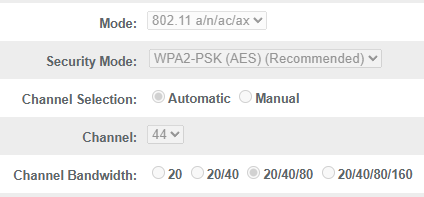
Even though your router is already on a non-DFS channel (44), the issue may still come from how the channel width is negotiated.

Many ISP-provided routers set to “20/40/80 MHz (auto)” will actually fall back to 20 MHz due to interference or firmware limitations, even if the Ul suggests otherwise.

This would explain the ~20 Mbps cap, as the connection is effectively stuck at 20 MHz.

I would recommend forcing the channel width to a fixed value (40 MHz or 80 MHz) instead of auto, and setting the channel manually.

If possible, testing with a different router would also help confirm whether this is a router-side limitation, especially since your connection works fine with a phone hotspot.

3 Likes

I would try adjust the band on my router and see if that does anything but sadly we are not allowed to configure anything lol. Hopefully there will be a way to solve this without that.

1 Like

We managed to get our ISP to change our channel width to 80mhz and we are now no longer capped. It took 3 days for that simple change.

3 Likes

Nice, that explains it. Channel width at 80 MHz would definitely remove the bottleneck, glad it’s fixed.

2 Likes

What confuses me is that prior there was no problem despite the channel having been on what I can assume was 20mhz

1 Like

I know I’m late to the convo, but I’ve also been dealing with this issue for months.
A temporary patch is available, but an official kernel patch is in the works. In a nutshell comcast routers ,possibly even back to the XB6, are broadcasting the router’s abilities as requirements. Likely a copy/paste error or misconfig. There is a patch available on github from WoodyWoodster which you might want to look into.

You’ll likely need to run this command to disable pmf if you get any slowdowns or spikes on ping:

nmcli connection modify "YOUR_WIFI_NAME" wifi-sec.pmf 1

nmcli connection up "YOUR_WIFI_NAME"

I’ll include the info I have from my own repo for a patched Bazzite build:

I’ll do my best to explain this from the information I’ve gathered, but I’m not a specialist in this field. Just a guy trying to get his wifi working.

Certain routers, namely the XB7 or later routers (XB6 may also be affected) from Comcast (Technicolor and Sercomm models confirmed to be affected), have a software bug that likely resulted from a copy/paste of the router capabilities into the basic MCS requirements for the older 802.11n (HT) and 802.11ac (VHT) standards. 802.11ac and ax are not affected, 802.11be is not yet confirmed as it was disabled on my router, but there shouldn’t be an issue. The Mac80211 kernel module by default adheres strictly to the ieee 802.11 standards and disables the HT capabilities when it sees these incorrect Basic MCS Set from the router. While thise likely differs from behavior in Windows and MacOS, it is technically the correct way to handle the situation. Some users may wish, however, to have the option to bypass this to make their wifi usable until a fix is integrated into the kernel.

This patch modifies the source file mlme.c in mac80211 to align HT mcs checks with how VHT mcs checks are performed by only verifying mcs in strict mode. This line is what already exists in the kernel where mac80211 checks the VHT MCS set agains what the router is requiring:

/*
	 * Many APs are incorrectly advertising an all-zero value here,
	 * which really means MCS 0-7 are required for 1-8 streams, but
	 * they don't really mean it that way.
	 * Some other APs are incorrectly advertising 3 spatial streams
	 * with MCS 0-7 are required, but don't really mean it that way
	 * and we'll connect only with HT, rather than even HE.
	 * As a result, unfortunately the VHT basic MCS/NSS set cannot
	 * be used at all, so check it only in strict mode.
	 */
	if (!ieee80211_hw_check(&sdata->local->hw, STRICT))
		return true;

Authored by @benzea and committed by @jmberg-intel The initial commit can be found here: (link redacted)

My patch simply inserts the same line into the similar HT function just above it.

+	 * Similar to the issue below with VHT, some APs, mainly Comcast XB7+,
+	 * are advertizing an all-F value, meaning the AP is requiring MCS
+	 * 0-76 in order to connect with HT. Connection to the affected 2.4
+	 * and 5ghz bands will fall back to legacy 802.11a/g,even if the
+	 * hardware and regulations support VHT or HE (and presumably EHT)
+	 * HT Basic MCS set cannot be used, so check only in strict mode
+	 * as is done in the VHT section.
+	 */
+	if (!ieee80211_hw_check(&sdata->local->hw, STRICT))
+		return true;

This instructs mac80211 to ignore the MCS verification and enable HT anyway until Comcast fixes their firmware or the kernel devs implement a bypass. I can confirm that VHT is indeed being falsely advertised as well, but VHT is already patched in the kernel while HT is not. This is the text from the commit:

wifi: mac80211: add HT and VHT basic set verification So far we did not verify the HT and VHT basic MCS set. However, in P802.11REVme/D7.0 (6.5.4.2.4) says that the MLME-JOIN.request shall return an error if the VHT and HT basic set requirements are not met.

Given broken APs, apply VHT basic MCS/NSS set checks only in strict mode.

While the VHT issue had to do with all-zero entries into the Basic MCS Set for VHT, the issue with HT is actually the opposite with all f’s, but the result is functionally the same. HT:

9d 05 17 00 00 00 ff ff ff ff ff ff ff ff ff ff ff ff ff ff ff ff

The first few pairs are simply things like the channel, offset/width, and protection bits. The series of f’s, however, is why things fail. Those are the bits that dictate the requirements that any client needs to meet in order to associate at high speed. To do this would require four spatial streams, while most wireless cards support only 2. When mac80211 receives this information from the wireless driver, it disables HT when it sees that the hardware can’t meet those requirements.

For reference here is what this looks like in VHT:

01 2a 00 00 00

In this case though, the 0 represents that the client must support MCS 0-7 in the 4 TX and 4 RX streams. This issue had been fixed in early 2025 however. I can only assume that this issue is only now appearing for HT because companies have shifted their focus towards newer standards. It is likely that the router’s supported MCS were simply copied and pasted into the Basic MCS Set at some point during development.

4 Likes

Thanks for digging into this, @Carrot and welcome to the forums. You’ve shared a really clear breakdown of what’s actually going on at the MCS level, and good to know there’s a patch already in motion.

Anyone else hitting this with a Comcast router should give Carrot’s workaround a shot and report back if you can.

1 Like

Welcome @Carrot thanks for joining us!

Thanks @hydn, just want to clarify I wouldn’t call it my workaround lol. Woodywoodster made the patch for arch, and someone else entirely happened to submit a patch to the kernel wireless git. (which does the same as Woody’s but with an added check for strict mode that existed already in the existing kernel for VHT.)

I’m no developer, just a guy with an obsession on fixing his Wi-Fi lol.
If someone that’s able to wanted to post the link though, I’m sure that’d be helpful.

4 Likes

This fixed my issue with Ubuntu 26.04 but I had to do some minor modifications to the “rebuild-mac80211.sh” in order to make it work.

3 Likes

Welcome to the forums @davolcx. Thanks for confirming!

1 Like