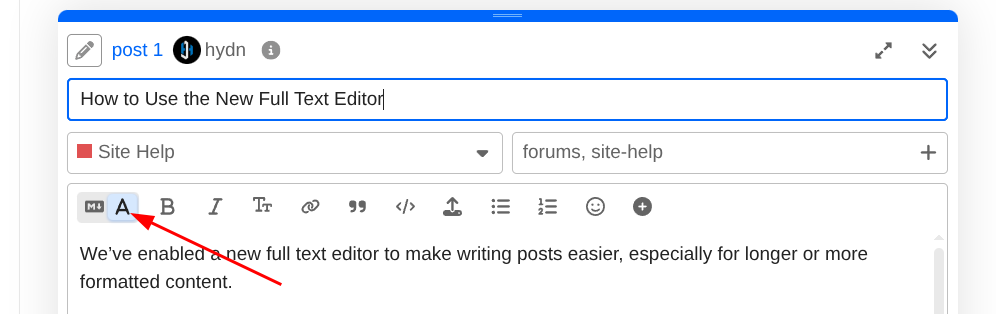
We’ve enabled a new full text editor to make writing posts easier, especially for longer or more formatted content.
Enabling the editor
When creating or replying to a topic, look at the toolbar above the text area.
- Click the A icon on the left side of the toolbar
- This switches the composer into the full text editor
- Clicking it again switches back to Markdown
Your choice is remembered per device.
What the full text editor does
The full text editor lets you format your post visually as you type.
You can:
- Apply bold, italic, and strikethrough using buttons
- Add links, quotes, and code blocks without typing Markdown
- Create bullet and numbered lists
- Insert emojis and upload images easily
- See formatting instantly instead of previewing it later
This is useful for guides, tutorials, and general discussion posts.
Markdown is still supported
- Nothing has changed for Markdown users.
- You can continue writing pure Markdown if you prefer
- Technical posts, code blocks, and inline code behave the same
- You can switch between modes at any time
The editor only affects how you write, not how posts are stored or displayed.
Which should you use?
- Use the full text editor for faster, visual formatting
- Use Markdown if you’re comfortable with it or writing heavily technical content
Both work side by side.


 The option is nice, but I figured most of us appreciate Markdown. Especially as we can be 100% certain that there’s nothing hiding in the input as is the case with rich text editors.