So I have an SSD that has 500GB and the way I have it partitioned my home drive is too small. I had planned on using my 3TB HDD for a VM Partition but I guess I need to take 1TB to add to my /Home directory. As long as I’m at it, how would I attach the remaining 2 TB as a /Virt partition?
If I run lsblkI get this:
lsblk
NAME        MAJ:MIN RM   SIZE RO TYPE MOUNTPOINTS
sda           8:0    0 232.9G  0 disk
`-sda1        8:1    0 232.8G  0 part
sdb           8:16   0   2.7T  0 disk
sdc           8:32   0  18.2T  0 disk
`-sdc1        8:33   0  18.2T  0 part /run/media/tmick/Elements
nvme1n1     259:0    0 465.8G  0 disk
|-nvme1n1p1 259:1    0  46.6G  0 part /
|-nvme1n1p2 259:2    0   8.4G  0 part
|-nvme1n1p3 259:3    0  20.5G  0 part [SWAP]
|-nvme1n1p4 259:4    0  97.6G  0 part /var
`-nvme1n1p5 259:5    0 292.7G  0 part /home
nvme0n1     259:6    0 931.5G  0 disk
|-nvme0n1p1 259:7    0   100M  0 part
|-nvme0n1p2 259:8    0    16M  0 part
`-nvme0n1p3 259:9    0 931.4G  0 part
So how would I add the partitions to the current Linux install on nvme1n1p5? I’d be fine with having an nvme1n1p6 partition.
In the early days of UNIX, disks were small and sysadmins often had to hive off a directory tree to a new disk to relieve overcrowding. A procedure often followed was:
Copy all the files over to the new disk
Add an extra file with a distinctive name to the new disk to serve as a marker.
Mount the new disk by hand on the old directory.
List the directory and check that your marker file is present. This shows that you are looking at a successful mount and not the original directory. You might do a quick check for other essential files too.
Unmount the new disk and clear the old directory. Remount the disk.
Add the new disk to the filesystem table so that it will mount automatically at boot.
UPDATE:
I reinstalled the system with LVM and I’m working on adding logical volumes to the 5GB disk from the 3TB disk. Wish me luck, fstab is being stubborn
Could it be possible to RAID them maybe as one drive? BTRFS does support such a thing, but note that RAID 5 and 6 is fundamentally broken as they are weak to one disk failures; especially considering you’re kinda mixing the home partition between drives from what I’ve gathered.
Do lemme know if my interpretation of the question is incorrect; I’ve just has a coffee so it’s gonna take me a bit to get going lmao.
I mean, does have sense install Linux with a separated home partition?
In my experience I always installed home directoy in main partition.. are there some advantages or disvantages are more the advantages?
I am also curious to know. I’ve often been presented with this option during an install to have the /home, /var, and /tmp directories on separate partitions. I guess I could reason through /var and /tmp but /home always stood out as an outlier to me. In any case, I’ve always put all of them on the same partition, so I’m very curious to the advantages and disadvantages as well!
For me personally, I only do this if I have more storage space than needed. But, splitting them onto separate partitions is mostly about risk management and flexibility so reasons may vary:
/home: Keeping it separate means you can reinstall or even switch distros without wiping your personal data and configs. It’s one of the simplest ways to make system rebuilds less painful.
/var: Useful if you run services that write a lot of logs or cache data. It prevents logs or a runaway process from filling up root and crashing the system.
/tmp: Isolating temporary files keeps them from consuming critical space elsewhere. Some people even mount it as tmpfs in RAM for speed.
The downside is managing disk space across multiple partitions. If you misjudge sizing and /var fills up while /home has plenty free, you’ll have issues. That’s why lots of us just keep it all on / (root) unless there is a specific use case.
So in practice, it’s a trade-off: simplicity versus flexibility and available space.
Thanks so much for the detailed explanation! I’ve heard of mounting /tmp as tmpfs before and seems like an interesting use case. /var also makes sense for what you’ve stated. Separating /home to save personal data/configs is not something I had considered. One of the primary reasons I don’t distro-hop is just b/c of the time it takes to set things back up, maybe this approach could/would help in this scenario…
I tried to use LVM and wound up slaughtering my Windows & Linux installs. so while reinstalling Windows I used the disk manager to get rid of the LVM groups (couldn’t do it in Linux) and reinstalled both Windows and Linux. I learned a new trick though, using “manual partitioning” in Debian, I was able to create new partitions on two hard drives instead of just one with the “Guided Partitioning”. I split my 500 gb SSD drive into seperate /, boot, swap and temp. I split my 3 TB HDD into 1/2 and one half went to /var, the other to /home.
Thankfully that’s over and all I gotta do is reinstall some programs on both Windows & Debian.
Fun fact, you can fix the windows boot partition, sometimes GRUB and that don’t detect it so you have to mount the EFI partition and copy the files over.
Not this time All I was able to get without using a USB stick was GRUB with a flashing cursor that did nothing. So, yeah I screwed the pooch this time.


 If you are distro hopping, it comes in handy for sure. Especially if you have the disk space.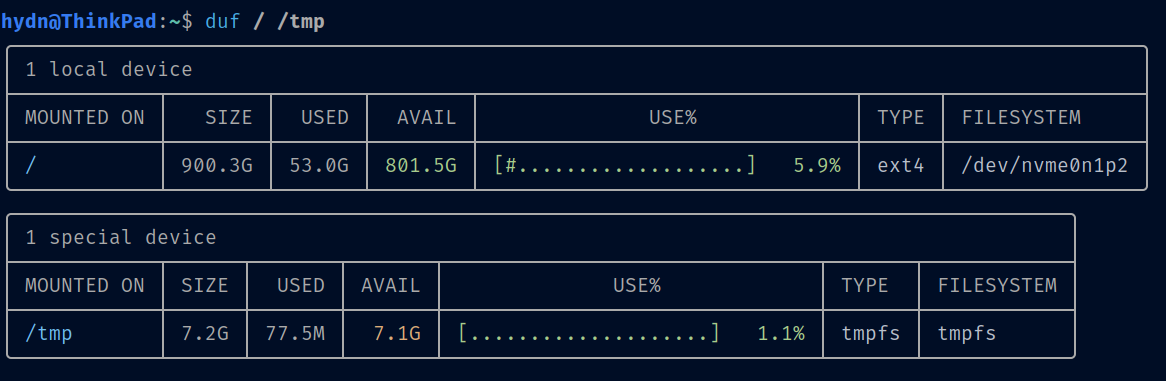
 so while reinstalling Windows I used the disk manager to get rid of the LVM groups (couldn’t do it in Linux) and reinstalled both Windows and Linux. I learned a new trick though, using “manual partitioning” in Debian, I was able to create new partitions on two hard drives instead of just one with the “Guided Partitioning”. I split my 500 gb SSD drive into seperate /, boot, swap and temp. I split my 3 TB HDD into 1/2 and one half went to /var, the other to /home.