Thank you, Pavlos. I appreciate your sharing that.
Frequency of Backup
Out of curiosity, is the “hourly” job for a business production environment or a home desktop environment?
Aren’t you concerned that the endless repeated disk “scanning” won’t eventually de-magnetize the inode indexes to the point that the data becomes non-readable? One of the reasons why I partition my disks the way I do is to be able to “rebuild” a fresh “imprint” of the inode tree every 2 years then re-load the data back onto my main drive from the backup image which, incidentally, is why I was asking if I should, now and then, perform the backup with checksum to ensure I don’t create a backup containing corruption. 
But before doing that, I wanted a sense of how long it might take for each 300 GB slice?
“–delete”
My own process uses “–delete-during”, which I believe amounts to the same thing as “–delete”. 
Monitoring Backup
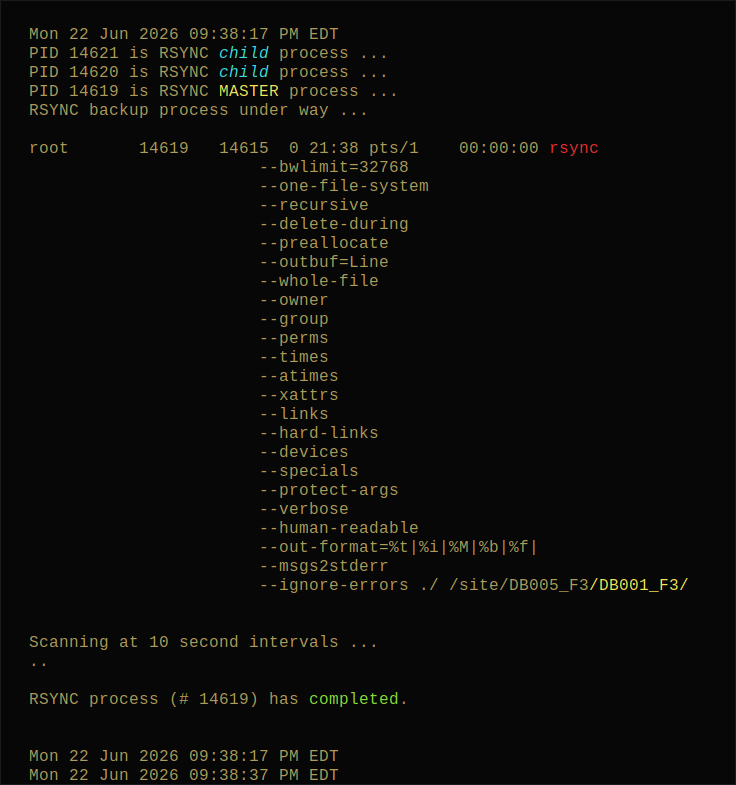
For those interested, the below is the output of my “backup monitor” script, which reports info about the rsync job which is running in background.
The yellow highlight is to make the full path to the source directory (represented by the short-form “./” used for the command) … in this case “/DB001_F3” … stands out visibly.
OS_Admin__partitionMirror_Monitor.sh
#!/bin/sh
##########################################################################################################
$Id: OS_Admin__partitionMirror_Monitor.sh,v 1.3 2022/08/05 03:46:55 root Exp root $
This script is intended to perform an ongoing scan to report when an active RSYNC backup process terminates.
##########################################################################################################
test_STEP1()
{
echo “root 7520 7514 12 20:50 pts/0 00:05:46 rsync --checksum --one-file-system --recursive --outbuf=Line --links --perms --times --group --owner --devices --specials --verbose --out-format=%t|%i|%M|%b|%f| --delete-delay --whole-file --human-readable --protect-args --ignore-errors --msgs2stderr ./ /DB001_F7/
root 7514 7512 0 20:50 pts/0 00:00:25 rsync --checksum --one-file-system --recursive --outbuf=Line --links --perms --times --group --owner --devices --specials --verbose --out-format=%t|%i|%M|%b|%f| --delete-delay --whole-file --human-readable --protect-args --ignore-errors --msgs2stderr ./ /DB001_F7/
root 7512 1 17 20:50 pts/0 00:08:27 rsync --checksum --one-file-system --recursive --outbuf=Line --links --perms --times --group --owner --devices --specials --verbose --out-format=%t|%i|%M|%b|%f| --delete-delay --whole-file --human-readable --protect-args --ignore-errors --msgs2stderr ./ /DB001_F7/” >${TMP}
awk ‘{ printf(“\trsync|%s\n”, $0 ) ; }’ ${TMP}
echo “”
}
test_STEP2()
{
echo “7520
7514
7512” >${TMP}.pid
awk ‘{ printf(“\t pid |%s\n”, $0 ) ; }’ ${TMP}.pid
echo “”
}
test_STEP3()
{
echo “7514|7520
7512|7514
1|7512” >${TMP}.ppid
awk ‘{ printf(“\tppid |%s\n”, $0 ) ; }’ ${TMP}.ppid
echo “”
}
. $Oasis/bin/INCLUDES__TerminalEscape_SGR.bh
BASE=basename "$0" ".sh"
TMP=“/tmp/tmp.${BASE}.$$”
now=“$(date | awk '{ printf(”\n\t %s\n\n", $0 ) ; }’ )"
echo “${now}”
if [ “$1” = “–snapshots” ]
then
SNAP=1
else
SNAP=0
fi
rm -f ${TMP}
ps -ef 2>&1 | grep -v grep | grep rsync | sort -r >${TMP}
#test_STEP1
if [ ! -s ${TMP} ]
then
echo “\t RSYNC process is ${redON}not${redOFF} running (or has already ${greenON}terminated${greenOFF}).\n”
exit 0
fi
awk ‘{ print $2 }’ <${TMP} >${TMP}.pid
#test_STEP2
awk ‘{ printf(“%s|%s\n”, $3, $2) }’ <${TMP} >${TMP}.ppid
#test_STEP3
for pid in cut -f1 -d\| ${TMP}.ppid
do
PPID=grep ${pid} ${TMP}.pid
PID=grep '^'${pid} ${TMP}.ppid | cut -f2 -d\|
PRNT=grep '^'${pid} ${TMP}.ppid | cut -f1 -d\|
if [ ( -n “${PPID}” ) -a ( “${PRNT}” -ne 1 ) ]
then
descr=“child”
echo “\t PID ${PID} is RSYNC ${cyanON}${italicON}${descr}${italicOFF}${cyanOFF} process …”
else
descr=“MASTER”
echo “\t PID ${PID} is RSYNC ${yellowON}${descr}${yellowOFF} process …”
fi
done
getRsyncProcessStatus()
{
testor=ps -ef 2>&1 | awk -v THIS="${PID}" '{ if( $2 == THIS ){ print $0 } ; }'
MODE=echo "${testor}" | awk '{ if( $NF ~ /^[/]DB001_F?[/]/ ){ print "2" }else{ print "1" } ; }' 2>>/dev/null
}
getRsyncProcessStatus
if [ ${MODE} -eq 2 ]
then
echo “\t RSYNC restore process under way …”
INTERVAL=60
group5min=5
else
echo “\t RSYNC backup process under way …”
INTERVAL=10
group5min=30
fi
if [ -n “${testor}” ]
then
echo “\n\t ${testor}\n” | sed ‘s±-+\n\t\t\t\t–+g’ | awk ‘{
rLOC=index($0,“rsync”) ;
if( rLOC != 0 ){
sBeg=sprintf(“%s”, substr($0,1,rLOC-1) ) ;
sEnd=sprintf(“%s”, substr($0,rLOC+5) ) ;
sMid=“\033[91;1mrsync\033[0m” ;
printf(“%s%s%s\n”, sBeg, sMid, sEnd) ;
}else{
pLOC=index($0,“/DB001_”) ;
if( pLOC != 0 ){
sBeg=sprintf(“%s”, substr($0,1,pLOC-1) ) ;
sEnd=sprintf(“%s”, substr($0,pLOC) ) ;
printf(“%s\033[1m\033[93;1m%s\033[0m\n”, sBeg, sEnd) ;
}else{
print $0 ;
} ;
} ;
}’
echo “\n\t Scanning at ${INTERVAL} second intervals …”
test ${SNAP} -eq 1 || echo “\t \c”
fi
durationCumulative=0
lapseCount=0
lapse=0
if [ ${SNAP} -eq 1 ]
then
while true
do
getRsyncProcessStatus
if [ -z “${testor}” ]
then
echo “\n\n\t RSYNC process (# ${PID}) has ${greenON}completed${greenOFF}.\n”
echo “${now}”
date | awk ‘{ printf(“\t %s\n\n”, $0 ) ; }’
exit 0
fi
jobLog=ls -tr /site/Z_backup.*.err | tail -1
echo “\t tail -1 ${jobLog}”
sleep ${INTERVAL}
done 2>&1 | uniq
else
while true
do
getRsyncProcessStatus
if [ -z “${testor}” ]
then
echo “\n\n\t RSYNC process (# ${PID}) has ${greenON}completed${greenOFF}.\n”
echo “${now}”
date | awk ‘{ printf(“\t %s\n\n”, $0 ) ; }’
exit 0
fi
echo “.\c”
durationCumulative=expr ${durationCumulative} + 1
if [ ${durationCumulative} -eq ${group5min} ]
then
lapseCount=expr ${lapseCount} + 1
lapse=expr ${lapseCount} \* 5
echo " ${lapse} min\n\t \c"
durationCumulative=0
fi
sleep ${INTERVAL}
done
fi
exit 0
exit 0
exit 0
INCLUDES__TerminalEscape_SGR.bh
#!/bin/sh
##########################################################################################################
$Id: INCLUDES__TerminalEscape_SGR.bh,v 1.2 2022/09/03 01:57:31 root Exp root $
This includes string variables defined to perform various substitutions for the ANSI Terminal Escape Sequences, i.e. SGR (Select Graphic Rendition subset)
##########################################################################################################
“\e” is same as “\033”
style_e()
{
boldON=“\e[1m”
boldOFF=“\e[0m”
italicON=“\e[3m”
italicOFF=“\e[0m”
underlineON=“\e[4m”
underlineOFF=“\e[0m”
blinkON=“\e[5m”
blinkOFF=“\e[0m”
blackON=“\e[30;1m”
blackOFF=“\e[0m”
cyanON=“\e[96;1m”
cyanOFF=“\e[0m”
cyanDarkON=“\e[36;1m”
cyanDarkOFF=“\e[0m”
greenON=“\e[92;1m”
greenOFF=“\e[0m”
yellowON=“\e[93;1m”
yellowOFF=“\e[0m”
redON=“\e[91;1m”
redOFF=“\e[0m”
orangeON=“\e[33;1m”
orangeOFF=“\e[0m”
blueON=“\e[94;1m”
blueOFF=“\e[0m”
blueSteelON=“\e[34;1m”
blueSteelOFF=“\e[0m”
darkBlueON=“\e[38:5:12m”
darkBlueOFF=“\e[0m”
magentaON=“\e[95;1m”
magentaOFF=“\e[0m”
redBgON=“\e[101;1m”
redBgOFF=“\e[0m”
whiteBgON=“\e[107;1m”
whiteBgOFF=“\e[0m”
}
style_o()
{
boldON=“\033[1m”
boldOFF=“\033[0m”
italicON=“\033[3m”
italicOFF=“\033[0m”
underlineON=“\033[4m”
underlineOFF=“\033[0m”
blinkON=“\033[5m”
blinkOFF=“\033[0m”
blackON=“\033[38:5:16m”
blackOFF=“\033[0m”
whiteON=“\033[97;1m”
whiteOFF=“\033[0m”
cyanON=“\033[96;1m”
cyanOFF=“\033[0m”
cyanDarkON=“\033[36;1m”
cyanDarkOFF=“\033[0m”
greenON=“\033[92;1m”
greenOFF=“\033[0m”
yellowON=“\033[93;1m”
yellowOFF=“\033[0m”
redON=“\033[91;1m”
redOFF=“\033[0m”
orangeON=“\033[33;1m”
orangeOFF=“\033[0m”
blueON=“\033[94;1m”
blueOFF=“\033[0m”
blueSteelON=“\033[34;1m”
blueSteelOFF=“\033[0m”
darkBlueON=“\033[38:5:12m”
darkBlueOFF=“\033[0m”
magentaON=“\033[95;1m”
magentaOFF=“\033[0m”
redBgON=“\033[101;1m”
redBgOFF=“\033[0m”
whiteBgON=“\033[107;1m”
whiteBgOFF=“\033[0m”
blackBgON=“\033[40;1m”
blackBgON=“\033[48:5:233m”
blackBgON=“\033[48:5:0m”
blackBgOFF=“\033[0m”
cyanBgON=“\033[106;1m”
cyanBgOFF=“\033[0m”
cyanDarkBgON=“\033[46;1m”
cyanDarkBgOFF=“\033[0m”
greenBgON=“\033[102;1m”
greenBgOFF=“\033[0m”
yellowBgON=“\033[103;1m”
yellowBgON=“\033[48:5:214m”
yellowBgOFF=“\033[0m”
redBgON=“\033[101;1m”
redBgON=“\033[48:5:9m”
redBgOFF=“\033[0m”
orangeBgON=“\033[43;1m”
orangeBgOFF=“\033[0m”
blueBgON=“\033[104;1m”
blueBgOFF=“\033[0m”
blueSteelBgON=“\033[44;1m”
blueSteelBgOFF=“\033[0m”
darkBlueBgON=“\033[48:5:12m”
darkBlueBgOFF=“\033[0m”
magentaBgON=“\033[48:5:55m”
magentaBgON=“\033[48:5:93m”
magentaBgOFF=“\033[0m”
}
#style_e
style_o
##########################################################################################################
Usage Examples:
##########################################################################################################
echo “\t RSYNC process is ${redON}not${redOFF} running (or has already ${greenON}terminated${greenOFF}).\n”
echo “\t ${PID} is ${cyanON}${italicON}${descr}${italicOFF}${cyanOFF} process …”
echo “\t ${PID} is ${yellowON}${descr}${yellowOFF} process …”
echo “\n\n\t RSYNC process (# ${pid}) has ${greenON}completed${greenOFF}.\n”
##########################################################################################################
Example of scenario where escape codes are hard-coded; \e was not accepted by awk
##########################################################################################################
echo “\n\t ${testor}\n” | sed ‘s±-+\n\t\t\t\t\t\t\t\t–+g’ | awk '{
rLOC=index($0,“rsync”) ;
if( rLOC != 0 ){
sBeg=sprintf(“%s”, substr($0,1,rLOC-1) ) ;
sEnd=sprintf(“%s”, substr($0,rLOC+5) ) ;
sMid=“\033[91;1mrsync\033[0m” ;
printf(“%s%s%s\n”, sBeg, sMid, sEnd) ;
}else{
print $0 ;
} ;
}’
##########################################################################################################
echo “\n Imported LIBRARY: INCLUDES__TerminalEscape_SGR.bh …\n”
##########################################################################################################