If you run a home lab long enough, this realization eventually hits you: a lot of your hardware spends more time idle than working. Servers sized for future growth, machines you planned to use for one thing but never quite did, systems that stay powered on 24/7 but barely break a sweat. Thanks to how… continue reading.
Yes. Some of them will credit users with cash, tokens, or points when shared. I just didn’t think to do so.
My main limitation is geolocation. Last year I tried to get started with Helium, but living around a small population isn’t that great for many of those listed.
Here are some I use and can recommend (affiliate links provide credit both ways):
– Honeygain—as mentioned location matters, so I make only about $50 a year. Earnings can range from $30 to $300 a year.
– Packetstream.io - also about $50/yr.
The bandwidth usage is noticeable. My ISP upload is 300/Mbps. I run them on my home lab’s Thinkcentre Tiny using Docker containers so they run 24/7.
Honeygain and Packetstream is proven and pays out in cash, while Grass.io is more speculative and pays in crypto.
I’m also on the waitlist for Timpi interested in these nodes:
As you know, I’ve been looking into setting up an NAS in my home lab. I’m hoping for 10TB to 20TB and then I’ll setup Storj or Sia (storage networks) These reward uptime and reliability more than location, which makes them a good regional‑agnostic way to monetize spare disk and outbound bandwidth.
This is a great article and one that I want to look into in the future – so, pinning this one for later. Unfortunately, while I have awesome 1Gbps download I have only 50Mbps upload. So, pretty limiting for anything other than personal use.
I was also worried about my bandwidth. But to be honest, usage has not been noticeable.
That 50 Mbps upload limit sounds tighter than it really is. I’m outside the US, so maybe the bandwidth usage/earnings is higher for locations in North America and Europe. But I’m averaging about 20 GB / day upload split across 2 services. I used multiple because, as mentioned, due to my location, the demand for bandwidth is lower.
If you round it up to 20 GB per day, only works out to about 1.8 to 2 Mbps on average when spread evenly across the day. On a 50 Mbps upload, that is a minimal slice of your available bandwidth and generally not noticeable for normal browsing, Wi-Fi use, or day-to-day internet activity.
That said, this becomes an issue if a service behaves in a spiky way and tries to burst hard for short periods. Most of these bandwidth-sharing services actively try to avoid that, BUT it is still something to plan for.
In my case, I have traffic rules on the router that cap the Lenovo Tiny server’s upload rate. That means even if a workload suddenly spikes, it physically cannot saturate my connection or impact the rest of the network.
You can also limit upload bandwidth for specific Docker containers:
With rate limiting in place, usage like this stays predictable and quiet in the background. You do not need a massive upload pipe for these projects. You mainly just need consistency and a sensible cap so your home network always wins.
What I’ve found is that for home labs where your server is online 24/7 and thus reliable, their systems will increasingly over time send you more and more traffic. lol.
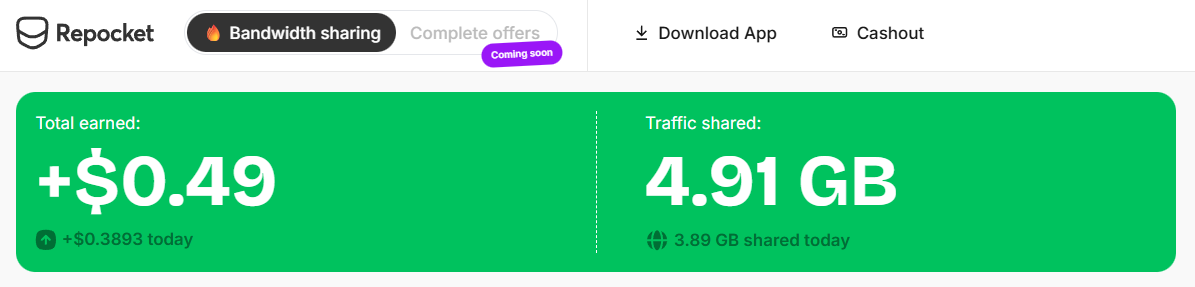
Since the demand is lower in my Caribbean location, I started also using repocket.com while writing the article, so ~ 5 days now. Bandwidth usage is low, but like the others, I belive over time, when their systems detect that my connection has great uptime, the demand will increase:
I’m somewhat wary of the phrase ‘running in the background’. While ostensibly, there’s a process priority system, in practice using the BASH nice command to decrease the priority of the apt update process while watching a video on my Pi, did nothing to reduce the choppiness and stalling of video playback, caused by the load.
How can you tell that such processes really are running in the background and not causing detriment to the performance of your own critical processes?