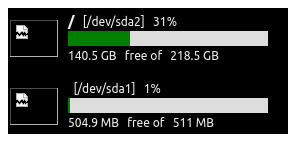
Reported need:
Challenge to self:
See what I can do, so …
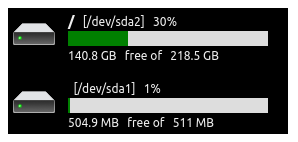
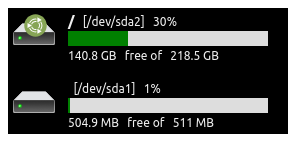
The following is a snapshot of what I was able to come up with:

As can be seen from the end of my script, the intent was to use YAD’s HTML capability to present that as a pop-up, but, my version on UbuntuMATE 22.04 LTS doesn’t seem to work. I do plan to test it on my UbuntuMATE 26.04 test install soon.
So … maybe someone can turn this into an actual Panel App, if the HTML can be easily wrapped into some other tool generator. 
I offer below the SHELL script used to create that HTML page. Admittedly, it is a hack, but I think it is decent enough!
-
I used the supplied image to create my own transparent icon for the “basic” drive.
-
I used the SVG icon artwork for the Ubuntu MATE roundel, so that “conditions” used to validate the OS type, it goes thru a case statement to choose which icon to overlay to represent that OS.
-
I did not incorporate logic for network drives because I don’t have any, but I looked at the tools to do so, and if someone would share a report for some commands to have the output that would be parsed, I could work out that additional logic to handle the case for network-mounted drives as well.
Artwork Ref:
[Edit: revised logic for portability]
Script: Devices__ReportDiskStatus.sh
#!/bin/bash
###
### VERSION 1 - Prototype with conceptual constructs
###
### VERSION 2 - Logic modified for proper self-contained initialization
###
### VERSION 3 - removed he sudo commands associated with wget
###
### VERSION 4 - icon cache re-defined under User HOME directory
###
populateIcons()
{
roundel_MATE_icon="${icons}/Ubuntu__MATE_Roundel.svg"
if [ ! -s "${roundel_MATE_icon}" ]
then
### Only perform test if icons not at expected location
if [ ! -d "${icons}" ]
then
mkdir -v "${icons}" 2>&1 | awk '{ printf("\t %s\n", $0 ) }'
if [ -d "${icons}" ]
then
chmod -v 775 "${icons}" 2>&1 | awk '{ printf("\t %s\n", $0 ) }'
chown -v ${primaryUserID} "${icons}" 2>&1 | awk '{ printf("\t %s\n", $0 ) }'
echo -e "\n\t CONFIRMED: Setup ... required icon repository created at '${icons}' ..."
ls -ld "${icons}" | awk '{ printf("\t %s\n", $0 ) }'
else
echo -e "\n\t Unable to create required icon repository at '${icons}'. Unable to proceed.\n" ; exit 1
fi
fi
roundel_MATE_url="https://upload.wikimedia.org/wikipedia/commons/0/07/Ubuntu_MATE_rondel_logo.svg"
wget -q "${roundel_MATE_url}" -O- | tee "${roundel_MATE_icon}" >/dev/null
if [ -s "${roundel_MATE_icon}" ]
then
echo -e "\n\t CONFIRMED: Setup ... required icon saved at '${roundel_MATE_icon}' ..."
ls -l "${roundel_MATE_icon}" | awk '{ printf("\t %s\n", $0 ) }'
else
echo -e "\n\t Unable to download required icon from the master source location [${roundel_MATE_url}]. Unable to proceed.\n" ; exit 1
fi
fi
roundel_UBUNTU_icon="${icons}/Ubuntu__Standard_Roundel.svg"
if [ ! -s "${roundel_UBUNTU_icon}" ]
then
roundel_UBUNTU_url="https://upload.wikimedia.org/wikipedia/commons/a/ab/Logo-ubuntu_cof-orange-hex.svg"
wget -q "${roundel_UBUNTU_url}" -O- | tee "${roundel_UBUNTU_icon}" >/dev/null
if [ -s "${roundel_UBUNTU_icon}" ]
then
echo -e "\n\t CONFIRMED: Setup ... required icon saved at '${roundel_UBUNTU_icon}' ..."
ls -l "${roundel_UBUNTU_icon}" | awk '{ printf("\t %s\n", $0 ) }'
else
echo -e "\n\t Unable to download required icon from the master source location [${roundel_UBUNTU_url}]. Unable to proceed.\n" ; exit 1
fi
fi
###
### FUTURES: Add additional logic to download icons representing the other OS flavours.
###
###
### Install the basic drive icon that is used
###
echo "iVBORw0KGgoAAAANSUhEUgAAADAAAAAlCAYAAAAEGWqvAAABhWlDQ1BJQ0MgcHJvZmlsZQAAKJF9kb9Lw0AcxV9/iKIVBwuKOGSoThakFXHUKhShQqgVWnUwufQXNGlIUlwcBdeCgz8Wqw4uzro6uAqC4A8Q/wBxUnSREr+XFFrEeHDch3f3HnfvAH+jwlQzOAmommWkkwkhm1sVul8RRB+GEEdMYqY+J4opeI6ve/j4ehflWd7n/hz9St5kgE8gnmW6YRFvEE9vWjrnfeIwK0kK8TnxhEEXJH7kuuzyG+eiw36eGTYy6XniMLFQ7GC5g1nJUImniCOKqlG+P+uywnmLs1qpsdY9+QtDeW1lmes0R5HEIpYgQoCMGsqowEKUVo0UE2naT3j4Rxy/SC6ZXGUwciygChWS4wf/g9/dmoV4zE0KJYCuF9v+GAO6d4Fm3ba/j227eQIEnoErre2vNoCZT9LrbS1yBAxsAxfXbU3eAy53gOEnXTIkRwrQ9BcKwPsZfVMOGLwFetfc3lr7OH0AMtRV6gY4OATGi5S97vHuns7e/j3T6u8H1Exyzg7r/gAAAAAGYktHRAC2ALIAdYBx6QYAAAAJcEhZcwAACxMAAAsTAQCanBgAAAAHdElNRQfqBAwABC8L4HNhAAAAGXRFWHRDb21tZW50AENyZWF0ZWQgd2l0aCBHSU1QV4EOFwAAAoBJREFUWMPtWLuO2kAUPX7MWEJii2iLlWgYabUNNit+IFKQKLajSaR8SpKfSJRvCBVgGxIqlg2p2W/YJlSrwCoKkVCAmyIxMbO2MWCTxqexZN+ZOWfmzL1XBjJkOAjKrgPevntPjDEoipIoESLCw8MUb16/UlITMLj5QkIIqJqWym6ulkvc3d2h+uxpbF5q3MDrwZCKKZIHAFXTUBQC1zdDSlRAf/CZikJAS5G8B03TUCwKdLqfKBEBjtslIQR0XT/axdR1HSXThNv5SAcJsN0OmVYZus6Onl10naFkWnDcLu0loG27ZJllMHZ88h4YYzBNC7bToZ0EtNoOWeUyGP9/5NciOIdpWWjZDsUS0GzZZJUvwRjfp0ykAs4NWNYlmm2bIutAvV6n2WwGoj9xiqKAiNZP/zv5u78gRRaegNigdeQxq9UK+XweuVwOjUZjPclGaimVSuj1eo+IyFU3aLEwkfIc20jLm+KPmUwmqFarm5c9KIUFCQgSFBUTRXoX0bJIwzDCBRiGkXixCrPFvuMjBTDG4DVqnvL5kznuX95jMV/grH0G45uROKmok5bjOOfhAjjnkDvN6fMprl5c4fbXLcaLMS4+XER2lGE+DiO77X7Jl16uS7rch8gKWY7h5OcJtK8aGNjGBEEE0oK3VqwT8OPUOUXzexNLZYnz4XloZY5rq0PtJ/dkj05AthD/wWG51r+FGUKPeJulorJLVMbyx8tJJtJCUR7dx0J+0kHPMPH+sVsFHNK8bbPHofYBAFVVwwUoigIhBMbjceILJ3GBC4VCdBYajUao1WqoVCqxe5pdd5yIoKpq7A3x5vDG9Pv97FdMhgwZMmTIkCHDX/wGM4dl7bE7Le4AAAAASUVORK5CYII=" |
base64 -d > "${device}"
if [ -s "${device}" ]
then
echo -e "\n\t CONFIRMED: Setup ... required icon saved at '${device}' ..."
ls -l "${device}" | awk '{ printf("\t %s\n", $0 ) }'
fi
}
getUsage()
{
# Get infor for individual disk
lsblk --output-all --pairs --paths ${drive} | sed 's+["][ ]+"\n+g' >${devDat}
# Get partition label & path
#dPath=$(echo "${dDat}" | awk '{ print $1 }' )
dPath=$(grep '^PATH' ${devDat} | cut -f2 -d\" )
#dName=$(echo "${dDat}" | awk '{ print $NF }' )
dName=$(grep '^LABEL' ${devDat} | cut -f2 -d\" )
if [ "$(df -h ${dPath} | grep '^/dev/sd' | awk '{ print $6 }' )" = "/" ]
then
test ${dbg} -eq 1 && echo "root" >&2
dName="/"
fi
# Get disk capacity in GB
#vals=$(echo "${dDat}" | awk '{ cnt=length($2) ; printf("%s %s\n", substr( $2, 1, cnt-1), substr( $2, cnt) ) ; }' )
vals=$(grep '^FSSIZE' ${devDat} | cut -f2 -d\" | awk '{ cnt=length($1) ; printf("%s %s\n", substr( $1, 1, cnt-1), substr( $1, cnt) ) ; }' )
dSiz=$(echo ${vals} | awk '{ print $1 }' )
dUniS=$(echo ${vals} | awk '{ print $2 }' )
# Get disk usage as percentage
#dUse=$(echo "${dDat}" | awk '{print $5}' | tr -d '%')
dUse=$(grep '^FSUSE%' ${devDat} | cut -f2 -d\" | tr -d '%' )
# Get free space
#vals=$(echo "${dDat}" | awk '{ cnt=length($4) ; printf("%s %s\n", substr( $4, 1, cnt-1), substr( $4, cnt) ) }' )
vals=$(grep '^FSAVAIL' ${devDat} | cut -f2 -d\" | awk '{ cnt=length($1) ; printf("%s %s\n", substr( $1, 1, cnt-1), substr( $1, cnt) ) ; }' )
dFree=$(echo ${vals} | awk '{ print $1 }' )
dUniF=$(echo ${vals} | awk '{ print $2 }' )
#dFree=$(echo "${dDat}" | awk '{print $4}')
}
colourUsage()
{
# Define color based on usage percentage
if [ "${dUse}" -lt 50 ]; then
statColour="green"
elif [ "${dUse}" -lt 85 ]; then
statColour="orange"
else
statColour="red"
fi
}
getOpSysType()
{
test ${dbg} -eq 1 && test -n "${testor}" && { echo ${testor} >&2 ; }
#/etc/X11/default-display-manager
# /usr/sbin/arctica-greeter
# /usr/sbin/lightdm
# /usr/sbin/lightdm-gtk-greeter
# /usr/sbin/slick-greeter
#
# # cd /home ; cat ${primaryUserID}/.dmrc
# [Desktop]
# Session=mate
#
# # primaryUserSession=$( eval grep '^Session=' ~${primaryUserID}/.dmrc | cut -f2 -d"=" )
# mate
case "${testor}" in
"mate" )
#Ubuntu MATE
flavIcon="file://${roundel_MATE_icon}"
#/usr/share/xsessions/mate.desktop
;;
"ubuntu" | "gnome" )
#Ubuntu Desktop
flavIcon="file://${roundel_UBUNTU_icon}"
#/usr/share/wayland-sessions/gnome.desktop
#/usr/share/xsessions/gnome.desktop
;;
"kde-plasma" | "kubuntu" )
#Kubuntu
flavIcon=""
#/usr/share/wayland-sessions/plasma.desktop
#/usr/share/xsessions/plasma.desktop
;;
"Lubuntu*" | "LXDE*" )
#Lubuntu
#/usr/share/xsessions/lubuntu.desktop
#/usr/share/xsessions/lxqt.desktop
flavIcon=""
;;
"xubuntu" )
#Xubuntu
flavIcon=""
#/usr/share/xsessions/xubuntu.desktop
;;
"budgie-desktop" )
#Ubuntu Budgie
flavIcon=""
;;
"cinnamon" )
#Ubuntu Cinnamon
flavIcon=""
;;
"xfce" )
#Ubuntu Studio
flavIcon=""
;;
"ukui" )
#Ubuntu Kylin
flavIcon=""
;;
"unity" )
#Ubuntu Unity
flavIcon=""
;;
* )
flavIcon=""
;;
esac
test ${dbg} -eq 1 && test -n "${flavIcon}" && { echo ${flavIcon} >&2 ; }
}
getDriveType()
{
# Logic to be finalized for optional addition
# of GUI hint of network-based drive
#findmnt -l -t nfs,nfs4,cifs,smb3,sshfs
#TARGET SOURCE FSTYPE OPTIONS
#/mnt/nas //192.168.1.50/share cifs rw,relatime,vers=3.0,iocharset=utf8
#/home/user/network 192.168.1.10:/volume1/homes nfs4 rw,relatime,vers=4.1,rsize=131072
#/mnt/remote user@host:/home/user fuse.s rw,nosuid,nodev,relatime,user_id=1000
#findmnt -D -t nfs,nfs4,cifs,smb3
#SOURCE FSTYPE SIZE USED AVAIL USE% TARGET
#//192.168.1.50/share cifs 1.8T 1.2T 600G 67% /mnt/nas
#192.168.1.10:/volume1/homes nfs4 5.4T 2.0T 3.4T 37% /home/user/network
# Need equivalent lsblk report for an instance of each type of remote mounted filesystem
#lsblk --output-all --pairs --paths ${drive} | sed 's+["][ ]+"\n+g' >${devDat}
echo "" >>/dev/null
}
diskHtml()
{
cat <<-EnDoFfIlE
<div style='width: 280px ; align-items: right ; margin: 0,0,0,0' >
<table style='width: 270px ;' >
<!-- Container -->
<tr>
<td style='width: 54px ; height: 54px' >
<span style='position: absolute ;
' >
EnDoFfIlE
if [ \( "${dName}" = "/" \) -a \( -n "${flavIcon}" \) ]
then
cat <<-EnDoFfIlE
<img style='z-index: 99 ;
position: relative ;
top: 0%; left: 0% ;
transform: translate(50%, -150%) ;
width: 25px ;
height: 25px ; ' src="${flavIcon}" >
<img style='z-index: 1 ;
position: relative ;
top: 0%; left: 0% ;
transform: translate(-63%, -50%) ;
width: 48px ;
height: 37px ; ' src="file://${icons}/DRIVE__Local.png" >
</span>
EnDoFfIlE
else
cat <<-EnDoFfIlE
<img style='z-index: 1 ;
position: relative ;
top: 0%; left: 0% ;
transform: translate(0%, -50%) ;
width: 48px ;
height: 37px ; ' src="file://${icons}/DRIVE__Local.png" >
</span>
EnDoFfIlE
fi
cat <<-EnDoFfIlE
</td>
<td>
<table>
<tr>
<td>
<p class="textUpper" > <span class="bigger" >${dName}</span> [${dPath}] ${dUse}%</p>
</td>
</tr>
<tr>
<td>
<!-- Bar Bounds -->
<div style='width: 200px ;
background-color: #ddd ;
margin: 0 ;
'>
<!-- Bar Measure -->
<div style='width: ${dUse}% ;
background-color: ${statColour} ;
height: 15px ;
text-align: left ;
line-height: 15px ;
color: white ;
font-weight: bold ;
' >
</div>
</div>
</td>
</tr>
<tr>
<td>
<p class="textLower" >${dFree} ${dUniF}B free of ${dSiz} ${dUniS}B</p>
</td>
</tr>
</table>
</td>
</tr>
</table>
</div>
EnDoFfIlE
}
#####################################################################################
#####################################################################################
dbg=0
dbg=2
# sudo:x:27:ericthered
primaryUserID=$( grep '^sudo:' /etc/group | cut -f4 -d":" | cut -f1 -d"," )
if [ -z "${primaryUserID}" ]
then
echo -e "\n\t Unable to identify the Primary User ID. Unable to proceed.\n" ; exit 1
fi
base=$(basename "${0}" ".sh" )
displayHtml="/home/${primaryUserID}/Downloads/${base}_report.html"
devDat="/home/${primaryUserID}/Downloads/${base}_driveRaw.txt"
icons="/home/${primaryUserID}/.config/icons"
device="${icons}/DRIVE__Local.png"
###
### Initialize graphics
###
populateIcons
# HTML and CSS for the progress bar
rm -f ${displayHtml}
#margin: 0, 0, 1px, 0 ;
echo "
<html>
<head>
<style type="text/css" >
div {
margin: 0px ;
padding: 0px ;
border-spacing: 0px ;
background-color: #000 ;
color: #eee ;
}
table,tr,td {
margin: 0px ;
padding: 1px ;
border-spacing: 0px ;
background-color: #000 ;
color: #eee ;
}
.textUpper {
margin: 0 ;
margin-bottom: 0px ;
font-family: Ubuntu ;
font-size: 12px ;
font-weight: normal
/* padding: 10px ; */
}
.textLower {
margin: 0 ;
margin-top: 0px ;
font-family: Ubuntu ;
font-size: 12px ;
font-weight: normal
/* padding: 10px ; */
}
.bigger {
font-size: 15px ;
font-weight: 900
}
.overlay-img {
}
</style>
</head>
<body>
" > ${displayHtml}
first=1
for drive in $(df -h | grep '^/dev/sd' | sort -k1,1 | sort -k6,6 | awk '{ print $1 }' )
do
test ${first} -eq 0 && { echo "<div style='height: 10px ; width: 280px'></div>" >> ${displayHtml} ; }
getUsage
colourUsage
flavIcon=""
if [ "${dName}" = "/" ]
then
testor=${GDMSESSION}
if [ -z "${testor}" ]
then
if [ -n "$( ps -e | grep 'mate-session' )" ]
then
testor="mate"
else
testor="ubuntu"
fi
fi
getOpSysType
fi
if [ "${dName}" != "/" ]
then
getDriveType
fi
diskHtml >> ${displayHtml}
first=0
done
echo "
</body>
</html>
" >> ${displayHtml}
# Display in YAD
#yad --html --title="Disk Usage" --width=400 --height=150 --center --no-buttons < ${displayHtml}
#sudo -i -u ${primaryUserID} firefox --new-tab ${displayHtml}
#su - ${primaryUserID} -c "firefox --new-tab ${displayHtml}"
echo -e "\n\t GENERATED: Report created as HTML file ..."
ls -l ${displayHtml} | awk '{ printf("\t %s\n", $0 ) }'