One feature, tool, or change you’d love to see happen.
If you could snap your fingers and make one thing happen in the Linux, hardware or tech world, what would it be? A feature in your DE, better hardware support, a tool that doesn’t exist yet, something that’s been promised for years but never landed?
Keep it to one thing so we can actually discuss each wish. You never know we might make it happen!
I wish linux be 99% responsive 99% capable
drop gtk, qt
drop nvidia drivers
drop the generic kernel build that we have over @Arch
drop steam as the default gateway for gaming on linux
stop wayland X x11 mixture
stop pipewire X pulseaudio mixture
once these stuff fixed or changed ig linux would #1 world most used desktop operating system.
I just want a vanilla Debian-Testing based distro that is rolling release, but with staging for added stability. Until then, I’ve been running Kali Linux stripped down to be just that.
kali-dev installability checks before kali-rolling
Kali is actually the only one of these 3 with a real staging buffer between Debian testing and what lands on my system. Sparky pulls straight from Debian testing with no installability filter, and Siduction does the same with sid (just including for reference even though it’s unstable-based, not testing-based).
For me personally that makes the “non-pentest Kali” approach I’ve been running for years more legitimate than people give it credit for. Even the Kali devs have made it more accessible as a generic daily driver compared to when I first started to manually strip it down. They got rid of the default root user install and easy one-click to uncheck tools during install.
Once you avoid all the meta-packages (kali-linux-default, kali-linux-large, etc.), what’s left is essentially Debian testing plus a quality-controlled staging pipeline with access to a ton of sysadmin, networking, web dev troubleshooting and inspection tools. That’s genuinely closer to what I want than Sparky or Siduction, which is a bit ironic given Kali’s reputation as a specialty distro.
I don’t know what the degree of Yeah/Nay is for “rolling releases” but, conceptually, I can’t get my mind wrapped around the need to be constantly going back and verifying everything is working with the expected API at every install for rolling releases !!! How else would you know for sure or have the confidence that things haven’t gone terribly wrong without knowing, unless you did the actual testing every time???
I would like a graphic program for average users that isn’t overkill and hard to use for casual users like gimp and Krita but not so simple you can’t accomplish much with editing photos like most paint drawing programs. I had some good programs on Windoze but have found nothing close to them on Linux.
Right now I mostly use Mirage for resizing and cropping and mtpaint or copy and paste but neither is ideal.
Hmm… Have you tried using “Pinta” - https://www.pinta-project.com/? I remember that, a few years ago, it was made available from the “Software Boutique” in “Ubuntu MATE”.
The Pinta project home page says the following: “Pinta is a free, open-source program for drawing and image editing. It combines intuitive tools with powerful features, making it easy to create, enhance, and manipulate images. Whether you’re sketching or retouching photos, Pinta keeps things simple without sacrificing functionality.”
I use to use Pinta but after the last upgrade and the modern picture menus I find it now next to worthless. I uninstalled Pinta. And from what I have read I am not alone.
I would like to see the Ubuntu installer expand upon boot to encrypted ZFS with native encryption.
A few years ago, when I last tried this, it was a bit of a mess with a dozen or more nested ZFS filesystem-type datasets…needlessly complicating backup/restore.
It also combined a LUKS encrypted partition for swap. Apparently, ZFS and swap do not play nice.
The whole Ubuntu ZFS root implementation looked like it would break at any moment.
Marshall, I will apologize in advance for the fact that I know nothing about ZFS.
Would the idea of a physical drive, including partition table, being stored on disk that is formatted ZFS from the outset sound like a possibility, or just plain insane because the surrounding ecosystem wouldn’t know how to deal with an encrypted Partition Table?
I am not familiar with an encrypted partition table.
For data drives and arrays, my normal order of operation would be to partition the drive(s) specifically sector-aligned and erase block aligned (hopefully). The erase block is poorly documented from most drive manufacturers.
As they say, if you don’t learn something new every day, you are probably dead!
Thank you, Marshall! I was not aware of that drive attribute, because I have not … yet … installed/used an SSD, but good information to know when the time comes.
Any special strategies in doing that alignment, or just approach it the same as when doing the sector-aligning?
I use a lot of the Samsung 870 EVO 1 TB. I had found documentation that suggested that the erase block size was 6 MiB. From the sample below, you can see that I am partitioning the disk starting at 6 MiB alignment, with a size of 838 GiB, and a partition typecode of “FreeBSD ZFS”. The 838 GiB is much less than the full size of the SSD; however, the disks are used with a SAS/SATA HBA that does not support TRIM. I underprovision the disks to allow the disk itself to handle garbage collection without write performance issues for QEMU-KVM. Several of these disks go in to a RAID-10 ZFS zpool.
sudo lsblk -a -fs

sudo lsblk -a

ls -lash /dev/disk/by-id/

sudo sgdisk --new=1:6M:+838G --typecode=1:a504 /dev/disk/by-id/ata-Samsung_SSD_860_EVO_1TB_S3Z8NB0Kxxxxxxx
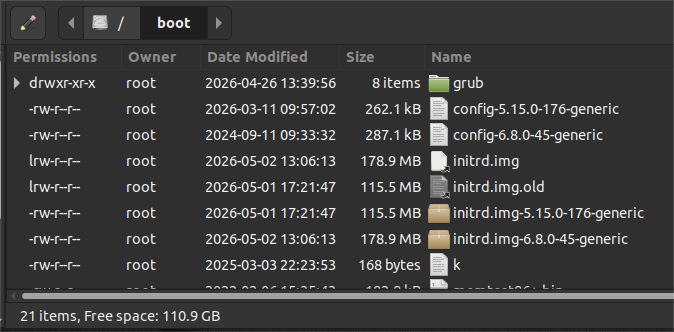
WANT: User-Specified Column-Widths for File Managers
File Managers should not have “fixed-rule” or “fixed-format” column layout.
I really want the system to apply, uniformly and globally, a User-specified
column-placement order, and
column-width
specified either by
user edit of width character count or
User-adjusted width by mouse-drag+drop
More specifically, ever since I adopted Linux back in 2006, I have wanted Linux to have a button, similar to the Windows environment, that you can click on for “Apply Globally”, so that the appearance would NOT be on a per folder basis. That the appearance specification would have the 3 global-setting states or each of
Icon view
List view
Compact view
As it is, I am constantly doing the drag+drop of column edges when I have to open a new File Manager window for a task, in order to set a preferred column width for the task at hand.
That’s really strange, @ericmarceau! I have set up default List view, selected columns of interest in Caja’s preferences, dragged columns to desired width… And all of them are preserved for each folder and each Caja instance I launch ever after @ Ubuntu Mate 24.04.