Like the other distro categories, I wanted to start a thread where we can all share our favorite tips and tricks for getting the most out of Debian. I’ll kick things off with a few:
Get familiar with apt vs apt-get. For day-to-day use apt is cleaner, but apt-get (and apt-cache) is still better for scripting since its output is more stable. See: Debian wiki on Apt
Know which release you’re tracking and what that means. Stable is rock solid but packages are older, Testing gets you newer stuff with some risk, and Sid is rolling. Mixing them without understanding pinning will break things. See: Debian Releases
Enable backports if you need a newer version of a specific package without leaving Stable. It’s the officially supported way to cherry-pick newer software.
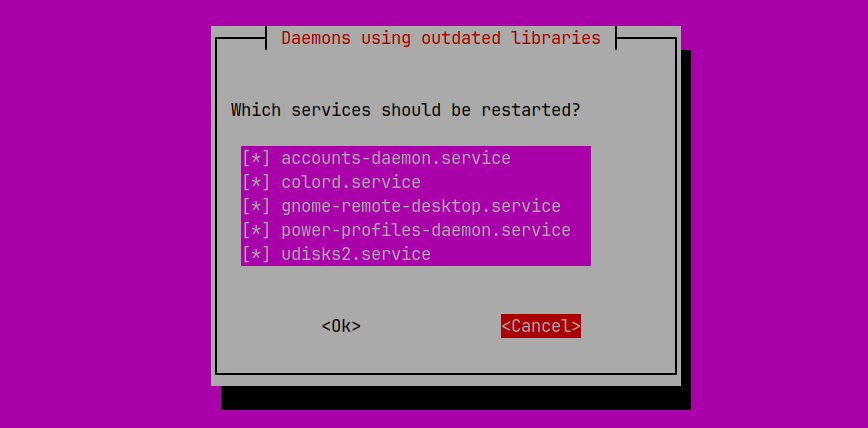
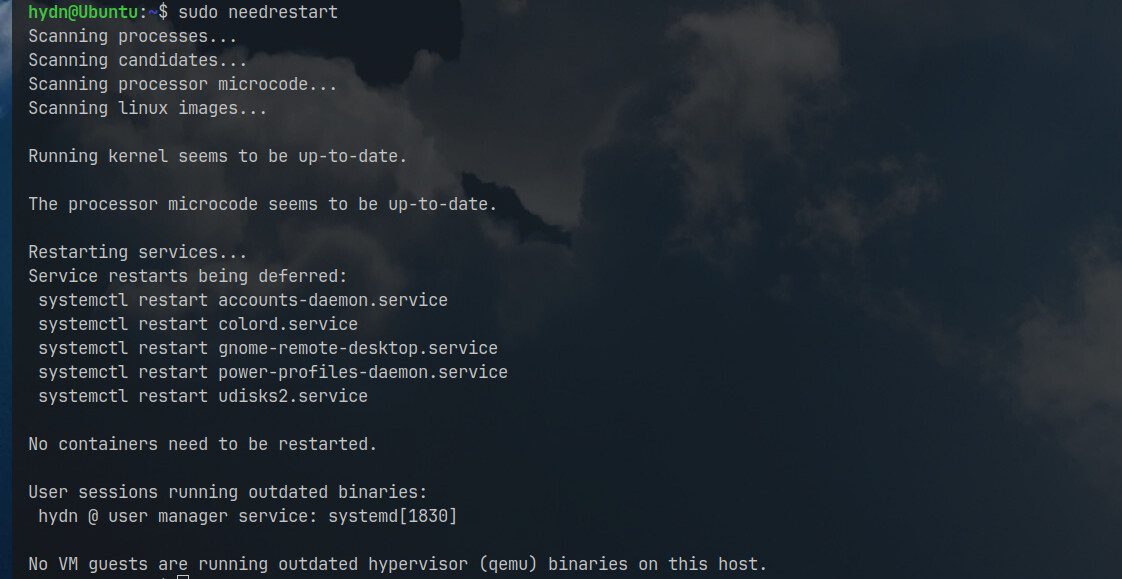
Use apt list --upgradable for a quick preview, and needrestart to identify services that should be restarted after updates. (Install with apt install needrestart)
Kali Linux documentation is a goldmine for Debian troubleshooting too, since Kali is built on top of Debian. Worth bookmarking: Kali Docs | Kali Linux Documentation
Read the Release Notes before doing a major version upgrade. Debian is great about documenting known issues and required manual steps.
I appreciate a LOT of features that Debian provides, but like many people, I want to maintain my systems as quickly and efficiently as possible. My solution - and it really is not limited to Debian, is to create bash command aliases for whatever common tasks I perform.
Given that I run other distributions besides Debian ones, I try to use as many of the same alias definitions as possible, and when it’s a different system, I change the contents of the alias command while using the very same alias - for example: I use u to update and upgrade my system software, and I change the alias command to suit each different distribution I use.
GUI interfaces are easy because they are point and click, but one or two character alias definitions run much faster than the typical GUI-based Welcome Center or System Management interface.
How about you? Am I the only one who does such things?
No worries, I locked my keys in the car two times this year already. Also cut and pasted from tldr (referenced it in another post but I personally use it a lot sometimes to get the quick useful commands, and othertimes because I can’t remember the options/flags lol):
List outdated processes: needrestart
Interactively restart services: sudo needrestart
List outdated processes in [v]erbose or [q]uiet mode: needrestart -v|q
Check if the [k]ernel is outdated: needrestart -k
Check if the CPU microcode is outdated: needrestart -w
List outdated processes in [b]atch mode: needrestart -b
List outdated processed using a specific [c]onfiguration file: needrestart -c path/to/config
Absolutely, I guess for us Linux users it’s like programming speed dial buttons on a phone instead of dialing the full number every time. These are the time saving things that make Windows such a chore to use.
May I bring some fun here, please?
You see, table-top phones have dial pad just like numeric keys on keyboard. Well, once upon a time, I noticed signs of potential server problem and had to call server room. I began to press phone buttons and suddenly felt stumbled. The mere absence of dot . on phone keyboard froze me. After a brief stupor I understood that I tried to type server’s IP address instead of phone number.
The package manager is great for keeping everything up to date but what about everything outside the package manager? I wrote a bash shell script to handle everything else on GitHub at /uberhacker/system-update. Open to suggestions and improvements!
What things are outside the package manager? Do you mean like updating appimage or programs installed with tarballs?
I know there are somethings I use, but they have repositories I can put in the package manager. I have ubuntuzilla and librewolf added to mine under the other software tab.
People talk about software packages being ‘old’ in stable. I always laugh. How many of us run with Openbox? That was ‘finished’ in 2015. It’s done. In computing parlance, that’s ancient.
You can find it in Debian Stable. You can also find it everywhere. Nobody says, oh, man Openbox is so old I can’t even want to use it…Could be because I am way past 50, though. Heh.
I think to get the most out of Debian you have to simply use it. It’s sane out the box and you can do about whatever you can dream up with it. Or, nothing outside of stock. I also think that you must take advantage of Debian, of the Debian way. Those DDs create ‘opportunity’ in the OS (ahh, distro). Take the installer routine, choose expert and drill down and when software selection comes around you can choose all of nothing or just a little something and your box will still be fine. Since always I choose to install nothing other than standard system tools and build-up my fancy from that - I think that’s getting the most out of Debian - taking advantage of the amazing platform it gives you.
Also, and this is important: do not build frankendebian. It won’t end well.

 Also cut and pasted from