hi! my name is Vishal .I currently pursuing B.Tech. in AIML . I recently bought a new laptop “Samsung BOOK 4 Edge with snapdragon X processor”. I got problems installing Linux on this .can someone please help me to solve this issue ?.
Google AI says
- Samsung Book4 Edge (Snapdragon X Elite): Specialized kernels are in development to support this architecture, with active, though experimental, support. Key efforts involve mainline Linux kernel 6.15+ to improve functionality.
Some more information (with links) related to Ubuntu distribution can be found here: Looking for support on installing Ubuntu on Snapdragon X - #2 by yancek - Support and Help - Ubuntu Community Hub
One thing I have learned on Linux is always check if hardware and peripherals support Linux out of the box or there is a work around before purchasing.
Welcome to the forums @Vishal_Parashar
When purchasing a laptop with Linux in mind a good place to start is with Lenovo, HP or Dell. I know that’s not a solution to your issue but it is I believe, the best advice overall for compatibility.
Also see: Certified laptops | Ubuntu
Now for Samsung (and other manufactures) always refer to the Arch Wiki. Arch is often at the bleeding edge of Linux support for hardware:
There’s a page similar to this for most manufacturers.
Also see:
I read many articles regarding snapdragon processor .i think they are working on for ARM chip.but i had installed ubuntu on WSL .can you tell me if WSL work similar to original one or not .
Are you referring to WSL version 1 vs. WSL version 2?
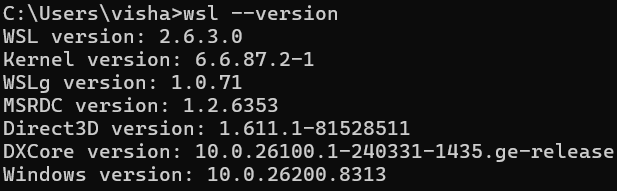
Microsoft added native ARM64 support for WSL. So WSL2 should work fine on the Samsung Book 4 Edge. I see you have it already installed.
yeah i had .i got interest in cybersecurity so i want to learn using linux.i just wanna know if wsl can help me learn it properly just like if i install it on hardware or not
I use WSL daily. I like it because I often have 2 to 3 systems open at the same time in tabs. IMO WSL is fine to start learning cybersecurity, you’ll get bash, scripting, nmap, netcat, package management, and most CLI tooling.
Where it falls short is hardware-level stuff like Wi-Fi, Bluetooth, USB, and some packet capture scenarios since WSL doesn’t give you direct hardware access.
When you get to that point where that is a limitation, then run Kali (unmatch tool box for learning network tools, network troubleshooting, traffic analysis and inspection, etc. in a VM (also see: Learn Linux: 4 Devices to boost your Linux skills (2026) ) or grab an old laptop for native install. Plenty of people start exactly where you are.
Check out this video (I’m subscribed to NetworkChuck):

Also see: