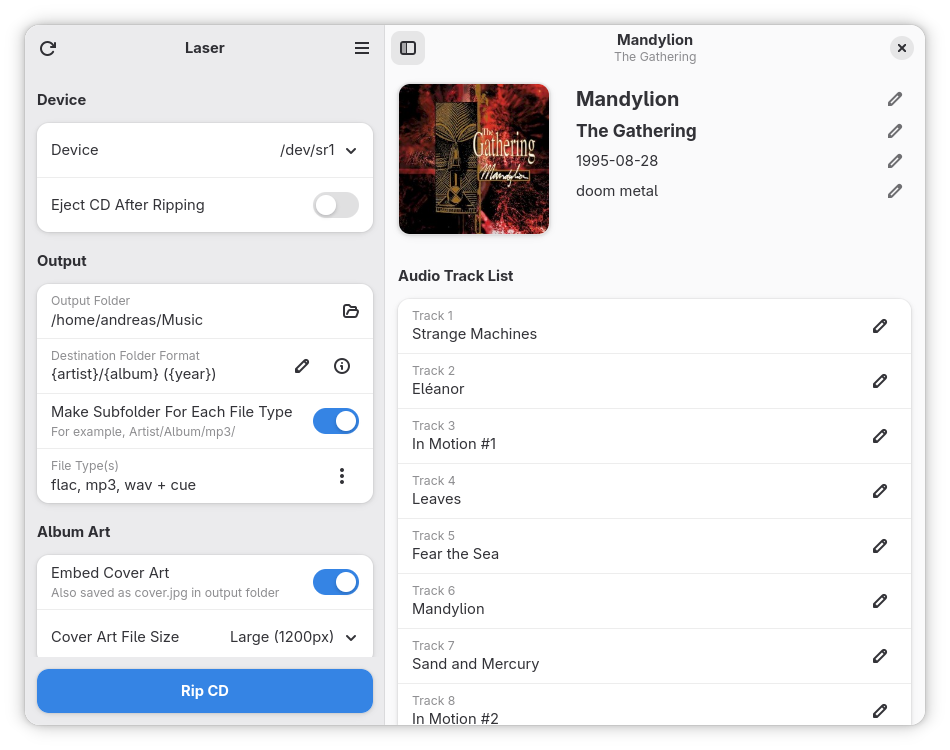
Hey everyone, I thought I’d share one of my recent projects here. It’s called Laser, and it’s a relatively simple CD ripping application developed with the GNOME desktop in mind (using GTK4 and Libadwaita). It currently supports:
Ripping to AAC, FLAC, MP3, OPUS, and WAV
Ripping to binary and audio image file formats with a cue sheet
Fetching album information automatically
Fetching and storing the album cover
The next big update is going to be pretty exciting as well, with ripping to image files in the pipeline and introduction of various options (and a very pretty new logo!). Stay tuned!
You can find the main repository here or you can visit the Flathub page directly.
I was inspired to work on this as I was looking for a relatively modern CD ripping application that’d nicely integrate with the GNOME desktop—and couldn’t find any. I also wanted to develop a piece of software that’d allow to rip a CD relatively easy, without overloading the user with options. It’s actually been really nice to have this little side project, especially as I’ve been dealing with some challenges with regards to my health. It has offered me a little something to put my focus and passion into!
If you do try it out, of course I’d love to hear your thoughts.
I keep an old laptop with a CD/DVD player/writer, but with digital music downloading I wonder how long rippers will be around? It’s been years since I have ripped or wrote a CD or DVD. USB drives allow so much more music in so much less space.
Fair enough—the reason I wrote this application is because I started to switch away from a digital collection to my CD collection. I prefer to own the physical media and play it on a CD player, but I’d also like to play it on-the-go, for example on my phone. For this purpose, I’d want to rip the CDs.
I don’t know how relevant it is—but it works for me and got some interest from other people as well, so as long as it’s useful to some, I’m happy to keep maintaining and developing (besides it just being an activity I enjoy doing). However, I do believe in recent times more people are aware of the downsides of digital media (especially subscriptions), and physical media (and therefore this application) are becoming more relevant again.
I still have a large CD collection, but a lot of my music (blues) is from independent artists that offered a free license or only had digital downloads so burnt not commercial CDs. I have all my music backed up on three laptops, two external hard drives and mulitple USB drives.
If you have a lot of CD’s this may interest you:
Protecting Physical Media: Combatting CD and DVD Rot
Burnt CDs are more susceptible to disc rot than commercial CDs because they often use a dye-based recording layer that is more vulnerable to environmental factors like heat and light, while commercial CDs typically have a more durable aluminum reflective layer.
Nothing last forever, always back up your collection.
It’s old 32bit laptop running Ubuntu MATE 18.04LTS. I can install Flatpak itself but no packages. Pretty much stuck with brasero which works for the intended purpose.
I am certainly going to look at this, having moved away from Windows and missing Poikosoft’s EZ CD Audio Converter. I did not use the conversion tools very much but I still do rip the occasional CD and the metadata support (including album artwork) is a must. Thank you for your work on this.
Thank you, and please let me know any feedback you might have—I always appreciate it.
I am currently preparing v0.5.0 for release, which would hopefully happen this week—in my opinion, it’s quite the exciting update introducing ripping to image files.
Does it have integration with a service for “disk track lookup” the way RipperX did with the old CDDB?
I’ve already migrated 98% of my Music CD library from optical to mp3, but have a few albums that need to be converted, which I missed when I did all the others about 1-2 years ago.