Hey everyone!
I wanted to post this as I’m feeling rather proud of this accomplishment! This has always felt a bit out of reach for me, and I was initially very concerned about the upcoming SSL certificate changes that it would take away the homelab that I love so much.
Even though this probably isn’t the best approach, or the best environment, or the most professional/perfect setup, it works for me and I’m happy that things like this continue to challenge my skillsets.
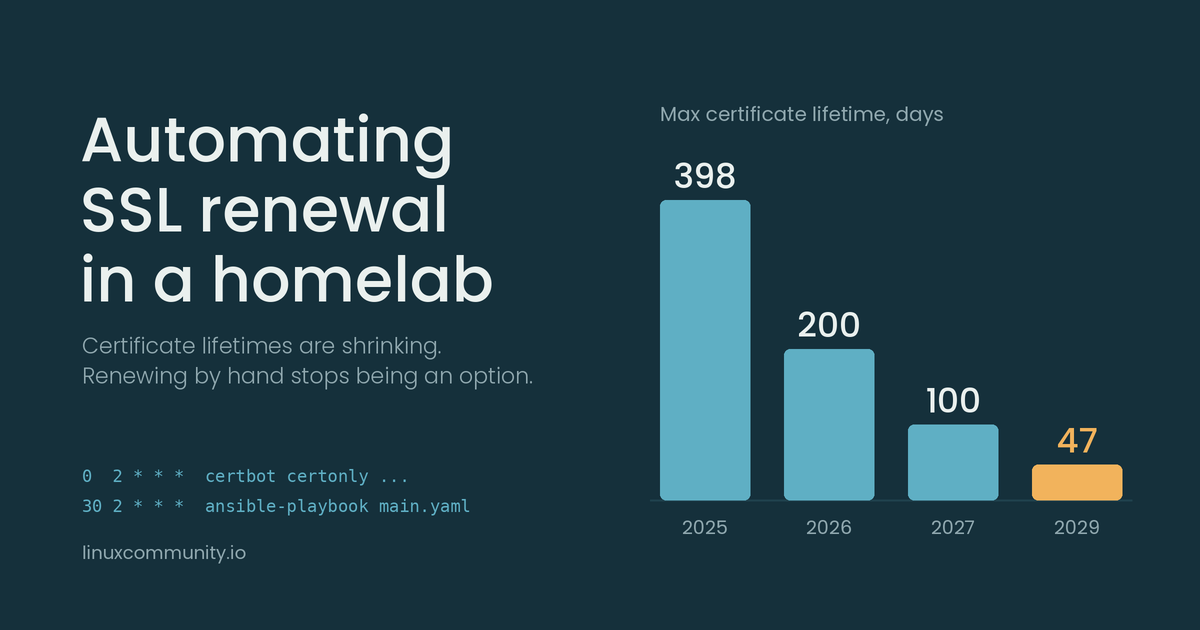
TL;DR: I learned how to automate SSL certificates in my homelab. Read on if you’re bored haha.
What SSL Certificate Changes are Coming?
In case you haven’t heard, the maximum lifetime of SSL Certificates will be changing, rather drastically, over the next three years. I’ll quickly summarize the changes, but I would recommend giving this article from Digicert a read through.
As of March 15, 2026, the maximum lifetime for a newly acquired certificate is 200 days, down from 398 days. Next year it will drop to 100 days, and finally in 2029, it will be down to 47 days.
The article that I linked above goes into some reasons for why 47 days was chosen and why the lifetime is reducing in general. There are some valid reasons given; my opinion is that I generally disagree with this change. I’d love to hear why (or if) you agree with the changes and what you think the impact will be.
What is my current environment?
Servers
While I run several different types of “servers” (read old PCs like Intel NUCs, Raspberry Pis, a lone Dell PowerEdge R510, and several other manually built and cobbled together boxes), generally my websites are all ran by Docker containers on a single host.
The key piece of information is that I run a Nginx reverse proxy container and I typically choose to do SSL termination at the reverse proxy. There are a few Docker containers and a few other physical hosts that have either required an encrypted end-to-end connection or I’ve chosen to enforce end-to-end encrypted connections for that particular service.
I then, have a unique situation, when it’s time to rotate a certificate that it has to be “deployed” to several different locations with several services requiring restarts/reloads to acknowledged the newly deployed certificate.
Certificates and DNS
I have two certificates: a Let’s Encrypt wildcard certificate for my domain, and a Namecheap certificate for just the base domain name (and www). My domain is through GoDaddy.
I have published a CAA Record to ensure only the correct CAs can publish a certificate for my domain. Additionally, the software I use to handle both the manual and automatic rotations is certbot, and I use the DNS challenge.
What’s the Focus/Reason of this Post?
My focus for this article is to then describe how I’ve solved for the automatic rotation and deployment of the Let’s Encrypt wildcard certificates.
I will then turn my focus, later, to transitioning the Namecheap certificate to another Let’s Encrypt certificate, so that I can re-use the same logic for all of my certificates now and/or in the future.
What Did I Do Originally?
Originally, I would run the certbot docker container, manually publish the appropriate DNS TXT record with the appropriate value, and then manually cp or rsync the new certificate files to all of the appropriate places/boxes and then manually restart all the services.
I was never bothered by this manual approach honestly. It gave me a chance to quickly peek in on the health of each of the services/boxes while rotating the certificates. And, because I only needed to do this once every three months, there wasn’t a feeling of repetitiveness or trouble.
With the maximum lifetime reducing down to 47 days, those feelings will definitely change AND there will be an added sense of urgency.
What Am I Doing Now?
First of all, I’d suggest that you take a look at what certbot is capable of doing by checking out this article.
So, what is happening? There are two parts to this “beast”:
- A cron job running at 2am that attempts to rotate the certificate, if it is close to expiring
0 2 * * * root certbot certonly --manual --keep-until-expiring --preferred-challenges=dns --manual-auth-hook /etc/letsencrypt/renewal-hooks/dns-authenticator --manual-cleanup-hook /etc/letsencrypt/renewal-hooks/dns-cleanup --deploy-hook /etc/letsencrypt/renewal-hooks/deploy-trigger -d '*.projecttiy.com' >> /dev/null 2>&1
- A cron job on another box running at 2:30am that actually rotates the certificate for each service and box, if it has been rotated
30 2 * * * cd /home/benjamin/playbooks/rotate_wildcard_certificate && ansible-playbook main.yaml > /home/benjamin/rotate_wildcard_certificate.log 2>&1
The 2am Job
I want to break down the command and then showcase the logic behind what is happening:
0 2 * * *: I chose 2am simply because it doesn’t conflict with other backups I’m doing on my network overnight.root: This needs to run as root so that it has access to the appropriate/etc/letsencryptfolderscertbot certonly --manual: This tells certbot how to run. Thecertonlyargument allows me, as the user, to choose when and where the deployment occurs and the--manualargument specifies that a challenge must take place--keep-until-expiring: I believe this is the default behavior, but, I wanted it in the command so that it’s easy for me to understand later--preferred-challenges=dns: Certbot can do HTTP or DNS challenges, and for me and my environment, the DNS challenge is the easiest to achieve--manual-auth-hook /etc/letsencrypt/renewal-hooks/dns-authenticator: This is the script that is executed at the beginning of the renewal process. It is the script responsible for handling the challenge--manual-cleanup-hook /etc/letsencrypt/renewal-hooks/dns-cleanup: This is the script that is executed at the end of the renewal process. It is the script responsible for cleaning up the challenge artifacts--deploy-hook /etc/letsencrypt/renewal-hooks/deploy-trigger: This is the script that is executed if the renewal succeeds (because it is expiring and if the renewal is actually successful)-d '*.projecttiy.com' >> /dev/null 2>&1: The-dargument specifies the DNS domain that I want a certificate for, withstdoutandstderrredirected to/dev/nullas certbot puts all logging to/var/log/letsencryptfor me. No reason to capture anything else
Certbot has many other arguments and ways of handling renewals, so this is not me saying this is the only way it can, or even should, work. This is just the best way I’ve found it to work for me and my environment.
The 2:30am Job
This command is pretty straightforward so I won’t break it down as heavily. I am moving into a specific directory and then executing an Ansible playbook. The reason why I need to be in that directory is because of how the main.yaml Ansible playbook is coded. I will show that below.
Just Show Me the Scripts!
godaddy-manager: The workhorse
This script is what is capable of actually creating and deleting TXT records in GoDaddy in the given DNS Zone with the appropriate credentials (sourced from environment variables). The result of the work is stored in a “state file” to help the cleanup work cleanly. You can view the script at my Codeberg repo.
dns-authenticator: Creating the TXT record
This script is executed by certbot and sources the appropriate credentials for GoDaddy and sources the appropriate environment variables from certbot so that I can put the appropriate value into the TXT record.
dns-authenticator
#!/usr/bin/env bash

source <redacted> || exit 1
bash /etc/letsencrypt/renewal-hooks/godaddy-manager -a create -d 'projecttiy.com' || exit 1
bash /etc/letsencrypt/renewal-hooks/godaddy-manager -a read -d 'projecttiy.com' || exit 1
sleep 180 # sleep for 3 minutes to wait for the DNS record to propagate
dns-cleanup: Removing the TXT record
Assuming that the renewal was successful, then we need to cleanup the TXT record that was just created. It’s only necessary for the DNS challenge and shouldn’t stick around in your DNS zone.
dns-cleanup
#!/usr/bin/env bash

source <redacted> || exit 1
bash /etc/letsencrypt/renewal-hooks/godaddy-manager -a delete -d 'projecttiy.com' || exit 1
deploy-trigger: Notifying Ansible
This is probably the hackiest part of the whole situation (well, at least it is for me)! All this script does is create an empty file called “rotated”. If Ansible sees this file, it will run all the other playbooks. If that file is not present, then Ansible does nothing.
deploy-trigger
#!/usr/bin/env bash

touch /etc/letsencrypt/rotated || exit 1
The Ansible Playbook
I’ve redacted and shortened some key details of this playbook as I don’t want to reveal everything about my environment haha (I’ve probably revealed way too much as it is). But the gist is, if the rotated file exists, do the work of distributing the appropriate files to the appropriate services and hosts, restart any necessary services, and then cleanup the rotated file if it was all successful.
main.yaml
---
- hosts: <redacted>
  tasks:
    - name: Is Certificate New?
      ansible.builtin.stat:
        path: /etc/letsencrypt/rotated
      register: is_rotated

    - set_fact:
        is_rotated: "{{ is_rotated }}"

- hosts: <redacted>
  gather_facts: no
  tasks:
    - set_fact:
        is_rotated: "{{ hostvars.<redacted>.is_rotated }}"
      run_once: true

- hosts: <redacted>
- name: Retrieve SSL Certificate Files from Source
  import_playbook: copy-ssl-certificate-from-source.yaml
  when: is_rotated.stat.exists

- hosts: <redacted>
- name: Install SSL Certificate for Nginx
  import_playbook: install-nginx-certs.yaml
  when: is_rotated.stat.exists

- hosts: <redacted>
  tasks:
    - name: Remove trigger
      ansible.builtin.file:
        path: /etc/letsencrypt/rotated
        state: absent
      when: is_rotated.stat.exists
...
The Results
The result is that my Let’s Encrypt wildcard certificate officially rotated itself all without me having to do any manual work! There were some slight hiccups along the way during my testing, and, I’m almost certain there’s something I’ve missed along the way. However, I am very happy with this approach and look forward to applying to my other certificate needs in the future!
 For me it’s a non-event since Cloudflare handles the edge and private stuff self-signed.
 )
)