I have installed windows over ubuntu (complete erase) on my desktop, because I shifted my work to my laptop. Perfectly happy with laptop.
However the desktop while booting takes ubuntu as default boot and goes into grub menu.
I have tried changing boot order and disabling ubuntu boot but the issue has not resolved.
Can someone guide me on how to delete ubuntu entries from the boot menu? There is no delete option in the set up. Windows 10
Thanks 
Welcome to the forums 
What’s happening is the old Ubuntu UEFI entry is still stored in your motherboard firmware. Reinstalling Windows does not remove it automatically.
Before changing anything, just be careful deleting entries. Only remove the one clearly labeled ubuntu. Deleting the wrong firmware entry can make the system temporarily unbootable.
Boot into Windows and open Command Prompt as Administrator, then run:
bcdedit /enum firmware
Look for the entry with description ubuntu, copy its identifier, then remove it:
bcdedit /delete {identifier}
Reboot and check.
If GRUB still shows, clean up the leftover EFI folder:
mountvol S: /S
S:
cd EFI
dir
If you see an ubuntu folder:
rmdir /s ubuntu
Reboot again and it should boot straight into Windows.
I’ve never heard about Ubuntu UEFI entry stored in motherboard firmware. Maybe there’s still an efi partition in the Windows 10 disk?
@Ravi_E I give this suggestion:
install on windows the free software https://www.resize-c.com/, open it, take a screenshoot of what you see and post a pic in here.
For I think fully working setup you might also delete the old grub EFI entry and rebuild Windows BCD boot.
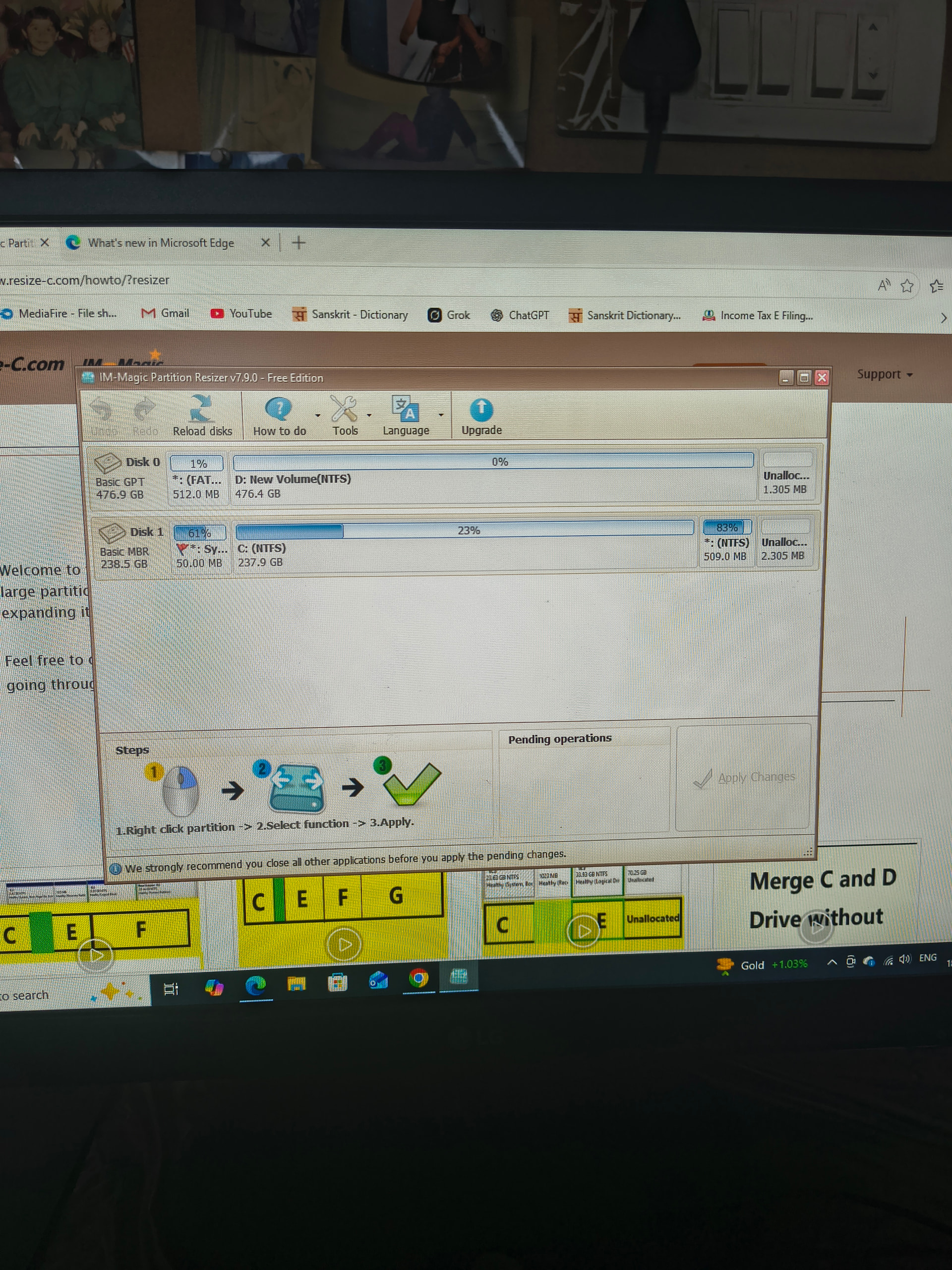
That’s a good idea to grab a screenshot of the partition layout. it would definitely help get a clearer picture of the setup.
For removing the Ubuntu boot entry itself, the safest route for most users is through the UEFI firmware settings menu directly, as rebuilding the Windows BCD is an extra step that shouldn’t be necessary in most cases and could cause headaches if something goes wrong.
No worries, it’s not immediately obvious! UEFI boot entries are actually stored in the motherboard’s NVRAM rather than on the disk itself, which is why reinstalling Windows doesn’t clear them. It’s one of those things that catches a lot of people out.
For anyone interested in reading more about how this works:
From the screenshot, it looks like you need to either delete the Ubuntu entry from your UEFI firmware settings menu (restart your PC and press DEL or F2 or applicable interrupt key during boot to access it), or mount the EFI partition on Disk 0 and delete the Ubuntu folder from it manually.
Thank you. I will attempt
Good luck!! Be careful. 
I believe that you can work all kinds of magic if you use the efibootmgr.