Maybe I missed it, but have you tried using hdparm to ensure the drive never goes to sleep?
Use this to confirm already set to “0”:
sudo hdparm -C /dev/sda
If not, you can set it to “no sleep” using:
sudo hdparm -S 0 /dev/sda
Maybe I missed it, but have you tried using hdparm to ensure the drive never goes to sleep?
Use this to confirm already set to “0”:
sudo hdparm -C /dev/sda
If not, you can set it to “no sleep” using:
sudo hdparm -S 0 /dev/sda
Sorry everyone - I’m on the new user quota and I got cut off for the day after 20 replies.
Thanks for the suggestion but yes, tried all the hdparm options. I don’t think USB passes these through to the drive.
sudo hdparm -B 0 /dev/sda

/dev/sda:
 setting Advanced Power Management level to 0x00 (0)
SG_IO: bad/missing sense data, sb[]:  70 00 0b 00 00 00 00 0a 00 00 00 00 00 00 00 00 00 00 00 00 00 00 00 00 00 00 00 00 00 00 00 00
 APM_level	= not supported


sudo hdparm -S 0 /dev/sda

/dev/sda:
 setting standby to 0 (off)
SG_IO: bad/missing sense data, sb[]:  f0 00 01 00 50 40 00 0a 00 00 00 00 00 1d 00 00 00 00 00 00 00 00 00 00 00 00 00 00 00 00 00 00
I have a resiliency exercise at work today and I’m not going to have any time to look at this again until at least this evening but I did have some time to think about this yesterday after I exhausted my reply quota.
The symptoms are present with:
These conditions lead me to believe the issue is somewhere on the Linux Mint host.
I ran a fan on the drive cabinet and kept the temp down to ~32 Celsius during the second half of the latest backup and still encountered the issue. The frequency seemed reduced so I think it helped but it did not eliminate the problem.
Next step will be to reformat the drive, reboot the box and repeat the full backup with the fan running on the cabinet and capture results while running. I likely won’t have new data to post before Saturday.
Thanks to everyone for taking the time to look at this with me and for the suggestions.
Here are some speculations on general troubleshooting of the problem.
IMHO, there are actually two candidates: OS, incl. kernel, drivers and whatnot, as well as laptop/desktop hardware incl. BIOS.
Theoretically, you could boot another laptop from Mint live CD and see if the problem persists regardless hardware change. Similarly, you could boot original laptop from, say Fedora or other live CD, to see if the problem is inherent to the particular OS or Linux itself.
@Nosugrof thanks for keep us updated. Invested now. We will bump your account’s trust level to remove that limit.
I used to run this on an Ubuntu desktop using a homegrown set of scripts to copy selected files to the USB drive. It was pretty effective and worked fine for several years. At some point ~3-4 years ago it started having problems with the USB drive remaining available. Initially I thought it might be a USB 2.0/3.0 compatibilty issue and I added an expansion card to add USB 3.0 to the desktop. I should probably clarify that this is a really old box I built from NewEgg parts over 20 years ago. Since building it I’ve replaced the power supply, a case fan, the CPU fan and all of the drives. It has 6 GB RAM and an eight core Intel i7 920 cpu - this was pretty hot when it was new in 2001. Also has a couple of DVD RW drives and a total of eight bays for drives with five 2TB drives dedicated to a raid 10 mdadm array and one 2 TB drive left over for everything else.
Here are the OS particulars:
   Static hostname: media-desktop
         Icon name: computer-desktop
           Chassis: desktop
        Machine ID: 5a2c3a5723ba43e2b585a6679d30085f
           Boot ID: 65eb2ebda38c42a1909ba3fc9bcb9f9f
  Operating System: Ubuntu 20.04.6 LTS
            Kernel: Linux 5.15.0-140-lowlatency
      Architecture: x86-64
After struggling to get this running reliably I decided to take a shot at channeling the backup through a laptop. To do this I took a Dell Precision 7750 laptop and mounted the raid array from the old Ubuntu desktop using SSHFS. Then I mounted a USB drive on the laptop and using it as a passthru tried pulling files from the raid array and writing to the USB drive.
The laptop looks like this:
 Static hostname: xxxx-Precision-7750
       Icon name: computer-laptop
         Chassis: laptop 💻
      Machine ID: 15c1c0ca199d48f7b5dd44292ea8c927
         Boot ID: 6dc8d6076e554872ba7f305682f63a10
Operating System: Linux Mint 22.3
          Kernel: Linux 6.17.0-23-generic
    Architecture: x86-64
 Hardware Vendor: Dell Inc.
  Hardware Model: Precision 7750
Firmware Version: 1.43.0
   Firmware Date: Thu 2025-11-27
    Firmware Age: 5month 1w 3d
Credit where it’s due - the SSHFS mounts have been flawless. No issues with the mounts and the performance has been similar to what I see on locally mounted disks. Should also state that I’m using ext4 format on the USB drive. I’ve tried it with exfat and NTFS but both of those end up with errors due to unsupported characters in the file names so I’m back to ext4.
When I encountered issues with this new approach I first assumed it was related to power management putting the USB drives to sleep. I disabled power management in the screensaver and set the power manager never take any action while the computer is on AC power. Then I took it to the next level and added this to grub config - GRUB_CMDLINE_LINUX_DEFAULT=" usbcore.autosuspend=-1". This should completely disable any power management disruption.
I also found some opinions in Google searches that “USB Attached SCSI (UAS or UASP)” isn’t a well documented standard that might be contributing to the issue. To force this back to usb-storage I used the option “usb-storage quirks=xxxx:xxxx:u” where “xxxx:xxxx” identifies the drive. There are a couple of ways to do this and I chose to add a configuration file under modprobe.d. It can also be done using a grub boot loader configuration update.
The next thing I worked on was trying to disable power management on the drive itself using hdparm with options like “-S 0” or “-B 0”. Every option I tried failed and I now believe the USB driver won’t pass these options to the drive. Okay with SATA but doesn’t seem to work with USB drives.
The last option explored came up after it was pointed out that the drive was going through heat up cycles prior to restarts running up to ~48 degrees Celcius and dropping ~20 degrees Celcius after shutting down. The evidence didn’t align fully with the theory and after adding cooling fans to the cabinets it was disproved since the drives continue to drop out even with temperatures staying in the mid 30 degree Celcius range.
Next steps:
Here are the details for the USB drive on the Ubuntu box. I didn’t need to use the quirks override to get it to use usb-storage on the old Ubuntu box. Guessing the kernel is old enough it doesn’t include UAS.
Bus 010 Device 003: ID 1058:25a3 Western Digital Technologies, Inc. Elements Desktop (WDBWLG)
Bus 010 Device 001: ID 1d6b:0003 Linux Foundation 3.0 root hub

/:  Bus 10.Port 1: Dev 1, Class=root_hub, Driver=xhci_hcd/2p, 5000M
    |__ Port 2: Dev 3, If 0, Class=Mass Storage, Driver=usb-storage, 5000M
The backup using duplicity is running now and I’ll share results as I get them. Could take a while as a full backup typically runs in excess of 24 hours. We’ll see how duplicity does with it since it’s using compression which should result in less of a bottleneck writing to the USB drive.
Thanks for the suggestions. I’ve provided additional details in a post further down the chain regarding the current setup. I’m going to leverage the existing installs and try to run on an old Ubuntu version and a current Mint release to see if it exposes new insights.
Starting my third test cycle now but ran into something really weird. I think I finally understand it but if I’m off track maybe someone here can explain it.
I ran test #1 on my Ubuntu desktop using duplicity to drive the backup. The USB drive is formatted ext4 and I ran it with no cooling fan on the USB drive cabinet. No big surprise - roughly four hours in the drive dismounted and the smart data for the drive showed a heat spike with an eventual dismount and cool down. The only interesting thing here is that dmesg showed the drive dismounting at 07:23 and then remounting at 08:21 - right around the time the smart data shows the big temp drop.
[Sat May  9 07:23:23 2026] usb 10-2: USB disconnect, device number 3
[Sat May  9 08:21:05 2026] usb 10-2: new SuperSpeed USB device number 4 using xhci_hcd
[Sat May  9 08:21:05 2026] usb 10-2: New USB device found, idVendor=1058, idProduct=25a3, bcdDevice=10.31
[Sat May  9 08:21:05 2026] usb 10-2: New USB device strings: Mfr=1, Product=2, SerialNumber=3
[Sat May  9 08:21:05 2026] usb 10-2: Product: Elements 25A3
[Sat May  9 08:21:05 2026] usb 10-2: Manufacturer: Western Digital
[Sat May  9 08:21:05 2026] usb 10-2: SerialNumber: 434133524E394D4B
[Sat May  9 08:21:05 2026] usb-storage 10-2:1.0: USB Mass Storage device detected
[Sat May  9 08:21:05 2026] scsi host14: usb-storage 10-2:1.0
[Sat May  9 08:21:06 2026] scsi 14:0:0:0: Direct-Access     WD Elements 25A3    1031 PQ: 0 ANSI: 6
[Sat May  9 08:21:06 2026] sd 14:0:0:0: Attached scsi generic sg10 type 0
[Sat May  9 08:21:06 2026] sd 14:0:0:0: [sdi] Spinning up disk...
[Sat May  9 08:21:07 2026] ............ready
[Sat May  9 08:21:18 2026] sd 14:0:0:0: [sdi] Very big device. Trying to use READ CAPACITY(16).
[Sat May  9 08:21:18 2026] sd 14:0:0:0: [sdi] 15627986944 512-byte logical blocks: (8.00 TB/7.28 TiB)
[Sat May  9 08:21:18 2026] sd 14:0:0:0: [sdi] 4096-byte physical blocks
[Sat May  9 08:21:18 2026] sd 14:0:0:0: [sdi] Write Protect is off
[Sat May  9 08:21:18 2026] sd 14:0:0:0: [sdi] Mode Sense: 47 00 10 08
[Sat May  9 08:21:18 2026] sd 14:0:0:0: [sdi] No Caching mode page found
[Sat May  9 08:21:18 2026] sd 14:0:0:0: [sdi] Assuming drive cache: write through
[Sat May  9 08:21:18 2026]  sdi: sdi1
[Sat May  9 08:21:18 2026] sd 14:0:0:0: [sdi] Attached SCSI disk
[Sat May  9 08:21:25 2026] EXT4-fs (sdi1): recovery complete
Index    Estimated Time   Temperature Celsius
 448    2026-05-09 00:28    28  *********
 ...    ..(292 skipped).    ..  *********
 263    2026-05-09 05:21    28  *********
 264    2026-05-09 05:22    29  **********
 265    2026-05-09 05:23    29  **********
 266    2026-05-09 05:24    30  ***********
 267    2026-05-09 05:25    30  ***********
 268    2026-05-09 05:26    31  ************
 269    2026-05-09 05:27    31  ************
 270    2026-05-09 05:28    31  ************
 271    2026-05-09 05:29    32  *************
 272    2026-05-09 05:30    32  *************
 273    2026-05-09 05:31    32  *************
 274    2026-05-09 05:32    33  **************
 275    2026-05-09 05:33    33  **************
 276    2026-05-09 05:34    33  **************
 277    2026-05-09 05:35    34  ***************
 278    2026-05-09 05:36    34  ***************
 279    2026-05-09 05:37    34  ***************
 280    2026-05-09 05:38    35  ****************
 ...    ..(  2 skipped).    ..  ****************
 283    2026-05-09 05:41    35  ****************
 284    2026-05-09 05:42    36  *****************
 285    2026-05-09 05:43    36  *****************
 286    2026-05-09 05:44    36  *****************
 287    2026-05-09 05:45    37  ******************
 ...    ..(  2 skipped).    ..  ******************
 290    2026-05-09 05:48    37  ******************
 291    2026-05-09 05:49    38  *******************
 ...    ..(  3 skipped).    ..  *******************
 295    2026-05-09 05:53    38  *******************
 296    2026-05-09 05:54    39  ********************
 ...    ..(  3 skipped).    ..  ********************
 300    2026-05-09 05:58    39  ********************
 301    2026-05-09 05:59    40  *********************
 ...    ..(  3 skipped).    ..  *********************
 305    2026-05-09 06:03    40  *********************
 306    2026-05-09 06:04    41  **********************
 ...    ..(  4 skipped).    ..  **********************
 311    2026-05-09 06:09    41  **********************
 312    2026-05-09 06:10    42  ***********************
 ...    ..(  5 skipped).    ..  ***********************
 318    2026-05-09 06:16    42  ***********************
 319    2026-05-09 06:17    43  ************************
 ...    ..(  4 skipped).    ..  ************************
 324    2026-05-09 06:22    43  ************************
 325    2026-05-09 06:23    44  *************************
 ...    ..(  7 skipped).    ..  *************************
 333    2026-05-09 06:31    44  *************************
 334    2026-05-09 06:32    45  **************************
 ...    ..( 10 skipped).    ..  **************************
 345    2026-05-09 06:43    45  **************************
 346    2026-05-09 06:44    46  ***************************
 ...    ..( 16 skipped).    ..  ***************************
 363    2026-05-09 07:01    46  ***************************
 364    2026-05-09 07:02    47  ****************************
 ...    ..( 27 skipped).    ..  ****************************
 392    2026-05-09 07:30    47  ****************************
 393    2026-05-09 07:31    48  *****************************
 ...    ..( 44 skipped).    ..  *****************************
 438    2026-05-09 08:16    48  *****************************
 439    2026-05-09 08:17    49  ******************************
 440    2026-05-09 08:18    49  ******************************
 441    2026-05-09 08:19    49  ******************************
 442    2026-05-09 08:20     ?  -
 443    2026-05-09 08:21    31  ************
 444    2026-05-09 08:22    31  ************
 445    2026-05-09 08:23    31  ************
 446    2026-05-09 08:24    32  *************
 447    2026-05-09 08:25    32  *************
Since this result aligned with the idea that drive heat is possibly causing the drive to drop out of service I decided to repeat the same test but this time with a fan cooling the USB drive cabinet. This test started at 08:42 and completed with drive failure at 13:13. The dmesg details and smart data for the drive are below.
Here you see the drive mounted at 08:21 prior to the test and then dismounting at 13:24 and recovering at 15:06. I was doing some yard work and didn’t catch the test failure right away.
[Sat May  9 08:21:05 2026] usb-storage 10-2:1.0: USB Mass Storage device detected
[Sat May  9 13:14:06 2026] usb 10-2: USB disconnect, device number 4
[Sat May  9 15:06:21 2026] usb 10-2: new SuperSpeed USB device number 5 using xhci_hcd
And here’s the smart data heat details for the drive. This is the part that tripped me up initially. According to the smart data dumped after the second test, the drive was midway through a heat spike at 08:41 already up around 46 degrees. If you look back at the smart data heat index dump taken after the first test you’ll see the drive was already down to 32 degrees at 08:25. Then I started comparing the two smart data heat index dumps and I noticed if you rely on the index number the heat recording from the two dumps are in agreement. The part that’s different between the two is the time stamp on each record. For example look at index 264 from each listing. The two records agree the temp reading was 29 degrees. The dump taken at 08:25 says that heat record occurred at 05:22 but the dump taken at 15:10 says that heat event occurred at 07:13. If you look at index 441 you see a similar issue. The dump taken at 08:25 says that event occurred at 08:19 but the dump taken at 15:10 shows that event occurring at 10:10 - almost two hours later and well after the first dump was taken that included that event. It seems apparent that the heat index timings changed between the two dumps.
I investigated a bit and here’s what I think I understand now. The event timestamps in the smart data are not system timestamps. They are relative timestamps to the power on time for the device. If the device were powered on for the full duration of all the events in the dump then they would align to the system time of the host. If the device is powered down for some period of time then all the events in the heat timeline that occurred prior to the power down will be off from the system time when the event actually occurred by the amount of time the device was powered down. The only way to use the timestamps in the event history dump is if you also know the duration of any time the device was powered down and when the start and stop times for the device occurred. Complicates the analysis but at least now it makes sense.
I think what I can conclude from the test results is:
Index    Estimated Time   Temperature Celsius
 264    2026-05-09 07:13    29  **********
 265    2026-05-09 07:14    29  **********
 266    2026-05-09 07:15    30  ***********
 267    2026-05-09 07:16    30  ***********
 268    2026-05-09 07:17    31  ************
 269    2026-05-09 07:18    31  ************
 270    2026-05-09 07:19    31  ************
 271    2026-05-09 07:20    32  *************
 272    2026-05-09 07:21    32  *************
 273    2026-05-09 07:22    32  *************
 274    2026-05-09 07:23    33  **************
 275    2026-05-09 07:24    33  **************
 276    2026-05-09 07:25    33  **************
 277    2026-05-09 07:26    34  ***************
 278    2026-05-09 07:27    34  ***************
 279    2026-05-09 07:28    34  ***************
 280    2026-05-09 07:29    35  ****************
 ...    ..(  2 skipped).    ..  ****************
 283    2026-05-09 07:32    35  ****************
 284    2026-05-09 07:33    36  *****************
 285    2026-05-09 07:34    36  *****************
 286    2026-05-09 07:35    36  *****************
 287    2026-05-09 07:36    37  ******************
 ...    ..(  2 skipped).    ..  ******************
 290    2026-05-09 07:39    37  ******************
 291    2026-05-09 07:40    38  *******************
 ...    ..(  3 skipped).    ..  *******************
 295    2026-05-09 07:44    38  *******************
 296    2026-05-09 07:45    39  ********************
 ...    ..(  3 skipped).    ..  ********************
 300    2026-05-09 07:49    39  ********************
 301    2026-05-09 07:50    40  *********************
 ...    ..(  3 skipped).    ..  *********************
 305    2026-05-09 07:54    40  *********************
 306    2026-05-09 07:55    41  **********************
 ...    ..(  4 skipped).    ..  **********************
 311    2026-05-09 08:00    41  **********************
 312    2026-05-09 08:01    42  ***********************
 ...    ..(  5 skipped).    ..  ***********************
 318    2026-05-09 08:07    42  ***********************
 319    2026-05-09 08:08    43  ************************
 ...    ..(  4 skipped).    ..  ************************
 324    2026-05-09 08:13    43  ************************
 325    2026-05-09 08:14    44  *************************
 ...    ..(  7 skipped).    ..  *************************
 333    2026-05-09 08:22    44  *************************
 334    2026-05-09 08:23    45  **************************
 ...    ..( 10 skipped).    ..  **************************
 345    2026-05-09 08:34    45  **************************
 346    2026-05-09 08:35    46  ***************************
 ...    ..( 16 skipped).    ..  ***************************
 363    2026-05-09 08:52    46  ***************************
 364    2026-05-09 08:53    47  ****************************
 ...    ..( 27 skipped).    ..  ****************************
 392    2026-05-09 09:21    47  ****************************
 393    2026-05-09 09:22    48  *****************************
 ...    ..( 44 skipped).    ..  *****************************
 438    2026-05-09 10:07    48  *****************************
 439    2026-05-09 10:08    49  ******************************
 440    2026-05-09 10:09    49  ******************************
 441    2026-05-09 10:10    49  ******************************
 442    2026-05-09 10:11     ?  -
 443    2026-05-09 10:12    31  ************
 444    2026-05-09 10:13    31  ************
 445    2026-05-09 10:14    31  ************
 446    2026-05-09 10:15    32  *************
 447    2026-05-09 10:16    32  *************
 448    2026-05-09 10:17    33  **************
 ...    ..(  3 skipped).    ..  **************
 452    2026-05-09 10:21    33  **************
 453    2026-05-09 10:22    34  ***************
 ...    ..(  4 skipped).    ..  ***************
 458    2026-05-09 10:27    34  ***************
 459    2026-05-09 10:28    36  *****************
 460    2026-05-09 10:29    35  ****************
 461    2026-05-09 10:30    34  ***************
 462    2026-05-09 10:31    33  **************
 463    2026-05-09 10:32    32  *************
 464    2026-05-09 10:33    32  *************
 465    2026-05-09 10:34    32  *************
 466    2026-05-09 10:35    31  ************
 ...    ..(  4 skipped).    ..  ************
 471    2026-05-09 10:40    31  ************
 472    2026-05-09 10:41    30  ***********
 ...    ..( 21 skipped).    ..  ***********
  16    2026-05-09 11:03    30  ***********
  17    2026-05-09 11:04    29  **********
 ...    ..(  3 skipped).    ..  **********
  21    2026-05-09 11:08    29  **********
  22    2026-05-09 11:09    30  ***********
  23    2026-05-09 11:10    29  **********
 ...    ..(233 skipped).    ..  **********
 257    2026-05-09 15:04    29  **********
 258    2026-05-09 15:05     ?  -
 259    2026-05-09 15:06    26  *******
 260    2026-05-09 15:07    25  ******
 261    2026-05-09 15:08    26  *******
 262    2026-05-09 15:09    26  *******
 263    2026-05-09 15:10    26  *******
I’m repeating the second test now but this time I captured the tail of heat index listing from the smart data. If I run the smart data dump again in ~four hours when I expect this to fail and the the timestamp on the indexed record has changed that will confirm my understanding of the event timestamps in the smart data.
If anyone has any ideas where to look next to resolve why the drive keeps dropping I’m all ears. I’ve now seen this with two different USB drives using different power supplies and USB cables running on two different Linux distros (Ubuntu and Mint) and two different computers (builder desktop and Dell laptop).
More to come.
Not sure you’ve thought of this for your situation, but I believe the level of heat generated has to do with the “data load” being handled.
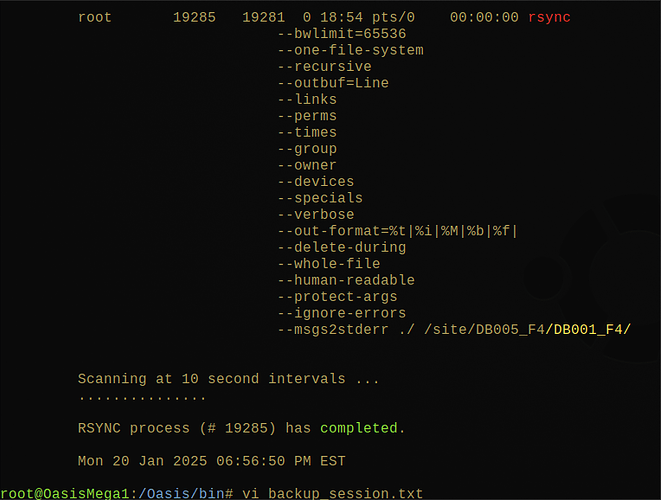
To that end, you might want to look into an option that I use for my own backups when doing rsync:
–bwlimit=RATE limit socket I/O bandwidth
My own command has the format:
ionice -c 2 -n 7 rsync --bwlimit=32768 ${other_options}
If you can establish your maximum datarate, I would recommend you start by trying a –bwlimit value of 80% of maximum to see if your drive fares any better in regard to stabilizing at a Max Temp which is below the self-preservation threshold of your drive.
In my case, I used the bwlimit to limit the amount of memory usage growth during the backup, to avoid flooding RAM with the read block queue pending to be dumped onto the external backup disk. That was the only thing I could get to work for me for my Desktop computer, to allow me to work with sufficient interractivity during full backups.
Example of batch file created by my backup script, so that my monitoring tool started up by the script can give a visual feedback (the dots) that the backup process is still running in background.

::::::::::::::
Z_backup.DB001_F2.DateSize.batch
::::::::::::::


echo 'Thu 07 May 2026 10:15:20 AM EDT |rsync| Start DB001_F2
	Process ID => '$$' ...' >&2
	cd /DB001_F2

	rm -f /site/Z_backup.DB001_F2.DateSize.out
	rm -f /site/Z_backup.DB001_F2.DateSize.err
	{

ionice -c 2 -n 7 rsync \
 		--bwlimit=32768 \
 		--one-file-system \
 		--outbuf=Line \
 		--recursive \
 		--delete-during \
 		--preallocate \
 		--links \
 		--perms \
 		--times \
 		--group \
 		--owner \
 		--atimes \
 		--devices \
 		--specials \
 		--verbose \
 		--out-format="%t|%i|%M|%b|%f|" \
 		--whole-file \
 		--human-readable \
 		--protect-args \
 		--ignore-errors \
 		--msgs2stderr ./ /site/DB005_F2/DB001_F2/

echo 'START = Thu 07 May 2026 10:15:20 AM EDT' ;
echo '  END = '`date`
	} 2>/site/Z_backup.DB001_F2.DateSize.err >/site/Z_backup.DB001_F2.DateSize.out
	RC=$?
If interested, I talk about that in another posting, where I also provide a URL to my script library on GitHub.
Hi Eric - thanks for the suggestion.
The last test kind of disproved the idea that it’s drive temperature triggering the dismount but I like the idea you’re proposing that it’s somehow load related. For a quick hit I just kicked off a test using ionice to drop the process class to ‘best-effort’. I used “-c2 -n7” for the options and I’ll watch to see if this has any effect.
Ideally I’d like to end up using FreeFileSync for the backup driver. I’ve been testing using ‘duplicity’ to keep the test simple but if I use the rsync throttling options I’m going to be locked into rsync for a solution. I may still take a run at that just to validate whether IO throttling may provide a remediation. I’m also investigating the cgroup-v2 kernel options to impose IO throttling for the device in the kernel. What I’ve read so far indicates that may be a good option although the documentation indicates programs using IO buffering rather than direct IO may get less benefit from the kernel level throttling.
We’re getting way out in the weeds now but it’s an interesting exercise and may prove to be an useful tool for all kinds of throttling control. If nothing exists yet it might make a good candidate for a project to create a UI tool for managing all the cgroup-v2 configuration files.
When I first looked at cgroups, it sounded like the most appropriate mechanism for that control, my mummified brain could not figure it out, so I stuck with the rsync option.
Haven’t provided any update in a while so here’s the latest.
Played around with cgroup2 io throttling but didn’t really accomplish what I needed. I was able to get the io throttling to work but it’s only effective with direct disc writes. If the process is using any kind of io buffering it’s not able to apply the throttling. After setting a limit to 100 bytes per second I was still able to use dd to write 30+ mbps to the USB drive. When I added the oflag=direct option ot the dd command then the cgroup2 limit kicked in and throttled the writes. The documentation on cgroup2 is difficult to follow and there aren’t a lot of examples posted but based on what I found and my own test results I think this is a limitation of the architecture. If this is the case then this isn’t really going to help with any of the tools I’m using for taking backups
Looked around in the BIOS and tried disabling ACPI which had a nasty effect on the Linux boot. Took about 15 minutes instead of 10 seconds and ended up at an initramfs prompt with limited resources working. Ended up back in the BIOS re-enabling ACPI. I didn’t find any other BIOS option that looked like it might affect USB drives.
Next added “pci=noacpi” to the grub command line but that was even worse. The Linux kernel failed to load and I had to use a recovery kernel to get back to a command prompt and revert the grub option.
Starting to run out of options so I switched direction. I recently upgraded to a tcplink mesh router system that includes a USB port on each node. I plugged the drive into the router hoping to access the drive from there. I was able to get it working but it only supports MS backed formats (exfat, fat32 and ntfs) all of which have character restrictions on the file names. A fair number of files on my mdadm raid drive have file names that aren’t supported so this isn’t an option I really want to use. Beyond that it’s really slow over the network and it just irks me that I can’t figure out this USB dismount issue.
I ran another test on the Ubuntu box and this time instead of sitting down at the console to monitor I launched an ssh shell from another laptop and checked progress from there. What I noticed is that when the drive dropped it no longer showed up in any utility (e.g. lsblk, lsusb, usb-devices). It was only when I went back to the console and used the mouse/keyboard that the drive woke up and remounted. The power light was lit on the external drive - it just wasn’t awake and Linux didn’t see the device at all.
I’m wondering now if I can create some kind of event hook to detect a system idle event and use it to simulate a mouse move event to keep the system awake and prevent the drive from being dismounted? I might even just set up a script to feed a mouse move event into the system every x minutes just while the backup is running.
Worst case I can continue to live with the issue and just restart the backup every time it fails. It does eventually complete and if I just synchronize the backup with changed files it would probably complete every time. It’s just when I take that first full backup that runs for hours that it has issues.
Appreciate all the support and suggestions - if anyone has any new ideas let me know.
Thanks
Is there a remote chance that the system has logic associated with screensaver mode, triggering drive sleep when session is idle?
ADDENDUM (for X11) …
I found this suggestion from a google query:
linux trying to fake active keyboard or mouse session to prevent triggering "idle" detection event
Using an innocuous keypress …
while true; do xdotool key Shift_L; sleep 60; done
These require the underlying X11 environment.
Using mouse movements …
while true; do xdotool mousemove_relative 1 1; sleep 60; xdotool mousemove_relative -- -1 -1; sleep 60; done
ADDENDUM (for Wayland) …
For a Wayland environment, using the following query:
linux trying to fake active keyboard or mouse session to prevent triggering "idle" detection event within Wayland-based Desktop Environment
It offers the following options:
while true; do ydotool mousemove 0 1; sleep 60; ydotool mousemove 0 -1; sleep 60; done
or
gnome-session-inhibit --inhibit suspend sleep 1h
Methods to Prevent Sleep:
bash
gnome-session-inhibit --inhibit suspend,idle --reason "Keeping system awake" cat
Use code with caution.
Note: Replace cat with any command that runs forever, or simply use cat to hold the lock until you press Ctrl+C.
Thanks Eric - I think we ended up going down the same rabbit hole. I had previously tried xscreensaver, xfce-screensaver and no screensaver at all with no discernible difference in behavior.
I threw this together earlier today, reformatted the USB drive to ext4, fired up the cooling fan on the drive and started a new backup. It’s been running almost eight hours now without any indication of the disc powering down. I was going to wait until morning to share so as not to jinx it but after your post I thought I should share.
#!/bin/bash
##===================================================================##
# File.......: mksim (mouse keyboard simulator)
# Date.......: May-11-2026
# Description: Utility script to simulate mouse and keyboard activity.
#              Considered safe for use to prevent power mangement from
#              powering down devices during extended processing (e.g.
#              to prevent unmounting USB external drives during
#              backup processing). Screen burn is still a problem
#              particularly for OLED displays so extended use is
#              discouraged since this will defeat screen savers and
#              other power management services.
##===================================================================##
set +x

# default delay is 30 seconds
delay=30

# check for a cmdline delay override
if [ $# -eq 1 ]; then
  if [[ "${1}" =~ ^[0-9]+$ ]]; then
    delay=${1}
  fi
fi

if ! type -P xdotool &> /dev/null; then
  printf "\nRun \"sudo apt install xdotool\" to use this utility\n\n"
  exit 1
fi

# Get the display geometry
read width height <<< $(xdotool getdisplaygeometry 2>/dev/null)
if [[ -z "$width" || -z "$height" ]]; then
  printf "\nFailed to get display geometry - aborting!\n\n"
  exit 1
fi

# log some startup messages
printf "\nStarting at: `date '+%Y/%d/%m %H:%M:%S'`\n"
printf "Display geometry is width:$width height:$height\n"
printf "Using loop delay $delay\n"
printf "Infinite loop - press <CTL+C> to terminate\n\n"

# initialize some variables
x=0
y=0
xincr=$(($width / 20))
yincr=$(($height / 20))

# main loop
while [ 1 ]
do
  # simulate a mouse move
  xdotool mousemove $x $y

  # increment the mouse coordinates
  (( x += $xincr ))
  (( y += $yincr ))

  # if coordinates get outside the display reset to the origin
  [[ $x -gt $width ]] && x=0
  [[ $y -gt $height ]] && y=0

  # simulate a key press for the left shift key - should be a noop
  # this seems to be more reliable than the mouse move for preventing idle detection
  # the mouse movements provide a nice visual confirmation everything's working
  xdotool key Shift_L

  # pause
  sleep $delay
done
I would say that it looks like we found the culprit!
Glad to see the test run is working fine … and hope that it runs successfully to a proper finish!
Walked into my office this morning and found a big error box over the FreeFileSync app and thought ‘well crud’. Went downstairs and started a remote SSH shell so I could check things out without using the console on the laptop running the backup and possibly waking the drive.
Looked around for a while and nothing seemed wrong. The USB drive was accessible, dmesg didn’t show any USB errors - everything seemed okay. Went back upstairs and discovered the error was a read failure trying to read from the SSHFS mount for the raid drive. I tried to ssh into the Ubuntu box and the connect timed out. Rebooted the Ubuntu box, remounted the SSHFS mount point, hit retry on the error dialog and the backup took off again. Now it’s maybe 45 minutes from complete and not a single issue with the USB drive dropping out. Closing in on 30 hours uptime without an issue so this is great! Hoping the SSH error was just a fluke and not related to the BIOS and GRUB changes I made while trying to get this working. At least it seems I now have a work around solution for running backups without the external USB drive dismounting every few hours.
Now the housekeeping stuff:
I suggest you mark your post that provided the “fake-out” script as your implemented Solution, so people know that it has essentially been resolved.
Thanks for the guidance - didn’t realize I was supposed to do that. Done now and thanks again to everyone that took time to review the thread and provide suggestions.