How many or you use the extra battery charge applet, which has a habit of not loading or crashing?

How many of you use the Mate battery charge applet which you can set with dconf editor to show both time left and percentage at the same time?
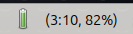
How many or you use the extra battery charge applet, which has a habit of not loading or crashing?
How many of you use the Mate battery charge applet which you can set with dconf editor to show both time left and percentage at the same time?
To make sure we’re on the same page here:
The ayatana indicator applet can be configured through the “indicators” option in mate-control-center.
Both time and percentage are selectable options.
The one that can be added from the panel-config can be set by right-clicking the icon and choosing properties.
Also here: Both time and percentage are selectable options.
I checked both laptops (one on 24.04 other on 26.04) and both are using the ayatana indicator.
No problems with it though. 
My Indicator applet complete shows battery power level without a problem. And I suppressed that big green battery icon by selecting Never display icon in power settings preferences.
OMG! you are right, there is a third battery charge indicator that can be activated through the powermanager.
Yes, I also selected in the powermanager Never display icon
I like the ayatana indicator applet because I can see both percentage and time remaining. It helps me know the health of my battery.
Stick with the Ayatana indicator. It provides the dual-view you want without the instability of the legacy MATE applet.
The MATE applet often hangs when it receives these inconsistent calculations from upower, whereas the Ayatana indicator tends to simply update the string or show the most recent valid data without crashing the panel.