This post is more or less a rewrite and update of a post I wrote years ago.
Since I wrote this code many years ago and also did some minor changes to this code plus the fact that I never posted it on this forum is my reason to revisit it.
Keep in mind though that some newer AMD GPUs (RDNA3) do not support external fan control due to firmware limitations. This controller is therefore not suitable for those cards.
Ok, let’s begin:
I have ran this little gadget for many years now and it is probably the most robust and
unobtrusive piece of software in my system.
AMD GPU cooling
Although I really love my XFX RX 570 8GB discrete GPU and it renders everything I throw at it with remarkable speed and without a hitch (yes, even RoboCop: Rogue City ) it has two drawbacks:
- The fans are absolutely great but also very loud when running fullspeed (4000 rpm).
- The card gets extremely hot under Linux (on MS-Windows it’s ok)
The reason it runs hot under Linux is that there is no fancontrol so the fans are at a fixed
speed of around 1450 rpm which is nice and silent but in my opinion inadequate when
running very heavy loads.
For MS-Windows there is the AMD driver software suite that takes care of it but for Linux
there was nothing, at least not when I wrote this script.
In the meantime several types of AMDGPU fancontrollers have been written. Some need manual intervention, some are written in an unstable language, a lot of them are outdated. This one however adheres to the current API and is written in bash: simpel, small, lightweight, robust and fully automatic (no interface, not needed)
The familiy of AMD RX chips can handle a maximum temperature of a stunning 94°C (
200°F ) before they either throttle or shut down but running the GPU close to that
temperature is in my opinion way too hot to be healthy, possibly shortening the lifespan
of the GPU considerably.
Goals:
-
I want the maximum temperature set on a sane value.
-
The fan should be at full speed at maximum temperature regardless any other
settings: Survival of the card is of utmost importance. It should never exceed the
maximum temperature that I configure. -
The fan should stop (preventing unneeded wear and tear) when the temperature is
below a certain level -
The script must be extremely simple. The reasons are
a. less chance on bugs, easier to spot them
b. easier to reason about how it works
c. much more robust (which is very important because GPUs are pretty expensive). -
It must be an invisible “set it and forget it” script.
What it turned out to be:
All of the above, You can change the following parameters in the script if you want to, but that is usually not needed at all:
- temperature for maximum fanspeed (default 80°C)
- temperature where the fan kicks in (default 50°C)
- temperature where the fan shuts off (default 40°C)
- fansetting for minimum rpm (if not shut off) (default around 900 RPM)
- temperature polling interval (default 10 seconds)
The temperature/fanspeed curve:
I have to reveal that I am artistically challenged so forgive my doodling:
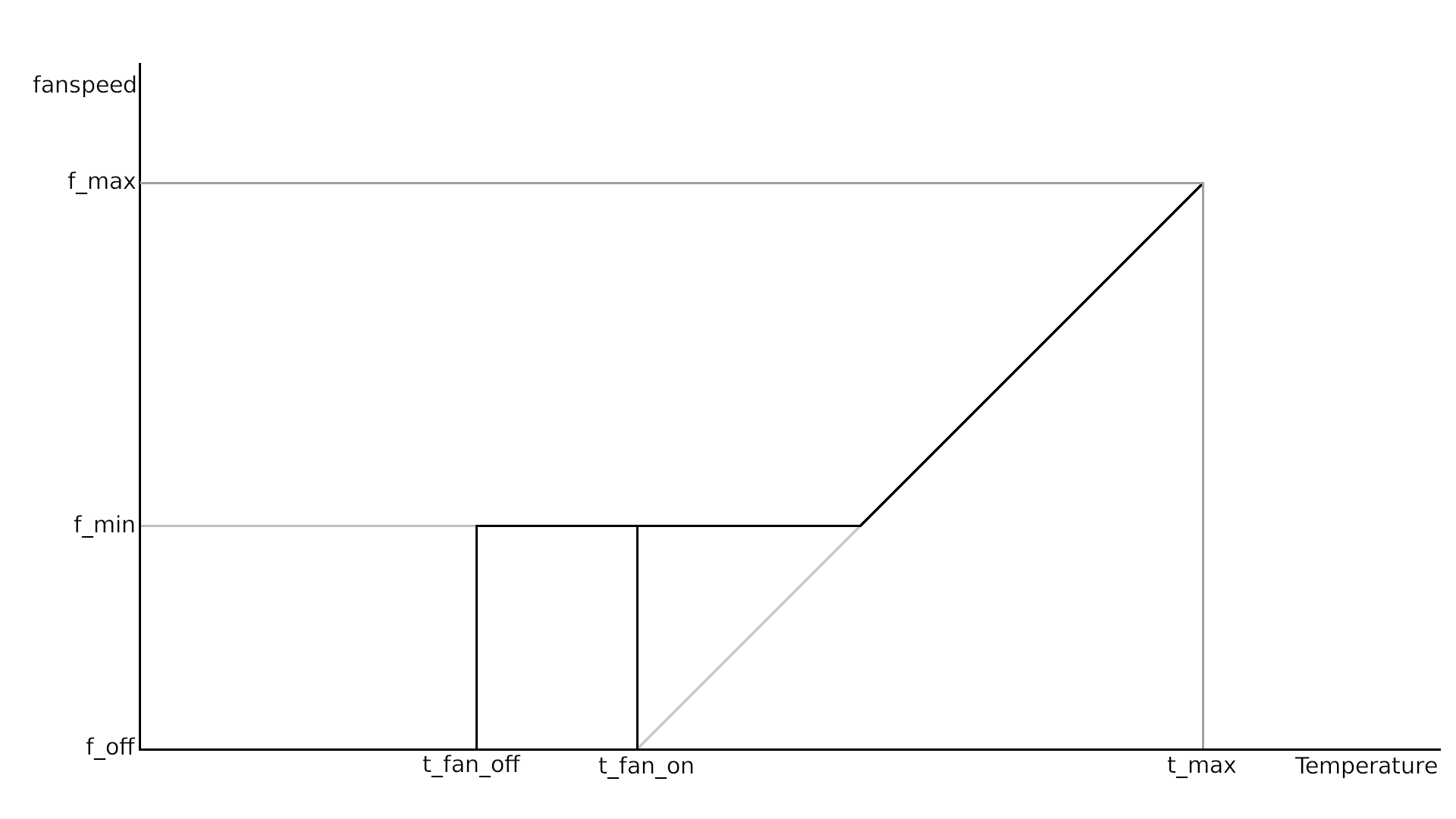
This is the code:
#!/bin/bash

## Find the AMD GPU or exit
sys_entry="$( /usr/bin/grep -Fril amdgpu /sys/class/hwmon/*/name 2>/dev/null )"
if [ -n "$sys_entry" ]
then cd "${sys_entry%/*}"
else /usr/bin/logger "fanctl: GPU not found" ; exit
fi

## give control back to the GPU-unit whenever we exit:
trap "echo 2 >pwm1_enable; wait; exit" INT TERM EXIT

## CONFIG: temperature is expressed in °C * 1000
t_max=80000            ## temperature for maximum fanspeed
t_fan_on=50000         ## temperature where the fan kicks in
t_fan_off=40000        ## temperature where the fan shuts off
f_min=90               ## fansetting for minimum rpm (0-255)

## don't touch the values below
f_max=255 ; f_off=0 ; (( t_delta = t_max - t_fan_on ))

while :
do
    ## get current temperature
    t_current=$(<temp1_input)

    ## when in operational range ...
    if  (( t_current > t_fan_on ))
    then
        ## ... calculate fansetting ...
        (( f_set = f_max * ( t_current - t_fan_on ) / t_delta  ))

        ## ... and prevent fan from dropping below minimum rpm
        (( f_set < f_min )) && (( f_set = f_min ))
    else
        ## But if temperature is really low -> shut fan off
        (( t_current < t_fan_off )) && (( f_set = f_off ))
    fi

    echo 1 >pwm1_enable     ## always take control of the GPU first
    echo $f_set >pwm1       ## write preferred fanspeed setting to GPU
    /usr/bin/sleep 10       ## polling interval in seconds (default: 10)
done
Save the script as /usr/local/bin/fanctl and make it executable
note: if the filename is already in use, choose a diferent filename.
The same applies for the systemd service below ofcourse
Installing in systemd so it runs when multiuser-target is reached:
Paste below codeblock in a terminal and press enter:
cat<<FANCTL | sudo tee /etc/systemd/system/fanctl.service
[Unit]
Description=AMDGPU Fancontrol Daemon
ConditionPathExists=/usr/local/bin/fanctl
ConditionFileIsExecutable=/usr/local/bin/fanctl
After=multi-user.target

[Service]
ExecStart=/usr/local/bin/fanctl

[Install]
WantedBy=multi-user.target
FANCTL
sudo systemctl enable fanctl.service
How does it behave ?:
Below you see a picture of both Unigine Heaven and Furmark heavily torturing (a.k.a.
stresstesting) my GPU at the same time, this has been running for 10 minutes before I
took the screenshot and it is keeping the GPU at a nice constant 72°C . Settings of the
fancontroller are the same as in the code above.
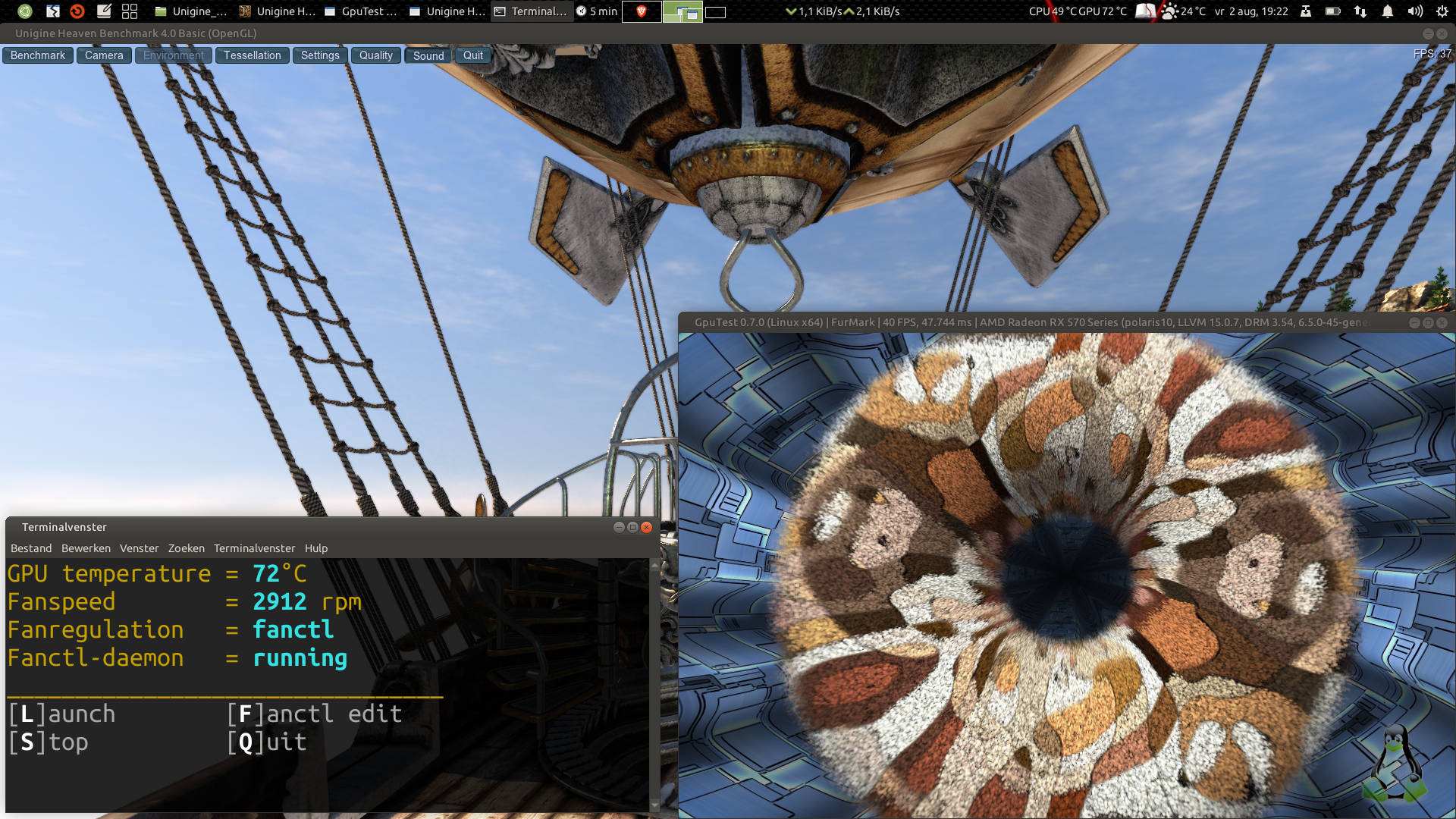
(P.S. The terminal with the temp/rpm values that you see in the picture, is not part of the fancontroller. Just a little helper script to view the values realtime)
EDIT: code change → fixed a typo and also enhanced readability