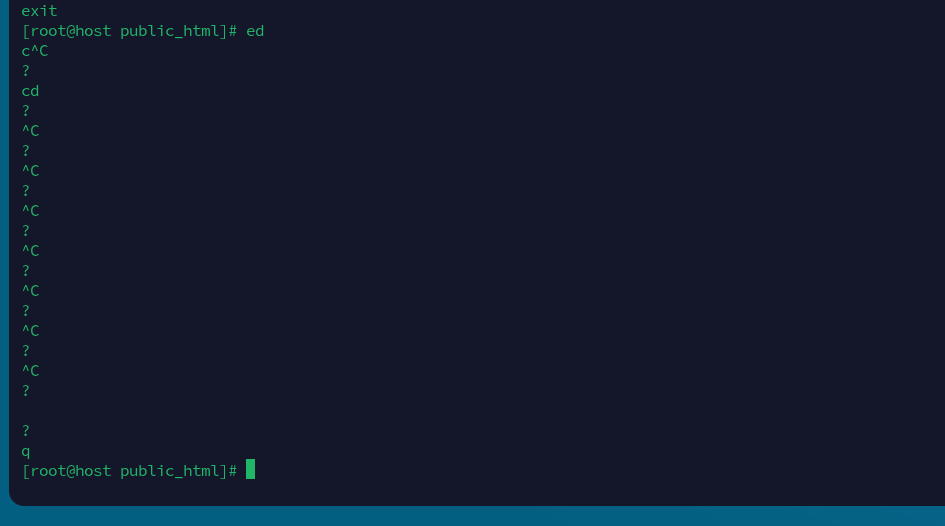
This morning early. I typed ed instead of cd. As you can see like a noob I panicked until, well, eventually. I realize it was ed.
Oops!
Anyone else have a terminal moment like this? Wrong command, wrong server, wrong directory, stuck in vim, a rm -rf that made your heart stop… Share your best (or worst) brain.exe-stopped-responding story below. Bonus points if it happened in production.
My previous, typo was a far worse outcome, I belive it was last year I typed crontab -r instead of e.
crontab -r deletes your entire crontab immediately, no confirmation!
e and r are keyboard neighbors so it’s not that hard to hit the wrong one. It took me about an hour to extra a backup of cron jobs from a nightly snapshot.
Not exactly terminal. Once upon a time I failed to call server room and felt quite disorientated until managed to find myself typing server’s IP using phone’s keys.
Yep. Several SSH terminals open to different computers/servers.
Ofcourse typing the wrong command in the wrong terminal
It took me a few minutes before I dawned on me what I had done.
I can’t say that I’ve had any of these experiences RECENTLY, but I HAVE self destructed a system DELIBERATELY with # rm -rf / when the system was going to be REPLACED!
I’ve said it HUNDREDS of times, whether here or elsewhere, MAKE 100% certain that you have BACKUPS and TESTED BACKUPS, maybe even redundant backups; then there is very little that can be lost other than a little bit of time and any changes performed in between backups.
I’ve been in places where we’ve been forced to recover from backups or replace something, whether it was due to a breech, a disk failure or something just as close to disaster. We HAVE lost time, but we DID have levels of backup. Back then, restoring took a LOT of time too; these days, at least on SOME systems it can be done relatively quickly, but in any case, provide yourself multiple ways to recover from the planned AND the unplanned; it may STILL be uncomfortable, but it WILL ultimately SAVE the DAY!
No, only because I am a poor typist, hardly ever use the terminal, and usually copy and paste when I do use the terminal. Otherwise my answer would be yes. everyday!
For me for work Termius - Modern SSH Client. It allows me to color code sessions which does help visually to catch when I’m not where I think.
Also, once you configure a color scheme on a saved profile in Remmina, it stays permanently assigned and automatically applies every time you open that session.
Thanks for the suggestion—it seems a bit too overkill for my needs though. If anyone has a suggestion for something simple that stays inside the terminal (I am using xfce4-terminal) please let me know