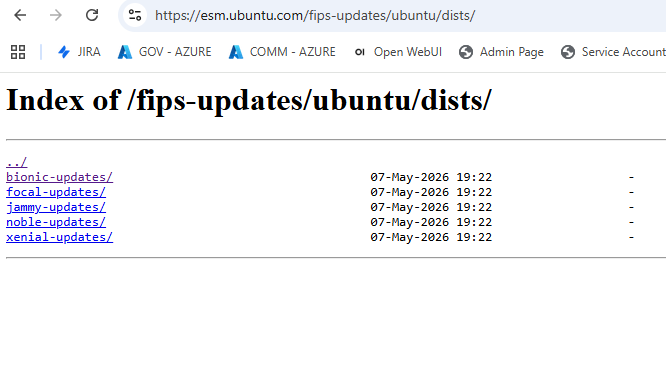
Trying to figure out how to change the deb mirror source. Here is the script itself;
#!/bin/bash
NOTES:
Trailing Slash is Required on the server=line
i.e. server=mirror.pit.teraswitch.com/
Leading and Training Slash is Required on the --root parameter
i.e. --root=‘/ubuntu-advantage/security-benchmarks/ubuntu/’
script_name=$(basename – “$0”)
if pidof -x “$script_name” -o $$ >/dev/null; then
echo “An another instance of this script is already running, please clear all the sessions of this script before starting a new session”
exit 1
fi
export GNUPGHOME=/root/ubuntukeyring
arch=amd64
inPath=/ubuntu
Ubunuta Advantage
#deb Index of /fips-updates/ubuntu/ bionic-updates main
#deb Index of /fips-updates/ubuntu/ jammy-updates main
Working
outPath=/var/www/html/latest/deb/esm/fips-updates/ubuntu
release=“bionic-updates,jammy-updates”
section=main
proto=https
repolog=“/var/log/debmirror/${server::-1}.log”
/usr/local/bin/debmirror -a $arch -s $section -h $server --dist=$release --method=$proto
–rsync-extra=none
–root=/fips-updates/ubuntu/
–user=bearer
–passwd='redacted’>
$outPath -v 2>&1 | tee -a $repolog
Now, the problem is that the path seems to have changed for esm.ubuntu.com to this;
esm.ubuntu.com/fips-updates/ubuntu/dists/bionic-updates/ but the debmirror script isnt picking it up. I have both bionic and focal on the farm so I can’t specify both or either. Any ideas? here are the errors;
gpgv: Good signature from “Ubuntu Federal Information Processing Standards Automatic Signing Key V1 [email protected]”
[ 0%] Getting: dists/jammy/main/binary-amd64/Packages.gz… Download of dists/jammy/main/binary-amd64/Packages.gz failed: 404 Not Found
[ 0%] Getting: dists/jammy/main/binary-amd64/Packages… Download of dists/jammy/main/binary-amd64/Packages failed: 404 Not Found
[ 0%] Getting: dists/jammy/main/binary-amd64/Release… Download of dists/jammy/main/binary-amd64/Release failed: 404 Not Found
[ 0%] Getting: dists/jammy/main/source/Sources.gz… Download of dists/jammy/main/source/Sources.gz failed: 404 Not Found
[ 0%] Getting: dists/jammy/main/source/Sources… Download of dists/jammy/main/source/Sources failed: 404 Not Found
[ 0%] Getting: dists/jammy/main/source/Release… Download of dists/jammy/main/source/Release failed: 404 Not Found
[ 0%] Getting: dists/jammy/main/binary-amd64/Packages.gz… Download of dists/jammy/main/binary-amd64/Packages.gz failed: 404 Not Found
[ 0%] Getting: dists/jammy/main/binary-amd64/Packages… Download of dists/jammy/main/binary-amd64/Packages failed: 404 Not Found
[ 0%] Getting: dists/jammy/main/binary-amd64/Release… Download of dists/jammy/main/binary-amd64/Release failed: 404 Not Found
[ 0%] Getting: dists/jammy/main/source/Sources.gz… Download of dists/jammy/main/source/Sources.gz failed: 404 Not Found
[ 0%] Getting: dists/jammy/main/source/Sources… Download of dists/jammy/main/source/Sources failed: 404 Not Found
[ 0%] Getting: dists/jammy/main/source/Release… Download of dists/jammy/main/source/Release failed: 404 Not Found
[ 0%] Getting: dists/bionic/main/binary-i386/Packages.gz… Download of dists/bionic/main/binary-i386/Packages.gz failed: 404 Not Found
[ 0%] Getting: dists/bionic/main/binary-i386/Packages… Download of dists/bionic/main/binary-i386/Packages failed: 404 Not Found
[ 0%] Getting: dists/bionic/main/binary-i386/Release… Download of dists/bionic/main/binary-i386/Release failed: 404 Not Found
[ 0%] Getting: dists/bionic/main/binary-amd64/Packages.gz… Download of dists/bionic/main/binary-amd64/Packages.gz failed: 404 Not Found
[ 0%] Getting: dists/bionic/main/binary-amd64/Packages… Download of dists/bionic/main/binary-amd64/Packages failed: 404 Not Found
[ 0%] Getting: dists/bionic/main/binary-amd64/Release… Download of dists/bionic/main/binary-amd64/Release failed: 404 Not Found
[ 0%] Getting: dists/bionic/main/source/Sources.gz… Download of dists/bionic/main/source/Sources.gz failed: 404 Not Found
[ 0%] Getting: dists/bionic/main/source/Sources… Download of dists/bionic/main/source/Sources failed: 404 Not Found
[ 0%] Getting: dists/bionic/main/source/Release… Download of dists/bionic/main/source/Release failed: 404 Not Found
[ 0%] Getting: dists/bionic/main/binary-i386/Packages.gz… Download of dists/bionic/main/binary-i386/Packages.gz failed: 404 Not Found
[ 0%] Getting: dists/bionic/main/binary-i386/Packages… Download of dists/bionic/main/binary-i386/Packages failed: 404 Not Found
[ 0%] Getting: dists/bionic/main/binary-i386/Release… Download of dists/bionic/main/binary-i386/Release failed: 404 Not Found
Download of dists/jammy/main/binary-amd64/Packages.gz failed: 404 Not Found
dists/jammy/main/binary-amd64/Packages.gz failed checksum verification
Download of dists/jammy/main/binary-amd64/Packages failed: 404 Not Found
dists/jammy/main/binary-amd64/Packages failed checksum verification
Download of dists/jammy/main/binary-amd64/Release failed: 404 Not Found
dists/jammy/main/binary-amd64/Release failed checksum verification, removing
Download of dists/jammy/main/source/Sources.gz failed: 404 Not Found
dists/jammy/main/source/Sources.gz failed checksum verification
Download of dists/jammy/main/source/Sources failed: 404 Not Found
dists/jammy/main/source/Sources failed checksum verification
Download of dists/jammy/main/source/Release failed: 404 Not Found
dists/jammy/main/source/Release failed checksum verification, removing
Download of dists/jammy/main/binary-amd64/Packages.gz failed: 404 Not Found
dists/jammy/main/binary-amd64/Packages.gz failed checksum verification
Download of dists/jammy/main/binary-amd64/Packages failed: 404 Not Found
dists/jammy/main/binary-amd64/Packages failed checksum verification
Download of dists/jammy/main/binary-amd64/Release failed: 404 Not Found
dists/jammy/main/binary-amd64/Release failed checksum verification, removing
Download of dists/jammy/main/source/Sources.gz failed: 404 Not Found
dists/jammy/main/source/Sources.gz failed checksum verification
Download of dists/jammy/main/source/Sources failed: 404 Not Found
dists/jammy/main/source/Sources failed checksum verification
Download of dists/jammy/main/source/Release failed: 404 Not Found
dists/jammy/main/source/Release failed checksum verification, removing
Download of dists/bionic/main/binary-i386/Packages.gz failed: 404 Not Found
dists/bionic/main/binary-i386/Packages.gz failed checksum verification
Download of dists/bionic/main/binary-i386/Packages failed: 404 Not Found
dists/bionic/main/binary-i386/Packages failed checksum verification
Download of dists/bionic/main/binary-i386/Release failed: 404 Not Found
dists/bionic/main/binary-i386/Release failed checksum verification, removing
Download of dists/bionic/main/binary-amd64/Packages.gz failed: 404 Not Found
dists/bionic/main/binary-amd64/Packages.gz failed checksum verification
Download of dists/bionic/main/binary-amd64/Packages failed: 404 Not Found
dists/bionic/main/binary-amd64/Packages failed checksum verification