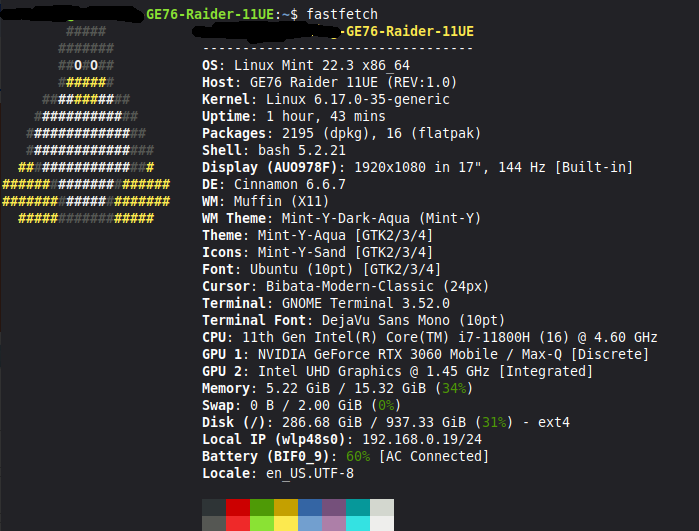
Hello, I have a question about a problem I have been having with two games in my Steam library (Like A Dragon: Infinite Wealth and Lost Judgment). All of my other games seem to work fine with Proton, including the other games in these series that I have (ie. Yakuza: Like A Dragon and Judgment work fine). The issue when I try to boot these games is that they seem to load and “play” with audio and ability to select things from the menus and such, EXCEPT there is no picture, just black screen. Everything else seems to work correctly. I tried asking Steam Support but just recommended I dual boot with an Ubuntu distribution that is directly supported by Proton instead of my Mint setup. But all my other games work fantastically except these two, and these two are also very close to working perfectly as well! Not to mention that on the ProtonDB website these two games are considered “Platinum” releases. For reference, when I originally played these on Windows 10/11, they worked fine so I do not think it is a hardware issue outside of the possibility that my current hardware may be clashing with Mint on these two games for whatever reason.
I did try the other Proton options (and got locked out due to Denuvo, who I contacted about it since they are legit purchases with receipts; they seem to be cooperating), but did not see your suggestion yet on the ProtonDB website, so when I get access back again I will try this. Thank you! I will return to this thread if it does not work.
For reference, the Vulkan shader function does work, or appears to anyways, when booting them. Is this related?
Denuvo is one of the most horrible pieces of DRM i’ve ever encountered.
It is said that it is anti-piracy but the reality teaches that pirates can work around it and the only victims are paying customers (most of them running windows).
If you have Denuvo infested software running on windows, there is a big chance it does not even survive an upgrade to a newer windows version.
Some game publishers never learn. And that while Steam showed the way how to get rid of piracy without those draconian methods.
Hi @svhs27102! I agree with @hydn’s thoughts on trying to use another version of Proton.
In my experience, when I’ve played games that have had audio, but no video, using the GE-Proton version instead of normal Proton has better results.
Trying the launch options is definitely the quickest first test though, and if that works, then stick with that as it’s simpler. If it does not work, look into GE-Proton.
You can install those easily (if you’re ok with Flatpaks) through this Flatpak: ProtonUp-QT. It’s pretty straightforward to get it going, and if you do, I would recommend installing GE-Proton10-33 or GE-Proton10-34, as those have worked very well for me in all the games I play.
You can change the Proton version in Steam by:
Right-click on the game in your Steam Library
Select Properties
Select the Compatibility tab
Check the box Force the use of a specific Steam Play compatibility tool (if not already checked)
Then select one of the new GE-Proton versions you installed
While you could set a GE-Proton version as a global default in Steam, I personally recommend doing per game. It’s been easier for me that way.
Hello, I got a chance to try your suggestion today. Unfortunately it did not work. Nor did using GE Proton in combination with your launch options. I will say that it did change slightly in that there was a flicker of color on a strip on the bottom part of my screen this time. Do you have any other launch option tricks that might help? Thanks though regardless. This is such a mystery to me with how good the ProtonDB reviews are for these two games, and with how all my other games run so well.
Hey @svhs27102, sorry to hear that the settings you tried didn’t work! I looked up the game “Like A Dragon: Infinite Wealth” on ProtonDB and filtered for Nvidia GPUs and Mint* as the OS to see what other people have tried.
There is only one other user with that combination that made a report from ~2 years ago that recommended a much older version of vanilla Proton (7.0.6). Looks like that version is still available to select in my Steam, so that may be worth trying (both with and without @hydn’s launch options).
Filtering by just Nvidia GPU reports, everyone seems to be on a much older Proton or GE-Proton version (most likely because the reports are older, but it shows that those versions worked at the time). So, as painful as it may seem, I would try rotating through older versions until you find a combination that works.
Thank you so much for going out of your way to help me. I was also thinking of the possibility of just dual booting a different Linux distribution if I can’t figure it out. We’ll see, but thanks again and I will try this.
Okay update number 1: Proton GE-7.41 seems to work for Lost Judgment! It takes a while to launch and the graphics at least at the main menu seem a bit PS3-ish so I might try to launch without the shaders launch option that I have on, just to see. If turning that off messes it off, I will need to go in-game to see how rough it looks, and if it annoys me I might still dual boot with a more game-friendly Linux OS, just because there seems to be far fewer issues on some others.
As a final update here, today I tried booting Nobara on a bootable USB. Nobara already had Steam installed so all I had to do was log in and add the external drives my games are on.
And when I tried Like A Dragon and Lost Judgment, the two problematic games on Mint, they worked out of the box immediately on Nobara with Proton 10. So I guess I can just try using Nobara for any problematic games I have. Glad I was able to figure that out. So I guess there was some kind of issue with those two games an Mint and the Nvidia drivers, based on the info we discussed in this thread. Just glad I can play them without issue again!
Thanks for keeping us posted on this! It may help others. Good to know Nobara handled both out of the box, that’s a handy fallback. Glad you can play them again.