If you have a Laptop with those specs… don’t throw it in the trash, but install the OS wisely so you can be productive on that computer.
1. antiX Linux
AntiX Linux is repeatedly identified in community discussions and technical documentation as one of the most efficient options for ultra-low-end hardware because it is designed specifically for older machines, avoids systemd in favor of lighter init systems, and uses extremely lightweight window managers such as IceWM or Fluxbox, which significantly reduces idle RAM usage and makes it highly responsive on systems with limited memory and slow mechanical storage.
2. Debian 12 with XFCE, LXQt, and LXDE
Debian 12 with XFCE, LXQt and LXDE is consistently described as the most balanced and sustainable option because it provides a stable base system with long-term support, a large software repository, and the ability to be heavily customized by removing unnecessary services and installing only essential components, allowing users to achieve a lightweight but still fully functional desktop environment suitable for daily use, why not Debian 13? because on my laptop in the same specs, Debian 13 does not work with Hardware rendering, but instead goes into Software Rendering (llvmpipe), Meanwhile, on Debian 12, it runs using GPU Acceleration (even though the Intel GMA 3150 is slow, Hardware Acceleration helps prevent UI lag and CPU work is lower).
3. Lubuntu 24.04 LTS (LXQt)
Lubuntu with LXQt is generally positioned as a middle-ground solution that offers a more modern and user-friendly desktop experience while still maintaining relatively low resource consumption compared to heavier desktop environments like GNOME or KDE, although it is typically considered slightly heavier than Debian or antiX on hardware constrained by slow mechanical drives.
4. Puppy Linux
Puppy Linux is frequently categorized as an ultra-lightweight and highly optimized system that can run entirely in RAM and achieve extremely fast boot times, but it is also considered non-standard in terms of Linux filesystem structure and workflow, which can make it less suitable for users who require conventional package management and system behavior.
5. Tiny Core Linux
Tiny Core Linux is described as an extreme minimal distribution that provides only the most basic system components and requires users to manually build their environment, making it more appropriate for experimental use or advanced customization rather than daily desktop computing.
6. Arch Linux
Arch Linux is widely recognized as a highly flexible and minimal base system that can be optimized for excellent performance on low-end hardware when carefully configured with lightweight components and minimal services, but it requires advanced Linux knowledge, manual installation, and ongoing maintenance, which makes it less practical for users seeking a ready-to-use system.
7. Real-World Performance Reality
Even though these distros are lightweight, it doesn’t make the Intel Atom N450 being a Monster and equivalent to a modern CPU, the Atom N450 is still an Atom N450, choosing the light distro only makes the CPU, GPU, and RAM work more efficiently, lower, and more faster than Regular distro (Ubuntu, Linux mint Cinnamon, and other)
8. Useful Tweaks
For advanced tweaks to maximize Resource Usage efficiency, Read this topic (The tweak applies to other distros besides Arch Linux).
9. Final Conclusion
The most practical configurations for this type of hardware are either antiX for maximum efficiency or Debian minimal with XFCE for the best balance of usability and stability, depending on whether the priority is raw performance or a more conventional desktop experience.
Extras
I’m using a Toshiba NB 305 with Intel Atom N450, Intel GMA 3150, 2GB DDR2 RAM, 250GB 5400RPM HDD, Now I use Arch Linux GNOME as my main OS, wait a minute, why GNOME? Isn’t that a very heavy Desktop Environment for this Hardware? Because I am a Linux application developer who focuses on GTK4 and Libadwaita Ecosystem, and I need GNOME Workflow, so I really need GNOME. But There are definitely limitations, slow application opening, slow initial boot response, slow multitasking, and other, But if it has been idle for a long minute and used for a long minute, the response is much better compared to the initial boot, the RAM usage is also lower (thanks to Cache and Zram)
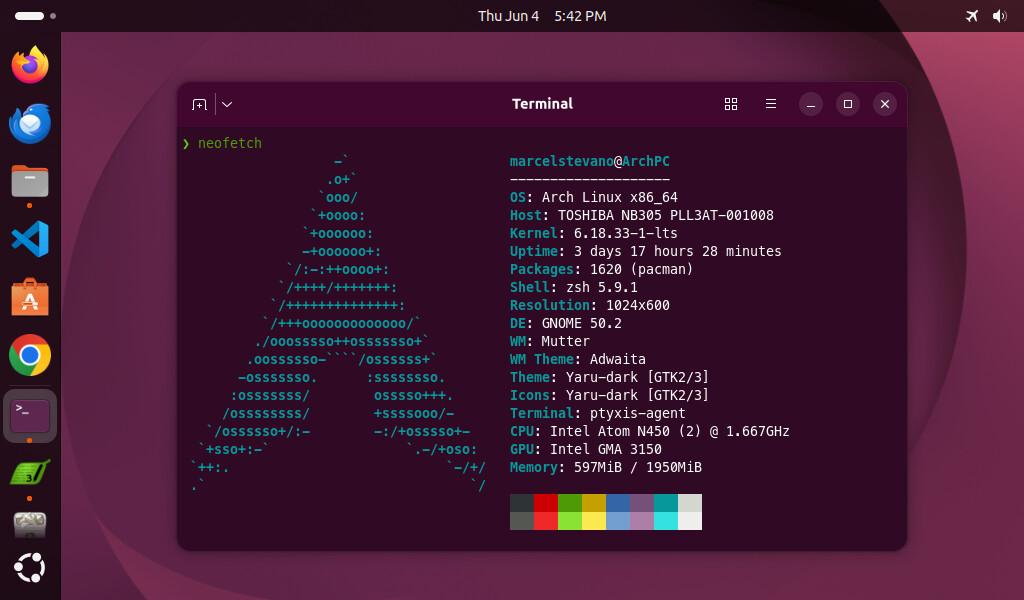
I have XFCE and MATE installed on my Arch Linux, so it’s not just GNOME, GNOME is really a Development and Workflow necessity, if I want to use it normally, I log in to XFCE or MATE