DigiKam facial recognition configuration with AMD GPU

I want to use DigiKam facial recognition software on my desktop machine. I have made a start at this, but I have run into a problem. Following is a description of my system and the problem, which I believe has to do with recognition of my GPU by AMD’s RocM software and the OpenCL software.

Software and Hardware Status:
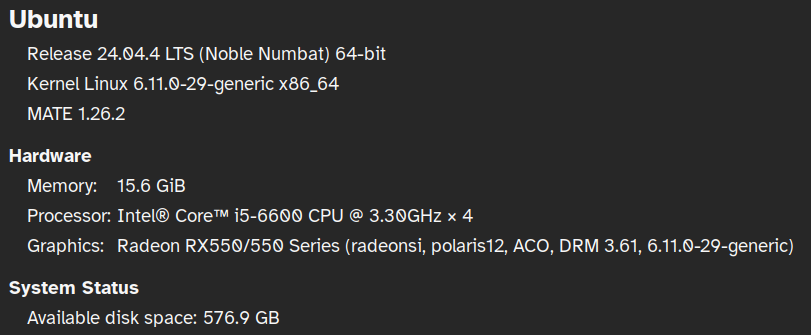
I have installed dependencies that I am aware of. -
sudo apt install rocm-opencl ocl-icd-libopencl1

I am using DigiKam as an AppImage:
digiKam: 9.0.0
KDE Frameworks: 6.20.0
Qt: Using 6.10.1 and built against 6.10.1
AppImage
Ubuntu 24.04.4 LTS (Xcb)
Build ABI: x86_64-little_endian-lp64
Kernel: linux 6.11.0-29-generic

I have created the following environment variable:
OPENCV_OPENCL_DEVICE=AMD:GPU:0

The Problem:
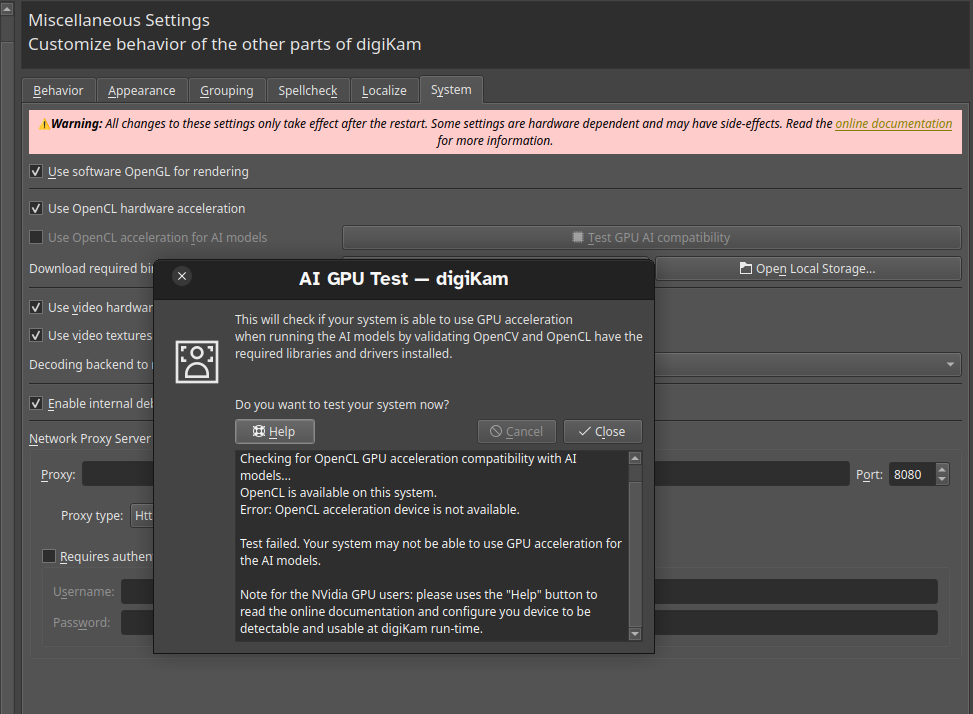
The OpenCL software does not appear to recognize my AMD GPU. Using clinfo I see the following.
“ Number of platforms 1
Platform Name AMD Accelerated Parallel Processing
Platform Vendor Advanced Micro Devices, Inc.
Platform Version OpenCL 2.1 AMD-APP (3581.0)
Platform Profile FULL_PROFILE
Platform Extensions cl_khr_icd cl_amd_event_callback
Platform Extensions function suffix AMD
Platform Host timer resolution 1ns

Platform Name AMD Accelerated Parallel Processing
Number of devices 0

NULL platform behavior
clGetPlatformInfo(NULL, CL_PLATFORM_NAME, …) AMD Accelerated Parallel Processing
clGetDeviceIDs(NULL, CL_DEVICE_TYPE_ALL, …) No devices found in platform [AMD Accelerated Parallel Processing?]
clCreateContext(NULL, …) [default] No devices found in platform
clCreateContextFromType(NULL, CL_DEVICE_TYPE_DEFAULT) No devices found in platform
clCreateContextFromType(NULL, CL_DEVICE_TYPE_CPU) No devices found in platform
clCreateContextFromType(NULL, CL_DEVICE_TYPE_GPU) No devices found in platform
clCreateContextFromType(NULL, CL_DEVICE_TYPE_ACCELERATOR) No devices found in platform
clCreateContextFromType(NULL, CL_DEVICE_TYPE_CUSTOM) No devices found in platform
clCreateContextFromType(NULL, CL_DEVICE_TYPE_ALL) No devices found in platform

ICD loader properties
ICD loader Name OpenCL ICD Loaderns
ICD loader Vendor OCL Icd free softwarens
ICD loader Version 2.3.2ns
ICD loader Profile OpenCL 3.0ns

This is confirmed in DigiKam settings:
I’m hoping that someone can offer assistance, for which I will be very thankful.

5 Likes

I’ll preface this by saying I know nothing about DigiKam but I do notice a few oddities here.

Was this a fresh install of 24.04.4 or have you upgraded to .4 over time from an earlier 24.04.x install? The reason I ask is that 24.04.4 iso installs the 6.17.x-xx kernel by default and you are currently on the 6.11.x-xx kernel which shipped with 24.04.2 though if you were following an upgrade path from .2 you should already have the 6.17 kernel I believe,if not a simple install of the latest kernel linux-generic-hwe-24.04 could very well solve your issue as it may support your GPU.

Also have you tried using the .deb or Flatpak versions instead of the Appimage? The .deb package that is in the repos is slightly older (8.2.0) while the Flatpak will be the latest version at 9.0.0. The .deb version is specifically packaged for Ubuntu so all dependencies should be met at install and work right out of the gate.

4 Likes

Hi Norm - Thanks for the reply.

Yes, you are right - you have detected that my configuration is a little unusual. It is a somewhat complicated story that started with the fact that I had an old nvidia gpu originally, At some point last year an update came out that included an nividia driver that no longer supported my gpu. At that point, I did some things to back away from the release to make my nvidia gpu work again. Ultimately, I removed the nvidia gpu and replaced it with an old amd one for which the default amdgpu driver worked. Since then my Linux kernel has not updated, and I have been reluctant to deal with that because of my lack of expertise. Perhaps I am stuck with the GA kernel. If you have suggestions for how I can get back on the most recent kernel, I will try them. Otherwise I can try -

“sudo apt install --install-recommends linux-generic-hwe-24.04”

Regarding use of the DigiKam AppImage, I could indeed try the .deb package instead. However, I guess that should start with installing an up to date kernel.

I don’t want to take too much of your time, but if you have any subsequent thoughts, I am interested. - Thanks again.

2 Likes

sudo apt install linux-generic-hwe-24.04 will install the latest 6.17.x-xx kernel,after a restart your pc should boot into this kernel. At that point see what works or doesn’t work as is.But I would still in the end recommend the DigiKam .deb package from the repos as it will just be better supported but if after booting into the latest 6.17 kernel works with the AppImage then it’s up to you,sometimes its best not to mess with what works.If everything works then it will be safe to remove the 6.11 kernel plus being on the latest kernel is better from a security standpoint.

4 Likes

Thanks! I understand, and I’m off to the races now.

2 Likes

Kernel 6.17.0-23 installed fine. There were the expected printer/scanner issues, but I am past that. Installed the .deb version of DigiKam from the standard repository, and it looks fine but it will take some time to fully explore.

Thank you very much for your advice! I think that this can be marked as a successful solution!

5 Likes

Excellent! Glad it worked out.

2 Likes