If you ever tried to change the backgrounds/wallpapers of Brave then you probably discovered that you can only have one wallpaper enabled at a time while the build in stuff rotates through many wallpapers.
This piece of code makes it easy to remove/add/change brave’s build-in wallpapercollection so you can insert or even completely replace the build in wallpapercollection which, ofcourse, rotates through every one of them.
What is the trick?
Brave hides its wallpapers in a directory with a random name and reads a photo.json file to learn which wallpapers it has to show and in which order.
Let’s make use of that
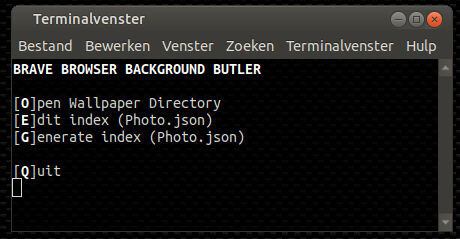
- select ‘O’ for Open Wallpaper Directory.
- delete the wallpapers you don’t like, add the wallpapers of your choice
- close the filemanagerwindow and choose ‘G’ for Generate a new index
That is all ! 
optional:
You can also edit the index manually if you feel the urge to do that ( press ‘E’ for Edit ) or if you want to change the order of the backgrounds.
make it suitable for your system:
Since everyone uses a different filemanager and editor, you can change the 2nd line in the script to make it conform to your filemanager and editor.
Since I use MATE-desktop:
editor=pluma ; filemanager=caja
but if you use GNOME you would use:
editor=gedit ; filemanager=nautilus
Here is the script:
#!/bin/bash
editor=pluma ; filemanager=caja

[ -t 1 ] || exit
shopt -s nullglob
declare -u choice
B=$(tput bold)			#Bold
G=$(tput setaf 2)${B}	#Green+bold
N=$(tput sgr0)			#reset to Normal
title="${B}BRAVE BROWSER BACKGROUND BUTLER${N}"
status="$title"
WriteRecord()
{
	local author="${1%%_*}" title="${1##*_}"
	author="${author//-/ }" title="${title%%.*}"

	cat<<RECORD
		"name":"$title",
		"source":"${1}",
		"author":"${author}",
		"link":"https://community.brave.com/",
		"originalUrl":"unused",
		"license":"unused"
RECORD
}
Generate()
{
	local x
	echo -e '{"schemaVersion":1,\n\t"images":[{'
	for picname in "${picdir}/"*{webp,png,jpg,jpeg,avif}
	do
		[ $x ] && echo -e '\t},{' || x=set
		WriteRecord  "${picname##*/}"
	done
	echo -e '\t}\n]}'
}
Menu()
{
	while :
	do
		clear
		cat<<-MENU
		$status

		[${B}O${N}]pen Wallpaper Directory
		[${B}E${N}]dit index (Photo.json)
		[${B}G${N}]enerate index (Photo.json)

		[${B}Q${N}]uit
	MENU
		read -s -n1 choice ; status="$title"
		case "$choice" in
		O) $filemanager "$picdir" ; status="${G}$filemanager launched${N}" ;;
		E) $editor "$index"	  & status="${G}$editor launched${N}"	   ;;
		G) Generate >"$index"	  ; status="${G}Photo.json generated${N}"  ;;
		Q) exit								   ;;
		esac
	done
}
exec 3< <( find $HOME/.config/BraveSoftware/Brave-Browser -name "manifest.json" )
while read -u3 manifest
do
	if grep "Brave NTP background images component" "$manifest" &>/dev/null
	then
		picdir="${manifest%/*}"
		index="${picdir}/photo.json"
		cp -n "${index}" "${index}.original"
		[ $(wc -l <"${index}") -lt 3 ] && sed -i "s|,|,\n|g" "${index}"
		Menu
	fi
done
EDIT: I only tested this on Ubuntu-MATE. If this script doesn’t work for you, let me know.