Hi Brian,
From your perspective, and since you like to distro hop, I would like your input on my Manjaro Spin called DeLinuxCo. It is aimed at a SOHO workstation.
-John
Hi Brian,
From your perspective, and since you like to distro hop, I would like your input on my Manjaro Spin called DeLinuxCo. It is aimed at a SOHO workstation.
-John
If I can ever figure out what’s broken with my VM Manager I’ll try it for you.
Hi John, While I’m a big fan of a couple of Arch Linux variations, unfortunately I’ve had nothing but misfortune with Manjaro, and they always end with some kind of bad package that makes it unbootable thereafter. I have not tried this particular variation or respin, but again a few months ago after I saw a very favorable review of Manjaro, tried, and this time I didn’t even get a full day out of it; the first time I rebooted it was inaccessible. It’s really too bad, because it does seem to be fairly easy to install and configure. I’ve had MUCH better results with both Endeavour OS and Cachy OS. Endeavour OS is the most solid of the three; I’ve tried Endeavour OS with different desktop environments and every one I tried worked well. I’ve had very good success with Cachy OS and it’s well regarded as well. If you want the most cutting edge stuff, try Cachy OS, but Endeavour OS is pretty current. But if you ask me for my favorite among the Arch varieties, hands down, at least for me, it’s Endeavour OS; I’ve been able to retain it with no problem at all, yet you can almost always find the software you want; that’s a great combination, plus it’s attractive as well.
UPDATE: Just over the past week I’ve reinstalled Cachy OS on my every day system and after the latest change, I see why Cachy OS has risen so far on the Distro Watch favorites; it keeps improving and closing the gap on Endeavour OS and other Arch derivatives; it’s also getting easier because, like Endeavour OS, they include a Welcome, Start Up or Initialization screen, whatever you (or they) want to call it; this makes Cachy OS easy to update once it’s installed, and it’s also easy to install.
Twenty or more years ago there were NO truly easy to use Arch Linux systems for the non computer experts. Hard core Arch Linux stuff called their stuff, easy or simple because it didn’t have a lot of cruft, and that’s certainly true, but unless you had a script or memorized the details to get it going, it was daunting. I mastered my first one by finding and modifying that “script” to suit my purposes, but I never found Arch Linux to be faster or more efficient, so I saw little value in it, because there have been Debian derivatives for decades that optimize and allow more current, more efficient, yet simple setups, so both Cachy OS and Endeavour OS have greatly raised the bar on this.
I WISH I could say the same about Manjaro Linux; unfortunately time after time it has disappointed me, frequently resulting in an unbootable system that I’d have to chroot into for any potential to fix it, Uh uh, no thanks; too many other excellent distributions to bother with that these days.
To those who are brand new here or even here for a few months, once again I want to continue to welcome you; each different person brings their own questions, ideas, and experience, and I believe this is a place that endorses and greatly encourages such things!
Hearty greetings to all!
Welcome to our forums guys! 
I wonder when that changed. When I got my RHCSA and RHCE, there was no requirement for the lpi certs.
Most of the cert courses for Redhat require the LPI certs so the stuff from Redhat doesn’t leave them shell shocked I guess.
Hello everyone!
Until recently, I was a prisoner of Windows, but yesterday I finally decided to join the Linux community. I feel like I’ve been reborn—though with a slight hangover.
I’m still finding my way around the system, but I can already see how incredibly it has evolved over the years. It looks fantastic and is far from the clunky experience I was warned about. I’m grateful for the chance to switch sides and become part of this open, global, open‑source movement. My hope is that Linux will remain free from corporate control until the very end of the universe. 
I’d love to contribute my own small piece to the development of this ecosystem. I’m not a programmer or an engineer—my background is in 3D graphics, photogrammetry, and photography (with some video work as a hobby). From time to time, I’ll be sharing free wallpapers and animations that can be used in personal Linux‑related projects. At least for now, I want to dedicate these contributions exclusively to Linux, as a way of helping to spread and popularize it.
Best regards,
Bart’ski
Hi @Bartski Nice yo meet you.
Welcome, Bart’ski.
That first switch off Windows feeling is familiar to a lot of us.
Your background actually fits the ecosystem really well. Design, visuals, and creative assets are an area where Linux projects always benefit from community contributions.
Sharing Linux-focused artwork is a solid way to give back, even without touching code. Open source is as much about culture and presentation as it is about engineering.
Glad to have you here, and looking forward to seeing what you share.
Welcome to our humble little group. Which distro are you trying? And I’ll take all the free wallpapers I can get.
Greetings and welcome to the forum!
Welcome! Nice to hear people succeeding who come from a non technical background. Hoping it’s continuing to go well for you, it sounds like you picked up a lot of skills quickly, impressive!
Welcome! Love to hear about your interest in using accessible hardware and pushing the boundaries of AI, hope to see you around here and learn some more about what you’re doing. 
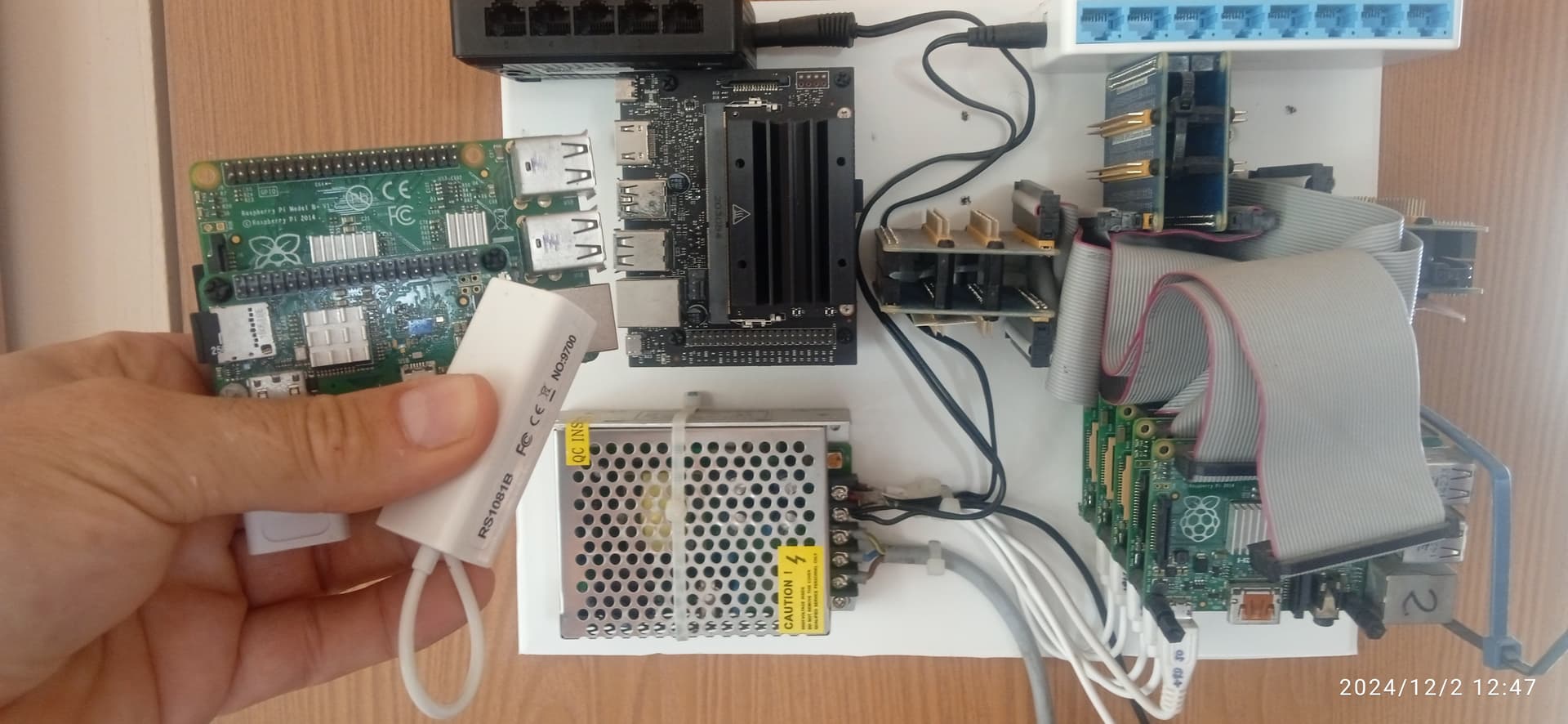
Hi for @Powder @JuiceB0xC0de, not enough time to follow this, but online for messages. About AI, my modules were nvidia Jetson TX2, Javier and Nano units. Not much happy with Ubuntu distro for Tegra Processors, and nvidia drivers, but were a good tools to supervised models like convolution, and small LLM next word prediction models on training or distilling from others, tunning, or as a inference servers for testing. Now the small jetson only as a demo with RPis stored. A picture before store this.
 Welcome to our Linux & tech forums.
Now that you’re in, we’d love to get to know you.
What do you do, and what draws you to Linux and tech?
Hit reply to introduce yourself to the rest of our community. 
Continued from the original Welcome thread!
I’m still “around”! Welcome to all newcomers!
I’m also still around, I’m just sporadically appearing and disappearing. (still stuck on trying to create a bootable, read-only, image of linux from a compiled code base lol.)
hey everyone sorry i’ve been gone for the past 2 weeks or so but i’ve been busy with school and everything else and working on my home lab but i’ve finally got it up and running and im proud to say this is all that i have been able to accomplish with it:
Home Lab & Technical Projects Event-Driven Automation & Hybrid-Cloud Management
Autonomous Monitoring Agent: Architected a real-time, event-driven Discord bot using the n8n automation engine to provide remote telemetry and command execution for a multi-node Proxmox environment.
Secure Tunneling & Integration:Bridged cloud APIs with local Linux infrastructure over a Tailscale mesh VPN, enabling secure SSH automation and remote management without exposing public firewall ports.
Custom Bash Scripting:Authored and optimized shell scripts to parse Linux hardware utilization (Xeon CPUs, NVIDIA GPU thermals/loads) and Proxmox hypervisor guest states (qmlist) directly to mobile devices.
API & Systems Troubleshooting: Enforced infrastructure security via API Privileged Gateway Intents and successfully debugged Linux daemon configuration hierarchy overrides (sshd_config) alongside deprecated NPM package dependencies.
Private Cloud & Virtualization Infrastructure Hardware Architecture: Engineered an enterprise-grade home server utilizing a Dell Precision T7910 with dual Intel Xeon processors (56 threads) and 128GB RAM. Configured high-performance, fault-tolerant storage architectures utilizing a 4-drive SSD RAID array for rapid application delivery alongside a high-capacity 4-drive SAS ZFS RAID pool for bulk data retention.
Hypervisor Administration: Deployed and actively manage Proxmox VE (Virtual Environment). Successfully allocated resources to prevent hypervisor bottlenecks, tuning vCPUs, memory ballooning, and ZFS ARC limits to ensure zero CPU wait time across multiple intensive workloads.
Network Security & Routing (OPNsense): Virtualized an OPNsense firewall instance within the Proxmox environment to serve as the primary network gateway. Configured core routing protocols, DHCP services, and secure GUI access interfaces to logically isolate and protect local VM infrastructure.
Zero-Trust Networking: Augmented edge security by implementing a “Zero Trust” architecture using Tailscale (WireGuard encapsulation) alongside OPNsense, allowing secure, remote access to server resources without exposing public ports. Managed local file sharing protocols (SMB/Samba) with strict read/write access controls.
Service Deployment & Media Automation Linux Systems Administration: Provisioned and tuned an Ubuntu Server Virtual Machine (VM) tailored for high-performance application hosting. Managed containerized applications using CasaOS as a centralized dashboard.
Database & Application Optimization: Deployed Shoko Server, actively managing its SQLite/MySQL database across the SSD array to mitigate I/O wait times and maximize throughput. Continuously optimized worker threads and hash concurrency to process massive backlogs of over 1,400 tasks efficiently.
Hardware Transcoding:Configured Jellyfin media server to utilize specialized NVIDIA NVENC/NVDEC chips for hardware-accelerated 4K video transcoding, dramatically reducing CPU overhead.
Local AI & Machine Learning Deployment GPU Virtualization: Successfully configured bare-metal PCI Passthrough in Proxmox, granting the Ubuntu VM direct access to a pooled 12GB of VRAM across dual GPUs (NVIDIA Quadro P4000 and GTX 1650).
Private LLM Hosting: Deployed Ollama locally via the Linux terminal to run open-source Large Language Models (like Llama 3). Demonstrated a strong understanding of data sovereignty and isolation by keeping AI processing entirely on-premises rather than relying on external cloud APIs.
im a linux beginner, studying how linux distro is built internally. im building my own while learning.