Hey everyone! I’ve either created something absolutely brilliant or completely niche, but I needed to scratch my own itch.
I got incredibly tired of GDebi constantly freezing or crashing on modern desktop layouts, and the default Software Center feels way too bloated and slow just to open a quick, local .deb file.
Since I couldn’t find a lightweight, visual tool that just handled local installs reliably, I built deb-progress-installer.
What it does
It’s a lightweight frontend script that uses Zenity to capture dpkg output in real-time. It gives you a smooth, graphical progress bar for local installations without any of the resource bloat.
How to get it
Zorin OS 18 / Ubuntu / Debian users: You can grab the raw .deb package directly from the GitHub Releases page and install it graphically or via a quick terminal one-liner.
Check out the repository, grab the installer, and let me know what you think!
Added Pre-Installation Dependency Checks
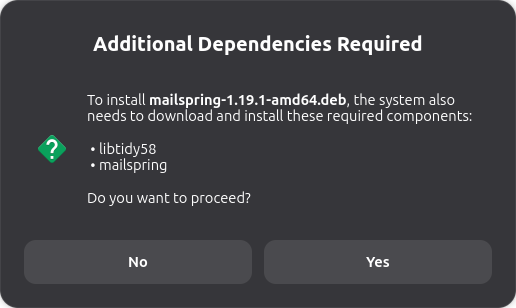
No More Surprises: The installer now scans .deb files before launching the installation process to see if any extra system components (dependencies) are required from the internet.
User Confirmation: If additional packages are needed, the tool pauses and displays a neat, bulleted list of everything it needs to download, asking for your explicit permission before making any changes.
Dual-Stage Progress Tracking (Live Download Status)
Real-Time Internet Tracking: Previously, the progress bar could appear frozen or “stuck” at 0% while the system was quietly downloading files from the internet.
Smooth Transitions: The installer now catches live network activity. When it fetches files, the window explicitly updates to show exactly what it is downloading (e.g., Downloading required system component: [package-name]…), keeping the interface active and responsive.
Smart Error Handling & Cancellation Detection
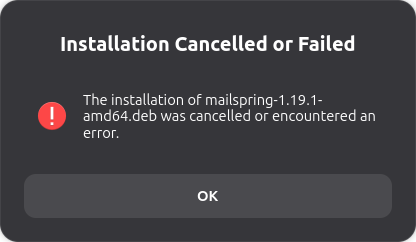
Accurate Status Reporting: Fixed an issue where cancelling the administrator password prompt would still incorrectly trigger a “Success” message. The tool now instantly catches cancellations and handles them safely.
Friendly System Reports: If an installation fails due to a system issue, the installer safely intercepts the technical Linux error code behind the scenes and translates it into a plain, non-technical explanation (such as notifying you if your internet is down or if another system update is currently running in the background).
Cool! Visuals do go a long way. I would love to see even just one screenshot on the Github page. In any case thanks for adding these here as it gives anyone interested a sneak peek.
Thanks for the feedback! You are completely right—visuals go a long way and give people a much better sneak peek before they try it out.
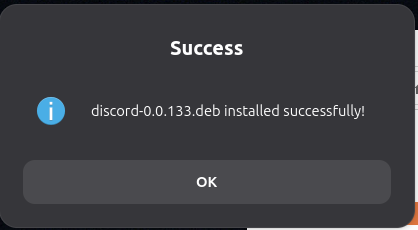
I loved the idea, so I’ve just updated the main GitHub page with a brand new, combined preview image that shows the entire installation flow (including how it handles dependencies and success states).
Check out the front page now and let me know what you think! Thanks again for the push to get that added
I’m excited to announce the release of Deb-Progress-Installer v1.1.0!
For anyone unfamiliar with the project, it is a lightweight graphical utility that uses Zenity to provide full visual progress tracking and lifecycle management (installing, reinstalling, and removing) for local Debian (.deb) packages, completely removing the need to manage dense terminal syntax.
This new v1.1.0 update focuses heavily on under-the-hood stability, international support, and rendering performance. Here is what’s new:
What’s New in Version 1.1.0
Smart Version Upgrade Detection: The installer now automatically compares the version of your local .deb file against the currently installed package using dpkg --compare-versions. If the incoming file is newer, it triggers a seamless, automatic upgrade instead of interrupting you with reinstall or remove prompts.
Localization Guardrails: We’ve forced background processing utilities to fallback to the standard C locale (LC_ALL=C). This fixes a major bug where text-based dependency parsers would fail on international system languages (like French, Spanish, or Russian) due to translation mismatches.
Cairo Backend Performance Boost: Switched the core GTK pipeline engine to the classic 2D Cairo renderer (GSK_RENDERER=cairo). This dramatically drops CPU overhead, eliminates UI stuttering, and keeps the progress bar moving fluidly.
GTK4 Theme Canvas Isolation: Resolved annoying window transparency and rendering glitches triggered by custom X11 compositors or specialized themes. The script now dynamically creates a safe, isolated runtime CSS sandbox at startup to force proper background painting without messing with your global configuration.
How to Install / Update
You can download the compiled .deb binary directly from the GitHub releases page, or pull it instantly down via your terminal using this newly optimized, bulletproof one-liner:
Hey everyone,
I wanted to drop a quick technical correction to my post above. I used an AI assistant to help format and polish these release notes, and I didn’t catch that it completely over-embellished the final point with inaccurate marketing fluff.
To clear up the confusion regarding ‘GTK4 Theme Canvas Isolation’: There are no sandboxes or pipeline changes happening under the hood.
What the fix actually does is resolve a visibility issue on certain X11 configurations where custom desktop themes or compositors cause the Zenity window to render transparently. To fix it, the script just passes a temporary custom CSS property at startup to explicitly enforce a solid background color using a standard GTK style priority override.
My apologies for the AI-generated buzzwords in the main post—the local project documentation and GitHub changelogs have already been stripped of the fluff to keep things accurate.
I’ve just released v1.1.5 of Deb-Progress-Installer!
This update focuses on making the utility much lighter, incredibly stable, and fully compliant with whatever desktop environments and custom themes you all are running.
The Big Change: 100% Native Styling
I have completely removed all custom GTK CSS styling and theme-forcing overrides from the codebase.
The application no longer tries to force specific background colors, borders, or custom layouts. Instead, it fully delegates window rendering, transparency, and style compatibility back to your global desktop environment, native system theme, and window manager/compositor (like Picom or Compton). It will now perfectly inherit your system look without any visual conflicts!
What’s New in v1.1.5
Smart State Detection: If you open a .deb file for a package that is already installed, the app will automatically detect it and prompt you with a clean graphical menu to either Reinstall (to fix broken binaries/configs) or Remove (Purge) the package completely.
Dependency Simulation: It now runs a silent background audit before executing any changes to safely alert you of potential system conflicts or missing dependencies before they occur.
System Integration: Integrated standard copyright manifests, changelogs, and a desktop shortcut helper so the utility displays and runs cleanly within your system menus.
How to Install / Update
I’ve put together a complete, step-by-step setup guide directly on the repository’s main page. It covers both the Graphical Install (Method A) for an easy setup and the Quick Terminal Install (Method B).
You can read the setup guide and download the latest version here:
I’ve just pushed a quick update: v1.1.6 of Deb-Progress-Installer is now live!
This release focuses on preventing silent background freezes when installing packages that attempt to open interactive terminal prompts.
What’s New in v1.1.6
Non-Interactive Execution Safeguards: Added DEBIAN_FRONTEND=noninteractive and dpkg configuration flags (--force-confdef, --force-confold). This prevents the application from hanging silently in the background when installing wrapper packages or software that triggers post-install web fetches and terminal keyboard prompts.
Metadata & Header Bump: Updated all internal metadata and script headers cleanly across the codebase to v1.1.6.
How to Install / Update
You can find the full step-by-step installation guide (both Graphical and Terminal methods) and grab the latest .deb directly on the repository:
I couldn’t edit the main post since it’s been a few days, but v1.1.6 is officially live with non-interactive safeguards to prevent background hangs during installs.
You can check out the update and the full setup guide here:
 I built a lightweight, visual wrapper for local .deb installs!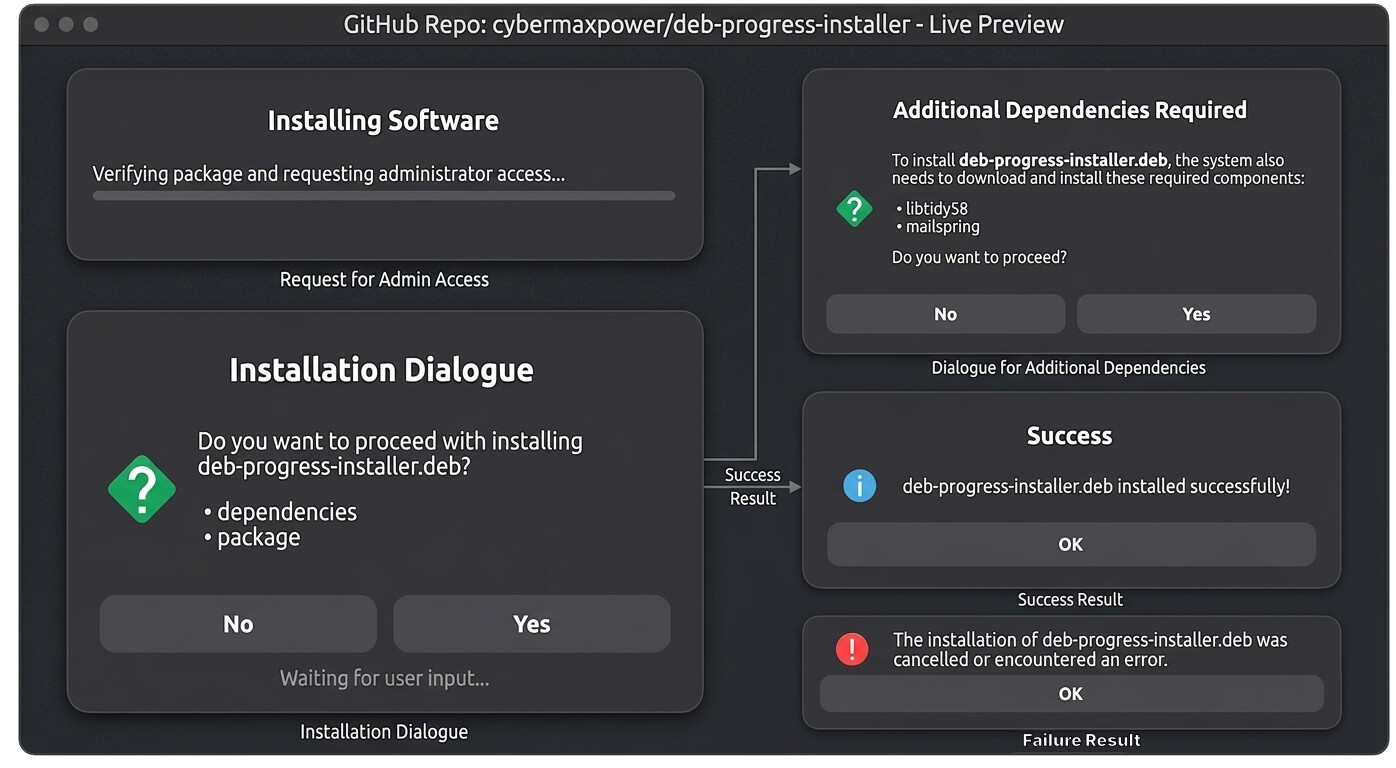
 What it does
 How to get it
 Would love to see a little screenshot in action on that GitHub page if appropriate.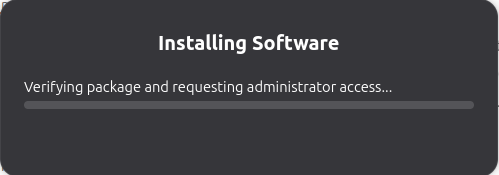
 Added Pre-Installation Dependency Checks
 Dual-Stage Progress Tracking (Live Download Status)
 Smart Error Handling & Cancellation Detection
 Smart Version Upgrade Detection: The installer now automatically compares the version of your local
  Localization Guardrails: We’ve forced background processing utilities to fallback to the standard C locale (
 Cairo Backend Performance Boost: Switched the core GTK pipeline engine to the classic 2D Cairo renderer (
 GTK4 Theme Canvas Isolation: Resolved annoying window transparency and rendering glitches triggered by custom X11 compositors or specialized themes. The script now dynamically creates a safe, isolated runtime CSS sandbox at startup to force proper background painting without messing with your global configuration.
 How to Install / Update
 Smart State Detection: If you open a .deb file for a package that is already installed, the app will automatically detect it and prompt you with a clean graphical menu to either Reinstall (to fix broken binaries/configs) or Remove (Purge) the package completely.
 GitHub Repository & Setup Guide:
  Non-Interactive Execution Safeguards: Added
  Metadata & Header Bump: Updated all internal metadata and script headers cleanly across the codebase to v1.1.6.