@ricky89 said: “I respect your point of view…” I respect your point of view too.
When it comes to “freely available software”, there is no one single “right way to do things.” A MAJOR reason why Linux was created in the first place was: 1) Windows lacked flexibility at that time, 2) Minix was nothing more than a conceptual piece of work. Yes, it had some features but it was incomplete. 3) UNIX had a lot of the flexibility, but it was still too proprietary and much too expensive to license for a personal system.
All these things led to the creation of Linux.
I don’t create gobs of systems for nothing. I change them because half of them were buggy and unreliable; they got DUMPED. The others have changed because of system updates or new versions to test.
Once antiX 25 and MX Linux 25 are released, I doubt I’ll be changing much, except to create two or three respins based on their code, customized for my personal interests.
“Right” or “wrong” from a professional systems point of view, this is absolutely fine for a personal systems point of view. When it’s PERSONAL, that’s just what it means. For you, your preferences are legitimate; the same is true for my personal systems.
I took a stab at Devuan since I heard it uses OpenRC instead of SystemD. Long story short there’s no significant difference in terms of boot times or RAM usage once up and running. Further more I found it a little more difficult getting to a normal GUI desktop since most of the tips-n-tricks are SystemD oriented.
I don’t think I qualify to answer about Debian derivatives since I just go minimal anyways hehe. One thing I will say is I’m no longer a fan of Ubuntu. Kinda like why I don’t like Metallica anymore.
@Mohaa I’m sorry, I don’t understand what systemD has to do with booting to a graphical user environment. Sure, we all have to use an init program to start our system but most systems are configured to go straight to either the login page or automatically go to the desktop environment, so what difference does it make between Debian and Devuan to reach the login unless it was incorrectly configured from the beginning?
A HOWTO install and configure Devuan is probably available. Try using a search tool and type HOWTO install and configure Devuan and you will probably find something useful.
Revisiting this. I lean toward the Debian family for the predictable base, sane defaults, and the depth of packages that just work with apt.
Pure Debian is my go-to for servers and lab boxes when I want a clean, minimal install that only does what I tell it to do. The common thread is consistency and tooling I trust.
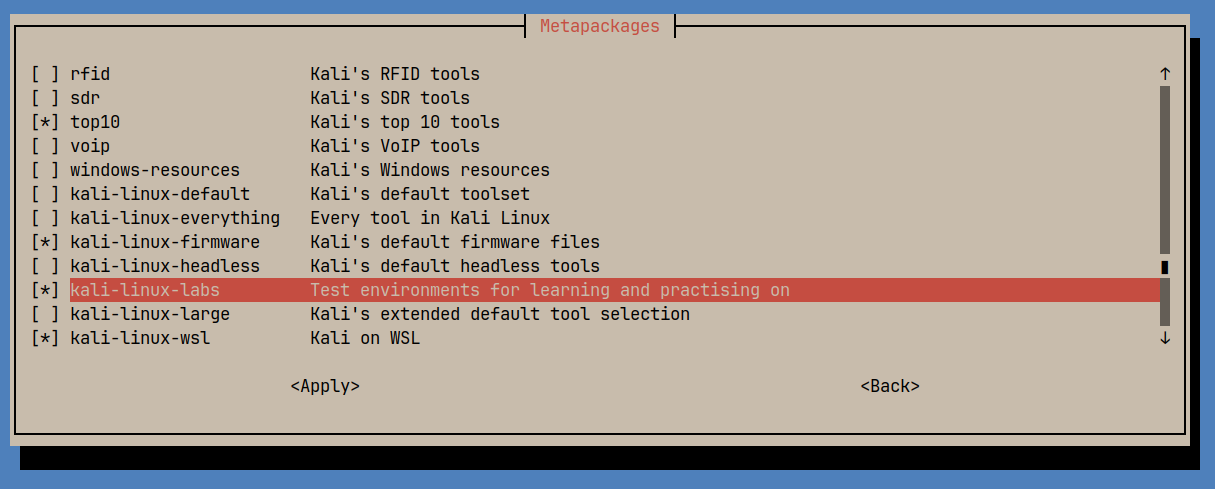
Day to day I run Kali. Under the hood it is Debian Testing, which gives me newer kernels and firmware without turning my laptop and desktop rig into a science experiment.
On my ThinkPad I get a stable GNOME setup, solid power management, and a hand-picked preloaded tools that doubles as my sysadmin kit: NMAP, Netcat, Wireshark, tcpdump, Nikto, fping, tcpflow, the works.
If you live in terminals and care about networking, security, and troubleshooting, Kali saves setup time while staying super close to Debian that I can follow online Debian guides by just cut and pasting 99% of anything Debian related that I stumble on.
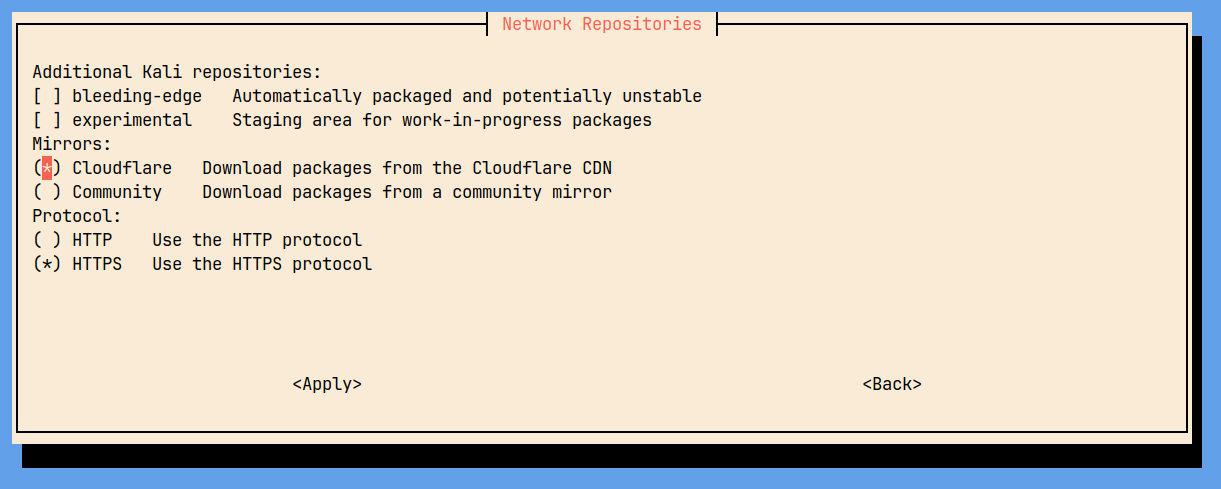
It makes tasks like managing repos and many other system “tweaks” easy and not heavy:
Thanks for the update; solid reasons for your choices.
Same on my end, different reasons and therefore different choices.
I think I have expressed more than once that I use a light, lean distribution derived from Debian, antiX, using nosystemD init alternatives, such as runit, s6 and dinit. I don’t need a lot of stuff, and in particular I don’t need a full desktop environment. I appreciate software that eases command based workflow; there are a few handy scripts that complement the ones that I wrote myself. Minimal, just what I prefer.
I usually use Icewm on the antiX distribution, a very light and lean distribution that works well with old or recent vintage systems. It’s cousin is MX Linux, a medium weight system with Debian roots. antiX is several hundred MB leaner immediately after start-up.
The init systems are in charge of running services at boot and for me to run Wayland i need either seatd or polkit, or even both. Some distros setup everything to begin with but what I’m doing is minimal installs. Fedora was more kind, FreeBSD was a struggle and oh my don’t get me started about OpenBSD
I don’t get what’s so great about Wayland - I don’t really need it since on LMDE (Mint Debian) the nouveau drivers have always worked perfectly on my low-end nvidia card.
I have never used Wayland, but supposedly it solves the X11 security issue of all applications being able to spy on each other. If you are already running malware, then game over.
Before switching from Windows to Linux, I had standardized on the Nvidia GeForce GTX 750 Ti for all of my systems. Using the downloaded Nvidia driver for Windows, everything worked great. When I switched to Linux Mint, I was determined to use the Nouveau driver with the cards, but it was impossible. The Nouveau driver crashed anywhere from four minutes to twenty days after rebooting. Of course when the driver crashed, it took Cinnamon down with it, and all of my running applications lost data. I fought with it for months, but I finally replaced Nouveau with the Nvidia proprietary driver, and it has worked flawlessly on every system since then.
Out of curiosity, which Nvidia card are you using successfully with the Nouveau driver?
nouveau works well on my (very) low-end NVIDIA GP108 [GeForce GT 1030] - which works perfectly well for non-gaming applications such as video streaming etc.
Whilst it’s not stable yet, Pop_OS! is far up there for me. It’s simple to get working out of the box, has a recovery partition and allows you to reset the computer if you want to sell it to someone else. If you want to get a debian/ubuntu based distro that matches common user needs for a good Out Of the Box Experiance. I think Pop_OS! can be regarded pretty highly.
Regarding Wayland, I tested it with a KDE Plasma system; don’t even recall which one because I don’t use it; might have been a Debian Trixie or one of the Arch Linux derivatives, but that’s only a guess.
Definitely a fan of LMDE myself. It’s like having the stability of Debian but with all the polish and ease of Mint. Cinnamon is just the right desktop for me—simple, but with all the features I need. It’s fast, reliable, and feels like a well-rounded system. I’ve tried a few other Debian-based distros, but LMDE has been the one I keep coming back to. Anyone else running it?
Most of my systems run Linux Mint (Ubuntu Edition).
I have an old Thinkpad T43 and one QEMU-KVM guest running the 32-bit LMDE, and they work fine.
My tiny complaint about LMDE is that Gnome Disks is in the wrong application group compared to Linux Mint (Ubuntu Edition). Searching for “Disks” finds it, but it was not under “Preferences” where I expected to find it.
With that being said, I have not used them side by side for a real comparison on like hardware.
I prefer Linux Mint (Ubuntu Edition) because of the Ubuntu kernel’s inclusion of ZFS.
For me, best choice for HPC servers is freeBSD (monolithic) with ZFS and mirroring; for std. http, Python/django,php/wordpress,…with not HPC required Linux Debian without systemd (AntiX, Devuan,…), are so flexible and simple update and maintenance. WorkStations commonly AntiX (Linux without systemd), some HPC grafana videowall workstations on freeBSD with xorg, X11/KDE, sddm, one workstation with wayland.
Regards.