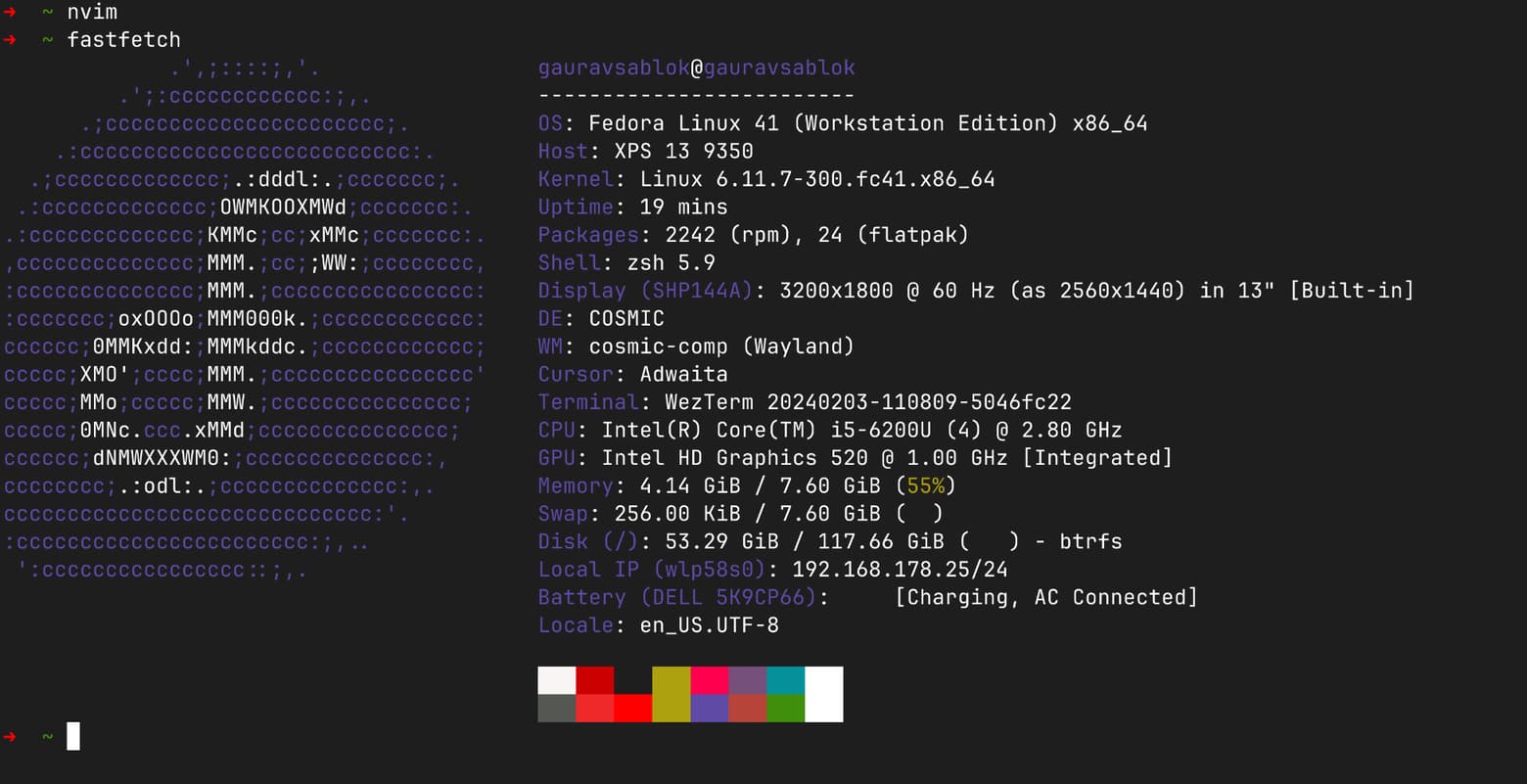
Thank you Hayden @hydn the new version of cosmic Desktop is much improved and you can enjoy that on a small laptop like mine also. I have a core i5 DELL XPS and the configuration is attached. I am using Brave Browser to save memory, Thunderbird email client, nvim, and vscode as code editor and python, go and RUST as the code language as of now mainly. GitHub Desktop as the git integration client, Wezterm as a terminal emulator. On this small laptop, with only 8GB RAM this works pretty well. May be soon, i will switch to a better one and then will see which configuration i set up for my use. This is all from me for those who are using small laptop and with this configuration it works well. Only cosmic Desktop and the embedded layout and no other themes or anything else.
@sfrias I’m with you on a lightweight window manager environment; I’ve been an IceWM fan between 25-30 years now!
@ricky89 also likes the DE that I use IF a simple window manager environment is not available - Xfce.
That said, I still experiment from time to time with KDE Plasma; if it was unstable around 2022, it sure seems to be a lot better recently. I downloaded a fresh version of KDE Neon, the standard platform for KDE testing these days, and even live it loaded and ran effortlessly; all three of these are solid choices; it really all depends on what you like and what your most common use cases are; mine are simple and that’s why IceWM works best for me; also IceWM config file syntax is really easy to learn and modify. Xfce is fairly easy; KDE Plasma is much more complex but also very configurable so these three represent the minimal end, the middle, and the most powerful, extensible desktop available (though everyone legitimately has their own favorites!
I would say that KDE Plasma is very stable. I had one total crash in two years. Otherwise, no problems.
I don’t use it all that often, but I have had KDE Plasma on multiple distributions over the past 2-3 years and it has indeed been solid; I’ve never seen a KDE Plasma crash myself.
Actually using Icewm, and ROX-Icewm on antiX. For my activities, terminals are primordial (tty1-tty6…, and graphical terminals. iS A Good tool for me, but my daughters are using KDE Plasma, XD. Regards
@sfrias maybe I’m being “picky” - just wanted to remind you and others that the correct distribution name is antiX. @anticapitalista says that there are organizations with the names Antix or AntiX and he doesn’t want any confusion or legal conflicts, so just prior to being away, he mentioned it again on the antiX Forum.
@Brian_Masinick just modified and I take in account for future XD
Thank you for taking care of the name.
I’m a forum moderator for antiX so I respect the reason for the name and the entire approach.
They’re not trying to make money; they’re trying to keep old hardware working as long as possible with lean, efficient software so it’s their antics to have antiX Linux bring computing to those who otherwise have difficulty with slow old hardware and software.
Running Linux on your laptop is indeed a fantastic way to bridge the gap between desktop usage and server administration. Since you’re looking for a short take on finding the right “distro + DE” combo, The beauty of Linux is that the kernel is the same everywhere; learning the terminal and filesystem structure on your laptop applies directly to servers. Choose based on your tolerance for maintenance and how you want your desktop to feel.
I’d go with KDE Plasma
Arch Linux with KDE Plasma is very nice, you can change the appearance, everything can be modified, Absolutely awesome for Powerusers who want freedom + beauty
If appearance and a wealth of features are the priority, then KDE has always been a leader, and the KDE Plasma versions are complete and powerful.
They are also well beyond what I need at this stage of my computer usage, where reading Email, visiting forums and tweaking just a few things are all I do, so KDE Plasma is unnecessary for me; in fact I don’t even need a light desktop environment; a simple window manager and a Web browser suffice for me.