Several of the editors I have in my collection have either Vi or Vim characteristics in them.
Because of my hobby I found an occasionally updated instance of Vi, produced by “Gritter”. I have Vim on a few systems, Neovim on most of them. Other editors that have some vi-like key bindings include Doom Emacs, and a LUA-based replacement for Vim called Vis, which combines many vi key bindings and some historical features of Plan 9 and Sam editing features. For that reason, Vis, while modal, so similar to vi and vim in some ways, also has a few other powerful, but different search and replace features, including the x, X, and variations, they replace the vi :s/old/new search and replace syntax.
Brian, given you indicated leaning toward Vi-type editors, where would you see major hurdles in the differences between GVim and neovim?
How “alien” would neovim be for someone who has basically only use GVim?
My only non-Vi experience is the editor in Geany, but I’ve abandoned trying to tweak that and always use GVim, then load changes auto-detected by Geany for compiling code.
If you are familiar with any vi family editors then you can run Neovim immediately. Neovim also accepts a init.vim configuration file or you can create a new one in LUA with a init.lua file.
As for familiarity it looks the same unless you choose to configure it to look different.
The usual color schemes are available as well as other customization.
Another app I use for editing files (or long running processes) is tmux.
tmux & vim is my goto.
I have a script that opens tmux, creates additional windows, resizes them, selects a specific window and launches btop, then changes to another window and cd’s into a specific directory.
@mr_mcbride I do something very similar as well, tmux + neovim for me.
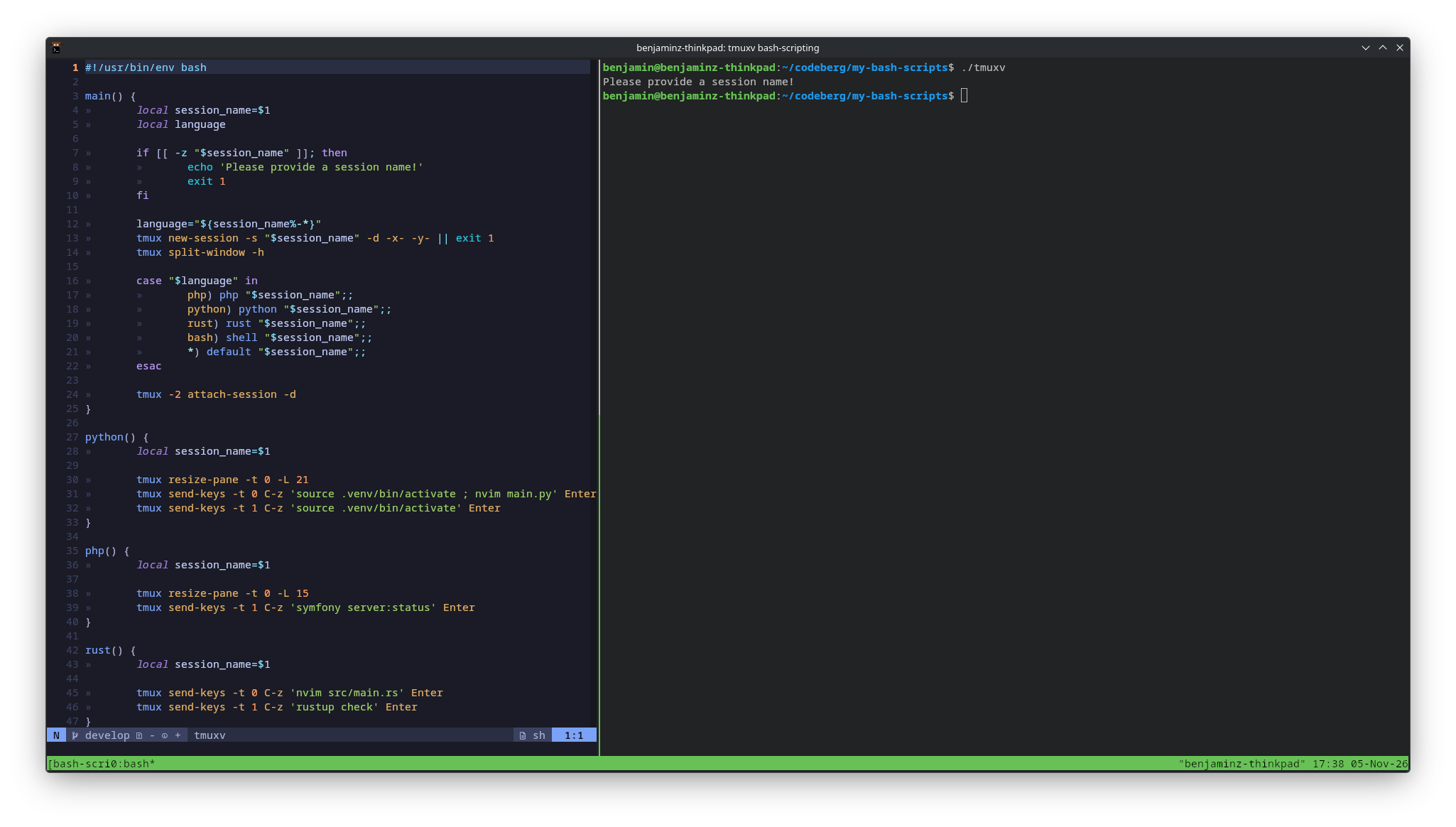
I have a bash script I wrote that you can find here if you’d like to check it out. It just does something like what you wrote as I like to set up two windows, but sized to the appropriate column count based on the language I’m writing in.
So you add the script to ~/.local/bin and then run it with something like tmuxv rust-programming.
The script launches tmux, sets the window sizes, opens src/main.rs, moves to the other window and runs rustup check. It takes the first part of the “session name”, split on a -, and that’s what determines what to do as it’s the language.
It can be easily extended based on the language name. Add a function, add a branch in the case statement, and it’s good to go. It’s not super fancy, but it’s been very useful for me!
**tmux is a terminal multiplexer for Linux that lets you create, manage, and persist multiple terminal sessions, windows, and panes within a single terminal window, enabling features like session detaching, reattaching, and remote workflow continuity.
What makes it necessary to multiplex like this? I can create multiple tabs, foreground, background, etc., so is the multiplexor a convenience or are there practical reasons some of you use tmux with your choice of vi-based editors?
So, for me, I rely pretty heavily on “print debugging” and just generally running my code against test data as a way of “verifying” what I wrote works.
So, in my old workflow, I was doing something like this:
Open Neovim against a file: nvim main.py
Writing in some code and saving: :wq!
Then running that to see what the output is: python3 main.py
Inevitably, I’d get something I didn’t like or something I didn’t expect, so now I have to repeat that flow over and over. It’s hard to remember what line is where when you get a Except message or an error.
With this workflow, I can both see my code AND see my output at the same time, making it easier for me to visually track what is happening:
I can use the hotkeys in tmux to swap between panes quickly, run the script to get some output, then swap back to the code editor and visually track what is happening.
Maybe I wouldn’t need to do this if I was a better developer!!
One of the special reasons is ssh
You can disconnect from tmux and close the ssh session while tmux keeps on running. The fancy part is that after you login again, you can reconnect with the tmux session.
You can have several tmux sessions open at the same time and you can disconnect or reconnect with any of them at will.
I doubt that! Developers made good use of tools, and if I were still in development and testing, it’s more likely that I would have considered similar use cases to what you’ve chosen.
That’s another useful scenario; thank you both for responding to my inquiry.