okay this is how my PC booted.

1 Like
@oswald_carter
Or you can try @ericmarceau script to control CPU. You have options.
1 Like
If you just want the basic command, it would be this:
sudo cpupower --cpu 'all' frequency-set --freq 1400
The script gives you different ways of controlling that cpupower command.
You can verify that you have it by typing
which cpupower
If nothing is reported, then the package needs to be installed.
1 Like
[sudo] password for ossie:
Setting cpu: 0
Error setting new values. Common errors:
- Do you have proper administration rights? (super-user?)
- Is the governor you requested available and modprobed?
- Trying to set an invalid policy?
- Trying to set a specific frequency, but userspace governor is not available,
for example because of hardware which cannot be set to a specific frequency
or because the userspace governor isn’t loaded?
ossie@ossie-PORTEGE-X30L-J:~$ which cpupower
/usr/bin/cpupower
ossie@ossie-PORTEGE-X30L-J:~$
1 Like
@oswald_carter Thanks. The saying goes, too many cooks spoil the pot. If you are going to CPU frequency root first. It’s best to do that and solve from that approach, treating the symptoms.
I am curious about the cause. We can do that, but not both simultaneously.
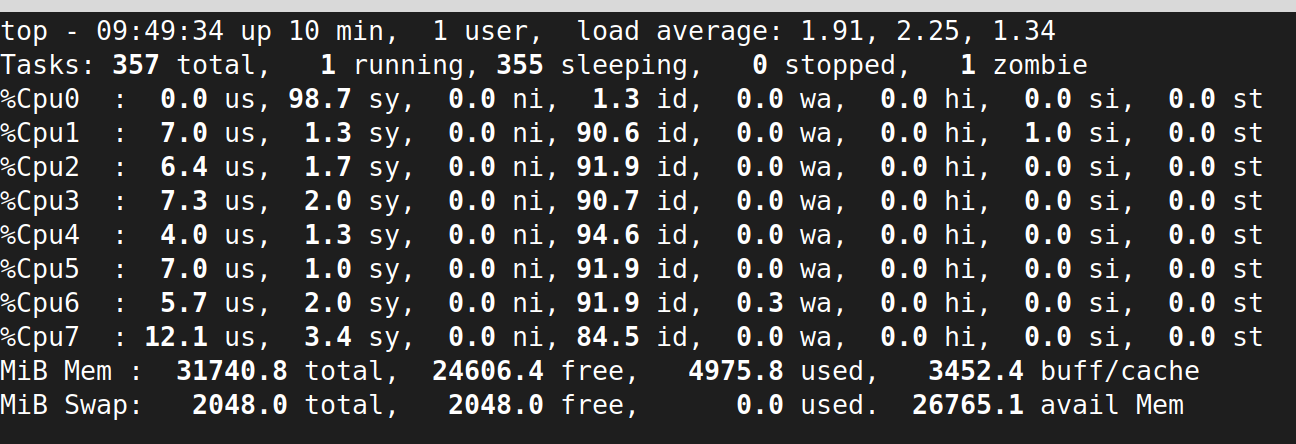
Your screenshot shows clearly sy (system/kernel time) but you cropped out some of the important lines below. If you can include the 3 to 5 lines below that.
1 Like
As much as I really appreciate your help, I need to go but I am greatful and will return.
Thanks Ossie
2 Likes
ossie@ossie-PORTEGE-X30L-J:~$ sudo cpupower --cpu ‘all’ frequency-set --freq 1400
[sudo] password for ossie:
Setting cpu: 0
Error setting new values. Common errors:
- Do you have proper administration rights? (super-user?)
- Is the governor you requested available and modprobed?
- Trying to set an invalid policy?
- Trying to set a specific frequency, but userspace governor is not available,
for example because of hardware which cannot be set to a specific frequency
or because the userspace governor isn’t loaded?
ossie@ossie-PORTEGE-X30L-J:~$ which cpupower
/usr/bin/cpupower
ossie@ossie-PORTEGE-X30L-J:~$
1 Like
cpupower -c all frequency-info
Look for the p-state lines at the end of the section for each CPU. that will tell you which Freq values are “legal” as choices for setting.
Also, what does the following give you
cat /sys/devices/system/cpu/cpu0/cpufreq/scaling_governor
ps -eo pid,ppid,pcpu,comm:100 --sort=-pcpu | head -n 2
Should give details on the offending process.
1 Like
As I said before, the script would just mask the symptom, not fix it.
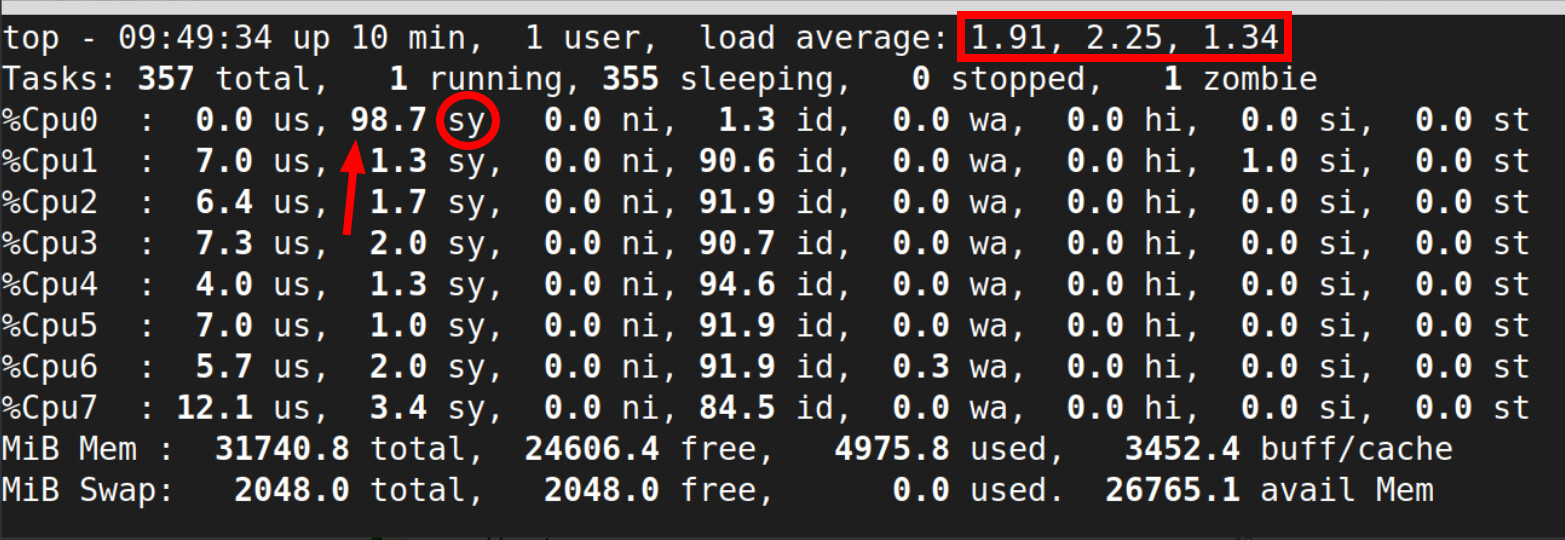
@ericmarceau Thanks for the script suggestion. But I’d personally would hold off on the frequency cap for now, because the top output @oswald_carter just shared with us shows CPU0 at 98.7% sy (system/kernel time), so the load is inside the kernel itself, not userspace.
Capping frequency would just mean the same stuck kernel thread is spinning at a lower clock. We should to identify the actual culprit first.
@oswald_carter still need that process list from top (the rows underneath the CPU summary), or the output of:
ps -eo pid,pcpu,comm --sort=-pcpu | head -15
That’ll well help narrow down exactly which kernel thread is the troublemaker, rather than trying to mask the issue via CPU frequencies.
3 Likes
I bow to Hayden’s better grasp of the issue being outside of “user space”.
Stepping away from discussion. 
2 Likes
@ericmarceau No bowing needed. Your input is absolutely welcome on this thread and others.
Ossie did the right thing a few times here in this thread by being upfront about his experience level, and we’ve all been there. I used nano for many years before vi as an example.
My biggest fear when I started with Linux was pasting commands from the internet without understanding them, sometimes with my own typos in tow, and ending up worse off than when I started.
So I tend to keep early troubleshooting as read-only as possible until we’ve narrowed down the actual cause. That’s where I was coming from with holding off on the frequency script, “for now”, nothing more than that.
I genuinely appreciate you jumping in! Your scripts are valuable and especially good for users who can grasp their purpose by scanning through.
If the issue cannot be solved then managing may very well be the only option. I just wouldn’t want something pushing one of my CPU cores to 100% and not at least try first to see why.
More eyes on these threads is always better! 
2 Likes
For me, the only point of contention regarding the approach, regardless of the experience level, is that we should always introduce newbies to … vi … as their first editor, because it is the ONLY one guaranteed to be present on all Linux distros.
That is not the case with nano.
Go universal common denominator from the start!
Nothing less, regarless of how attractive nano might be to some. IMHO
As for bowing out, if I see that I don’t have the skill set to specifically tackle the “domain” of the issue, then I step away, gracefully, which is why I use the expression “bowing out”!
3 Likes
Yes, fair point on the universal default argument! Historically you are right. vi was the only safe bet for decades.
These days nano ships by default on most desktops including Mint and many server distros. (Debian, Ubuntu, Fedora, openSUSE, RHEL family in non-minimal installs)
So in practice it’s almost as universal now. But, I do take your point, that vi IS still the safer assumption if you’re going to land on a random system.
It could be that I remembered my own struggles with vi in the beginning. Likely you caught on to vi a lot faster than I did, and so you may have better early day memories. I guess I brought my vi baggage into the topic.
Even Linus Torvalds, when faced with picking a modern terminal editor, leaned toward nano over vi:
And glad to hear “bowing out” was just your phrasing. I read more into it than I should have.
2 Likes