This seems like an AI generated comment.
3 Likes
Some may argue, it’s boring to write a query just to play an album. Right.
But in the following video I will show that the user can play an album typing just a few keys.
The user wants to listen to some music by a composer, that is, Brian Eno in the music of David Bowie.
The user types:
p, c, (enter), eno, (enter), (enter)
and the player starts.
Then the user types:
p, al, (enter), best, (enter), (enter)
and he listen to “The Best of” some favorite artist.
. . .
2 Likes
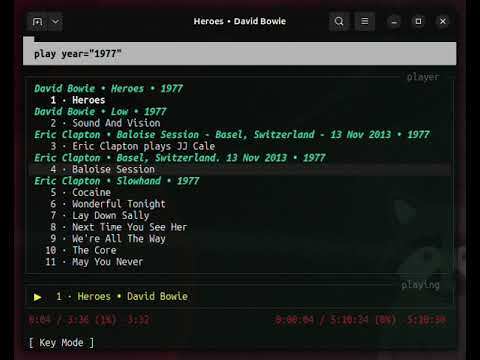
In this video I select an artist and all the albums/songs are displayed.
Then I switch to the properties sheet for a song.
Here I can see all the properties (tag fields), like: genre, album, year…
I just added this feature: when a property is selected and I press enter, that tag field is used for a new query.
For example, if I select that song’s album and press enter, that album will be opened.
In this video I just play with this feature jumping around…
3 Likes
I don’t know what to think about that comment because I actually wrote it. Maybe the AI stuff learned something from me 

4 Likes
You’re right. I’m sorry for my reply. Maybe I’m paranoid because of all the AI content I receive. Is nice to read your comments.
3 Likes
Okay, I feel better about your comment then. I wasn’t sure if you were trying to be a “smart alec”; I am relieved that is NOT the case!
I’ll say something else, and I think I can say this without being arrogant, because I have worked hard all my life to amass plenty of information and knowledge about technology. I am the first to admit that when it comes to recent technology and features, I am no longer an expert in all of them. When I speak about something in general terms, those things I speak based on knowledge. If I do speak in specific terms, it means that I know what I’m saying because I actually have used whatever we’re talking about.
In this particular space, I’m not an expert in either Go or in music players. What I’ve learned about Go I did by actually trying out a few simple Go programs; this definitely does NOT turn me into a Go expert, but I do know quite a few programming and scripting languages, so I can speak in general terms. Similarly I do not claim expertise in music players; again, I’ve used several of them; that alone does not turn me into an expert either, so I try to be honest about what I know, what I don’t know, what I can reasonably guess, due to decades of general experience, and what I have zero idea about at all; that’s a more complete statement on where I stand. I did try the tool you shared with us and that’s how I knew to ask about the “skips” in something I was listening to earlier.
Cool stuff here; you DEFINITELY know a lot more than I do about this technology! Thanks for sharing several examples of how to use it and visual examples too!
4 Likes
Please don’t use any of the files I put in github. That is old stuff. I don’t use github at the moment, I only post videos of me using the program/command.
3 Likes
I finally wrote a couple of good algorithms to simplify the code.
The first algorithm is for parsing a command line argument, the second is to filter by that argument.
There is a database of audiofiles (songs). When the program starts, I load the database in a slice of “audiofiles”. Each audiofile contains all values for that song (tag fields, filename, length…).
Then there is a slice of database indexes.
When the linereader begins to read a new “play” command (that is: a query to select some audiofiles), that slice contains the indexes of all the audiofiles.
Each time the user types an argument (such as “artist=…”), the slice is filtered by that argument.
The first algorithm parses the argument. I put here a couple of examples:
First example
play artist=pink,⟨The Beatles⟩,a:b
JSON representation of the last argument:
{
    "Name": "artist",
    "FieldValues": {
        "PatternValues": [
            "pink"
        ],
        "PreciseValues": [
            "The Beatles"
        ],
        "RangeValues": [
            [
                "a",
                "b"
            ]
        ]
    }
}
db indexes len is 363
Here above, the user typed, for the “artist” argument, a pattern (“pink”), then selected a precise value from the list of artists (“The Beatles”), that typed a range (artist name starts with “a” to “b”). If any of these conditions is true, the audiofile is selected.
Second example
play artist=pink,⟨The Beatles⟩ title=love,hell
JSON representation of the last argument:
{
    "Name": "title",
    "FieldValues": {
        "PatternValues": [
            "love",
            "hell"
        ],
        "PreciseValues": null,
        "RangeValues": null
    }
}
db indexes len is 14
Here, all audiofiles where artist contains “pink” or is equal to “The Beatles” are selected. That is for the first argument, “artist”. But there is a second argument “title”.
A second filter is applied to the slice of indexes: the title must contain either the “love” or the “hell” pattern.
“Run like hell” but also “Michelle” are selected.
If the argument is “any”, search is made in a number of tag-fields: genre, artist, album and title.
play any=david,lucio
All audiofiles where at least one tag-field contains one of the patterns is selected. Only patterns are accepted for this argument.
Quotes are used when there are spaces inside a pattern:
play title=ciao,"come stai"
play title=hi,"how are you"
4 Likes
Nice work! You’re getting more and more out of your personal TUI music player written in Go!
On another thread I was just encouraging someone who wants to improve their knowledge to do some reading and research, but then get going by actually trying things out, make some mistakes, learn from the mistakes and get better through the experience.
Here, it’s not necessarily mistakes, but it is building and improving on something you are interested in and passionate about, so this is a really good example of what you can do by digging in, trying things, then building upon them. Your project is a modern example of precisely that!
That’s a great example of leveraging your search terms and you’ve been consistently sharing numerous examples of how to utilize this procedure. Great work; thanks again for updating what you are doing with Go and this cool project!
2 Likes